Understanding the Role of a Salesforce Administrator

Teams usually notice the importance of a Salesforce Administrator when the platform stops feeling simple. Access requests start piling up, automation becomes harder to trust, reports no longer match expectations, and small configuration choices begin to create bigger operational consequences.
That is where strong admins add real value. They keep Salesforce usable, governed, and aligned to how the business actually works. In my experience, organisations often underestimate the role until they see how much platform stability, user trust, and delivery speed depend on someone owning the day-to-day health of the system. For how the Admin role relates to other platform responsibilities, see Salesforce Roles: Admin, Developer, or Architect?.
This guide explains what a Salesforce Administrator actually does, where the role matters most in production, and why organisations rely on strong admin judgment long after the initial implementation is complete.
🧑💻 What is a Salesforce Administrator?
Section titled “🧑💻 What is a Salesforce Administrator?”A Salesforce Administrator is responsible for the day-to-day management, configuration, and operational health of an organisation’s Salesforce environment. They translate business needs into practical platform changes, keep users productive, and make sure the system remains trustworthy as requirements evolve.
Admins are often closest to how Salesforce is actually used. They see where data quality starts slipping, where permissions no longer fit the operating model, and where automation is helping or quietly creating risk. The exact emphasis varies by organisation size, industry, and team structure, but the core of the role is the same: keep the platform useful, safe, and maintainable.
📋 What a Salesforce Administrator owns
Section titled “📋 What a Salesforce Administrator owns”The exact boundary varies by team, but a production Admin normally owns the operational outcome, not just the Setup task:
| Area | Typical Admin ownership | When to involve another role |
|---|---|---|
| Users and access | Joiners, movers and leavers; permission assignments; access troubleshooting; periodic reviews | Involve identity or security teams for SSO, authentication policy, or wider control design |
| Configuration and automation | Objects, fields, Lightning pages, validation and maintainable Flow automation | Involve a Developer when code, complex integrations, or high automation density make declarative delivery the wrong fit |
| Data quality | Validation, duplicate controls, imports, cleanup routines, and data-quality monitoring | Involve data owners for business definitions and integration teams when the source problem sits upstream |
| Reporting and adoption | Reports and dashboards, user support, training, and feedback loops | Involve business owners to approve metrics, processes, and adoption priorities |
| Platform operations | Release readiness, limits, certificates, audit evidence, backup checks, and issue triage | Involve an Architect when a decision affects shared platform risk or long-term design |
This ownership model matters because “the Admin configured it” is not the same as “the business process is operating safely”. A strong Admin confirms who owns the requirement, how the change will be supported, and what evidence shows it is working after release.
⚙️ Operational Responsibilities in Production Orgs
Section titled “⚙️ Operational Responsibilities in Production Orgs”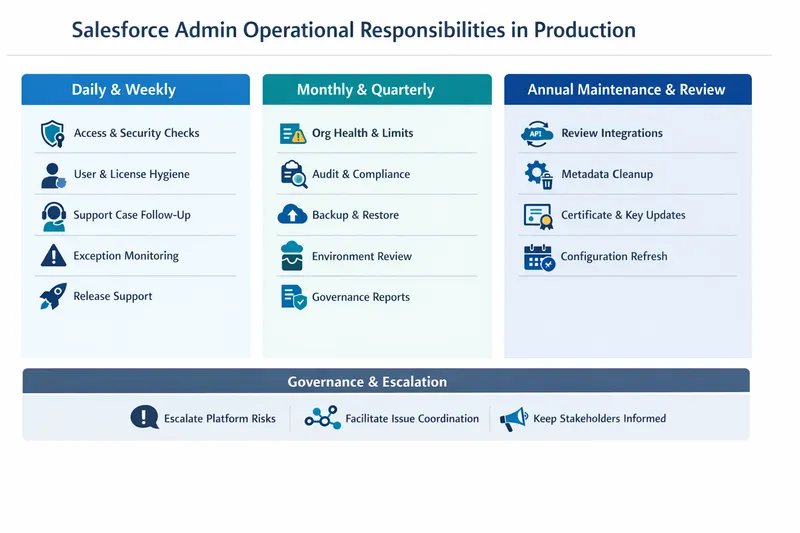
This visual maps core Salesforce Admin operational responsibilities by cadence, helping you quickly see what matters daily, monthly, and annually.
In many organisations, Salesforce Admins do more than user management, configuration and flows. They also help run the platform safely in production through recurring operational checks, escalation, and governance. While the specific responsibilities may vary by organisation size, team structure, and operating model, below is a practical view of some common admin duties by cadence.
📅 Daily and Weekly Operations
Section titled “📅 Daily and Weekly Operations”- Access and security checks: Confirm users have appropriate access, review privileged access, and verify controls such as multi-factor authentication (MFA) remain enforced.
- User and licence hygiene: Review inactive users, validate profile and permission assignments, and check licence consumption across Salesforce and connected platform tools.
- Support case coordination: Monitor Salesforce support cases, follow up with collaborators, and escalate when service-level targets are not met.
- Exception and delivery monitoring: Review Apex exception notifications, email-related logs, and critical operational alerts.
- Release support: Assist release teams with production checks for major and minor releases and hotfixes based on approved run sheets.
🗓️ Monthly and Quarterly Operations
Section titled “🗓️ Monthly and Quarterly Operations”- Org health and limits monitoring: Review storage growth, limits dashboards, and consumable limits such as API calls, automation runs, and event usage.
- Audit and compliance checks: Review login history, setup audit trail activity, connected apps, and permission model drift.
- Backup and restore governance: Confirm backup jobs are successful and verify restore testing is scheduled and evidenced.
- Environment governance: Review sandbox sprawl, ownership, and access duration for temporary release and development users.
- Reporting to governance forums: Prepare regular org health updates and risk summaries for technical and business stakeholders.
🧹 Annual Platform Maintenance and Review
Section titled “🧹 Annual Platform Maintenance and Review”- Review outdated integrations and API versions.
- Clean up unused metadata (for example unused objects, fields, reports, list views, and trusted-site entries).
- Review certificates and key rotation requirements.
- Refresh annual business configuration dependencies such as holiday calendars where relevant.
Platform maintenance includes reviewing what is no longer needed so Salesforce stays efficient, secure, and easier to operate.
🔐 Security and Access Governance
Section titled “🔐 Security and Access Governance”In enterprise environments, admins may play a key role in identifying and escalating platform-wide control issues, often in collaboration with security, service desk, or architecture teams.
Typical responsibilities include:
- Monitoring administrative access and approvals.
- Identifying unauthorised or risky access changes.
- Ensuring profile and permission strategy remains aligned to policy.
- Coordinating with service desk, security, or architecture teams for resolution.
This governance work is a major part of keeping Salesforce trustworthy at scale.
🚨 Escalation and Facilitation Responsibilities
Section titled “🚨 Escalation and Facilitation Responsibilities”Admins often sit at the centre of issue triage. In practice, this means:
- Escalating platform-wide issues such as certificate concerns, identity and access control drift, or systemic limit pressure.
- Facilitating application-specific issues with the right product, integration, or delivery teams.
- Keeping stakeholders informed on impact, ownership, and expected next steps.
A useful rule is: if an issue affects platform trust, security, or shared reliability, escalate early.
💡 Why This Matters for the Admin Role
Section titled “💡 Why This Matters for the Admin Role”These operational duties are what separate a purely configuration focused admin from a production ready platform administrator. They reduce risk, improve reliability, and help organisations scale safely as Salesforce usage grows.
Mastering these responsibilities also helps admins grow as trusted advisors who protect platform health while enabling business outcomes.
🏢 When a team needs Admin capacity
Section titled “🏢 When a team needs Admin capacity”Every live Salesforce org needs named Admin ownership, but that does not always mean a full-time hire. Match the coverage model to the operational load and risk:
| What you are seeing | Sensible coverage |
|---|---|
| A small, stable org with few users and infrequent changes | A trained part-time owner with documented support and an escalation path |
| Regular onboarding, access requests, reporting changes, Flow work, or data cleanup | Dedicated Admin capacity with a visible backlog and release cadence |
| Multiple clouds, business units, integrations, or regulated data | Dedicated Admin capacity, usually a senior Admin or Admin team, owning platform operations and coordinating clear hand-offs to Developers, Architects, security teams, and business owners |
| Recurring incidents, unreliable automation, permission drift, or reports nobody trusts | Immediate Admin capacity to stabilise operations before adding more features |
Headcount is not the only answer. A team can first clarify ownership, reserve operational time, document recurring controls, and arrange specialist support. The unsafe option is leaving the work unowned because the org appears quiet.
🚀 Career Path and Opportunities
Section titled “🚀 Career Path and Opportunities”For those interested in pursuing a career as a Salesforce Administrator, Salesforce provides a structured Admin Career Path that maps the skills and certifications needed to grow in the role. Salesforce’s current Administrator credentials overview covers the Platform Administrator and Platform Administrator II credentials, which represent progressively deeper skills in configuring and managing Salesforce environments.
In practice, many strong admins come from support, operations, business analysis, or power-user backgrounds rather than a traditional technical pathway. What matters most is learning how to combine platform knowledge, user empathy, and sound operational judgment.
As the role matures, many admins grow from configuration and support work into broader platform operations, governance, release coordination, and trusted-advisor responsibilities.
The Salesforce Admin site is also worth following for practical guidance, community insight, and ongoing platform advice.
🔍 Explore Core Salesforce Administrative Responsibilities
Section titled “🔍 Explore Core Salesforce Administrative Responsibilities”Learn about the role of a Salesforce Administrator and how they ensure trust in the system with the Explore Core Salesforce Administrative Responsibilities trail.
✅ Conclusion
Section titled “✅ Conclusion”Salesforce Administrators create value by keeping the platform reliable, understandable, and usable as the business changes around it. The role matters most when organisations need someone to own the practical realities of access, automation, data quality, reporting, and day-to-day platform trust rather than treating Salesforce as a set-and-forget system.
For organisations that depend on Salesforce for real operational work, strong admin capability reduces risk, improves adoption, and keeps the platform aligned to how teams actually work. If you are deciding how much admin capacity you need, look for recurring support friction, unstable automation, reporting distrust, or slow response to operational issues.
If you want to compare where admin ownership ends and adjacent technical roles begin, continue with Exploring the Role of a Salesforce Developer and Understanding the Role of a Salesforce Architect.
Use the official resources below for formal learning paths, role guidance, and hands-on practice.