Salesforce Service Cloud: Cases, Omni-Channel & SLAs

Support teams often lose customers not because agents lack skill, but due to slow case routing, missing context, and service history scattered across email, chat, and spreadsheets. Service Cloud is the familiar name for Salesforce’s customer-service platform, and it remains common across teams, learning resources, and parts of the product. Salesforce’s current official product name is Agentforce Service. This guide uses “Service Cloud” throughout while focusing on the decisions that shape a reliable service operation: cases, routing, knowledge, SLAs, channels, access and licensing.
🌐 What is Salesforce Service Cloud?
Section titled “🌐 What is Salesforce Service Cloud?”Service Cloud, now officially Agentforce Service, is Salesforce’s customer service product for support and contact centre teams. It provides tools to manage cases across channels, deflect avoidable contacts with knowledge and self-service, measure SLA performance, and collaborate on complex issues. From first contact to resolution, the product keeps service work and customer context on the same platform.
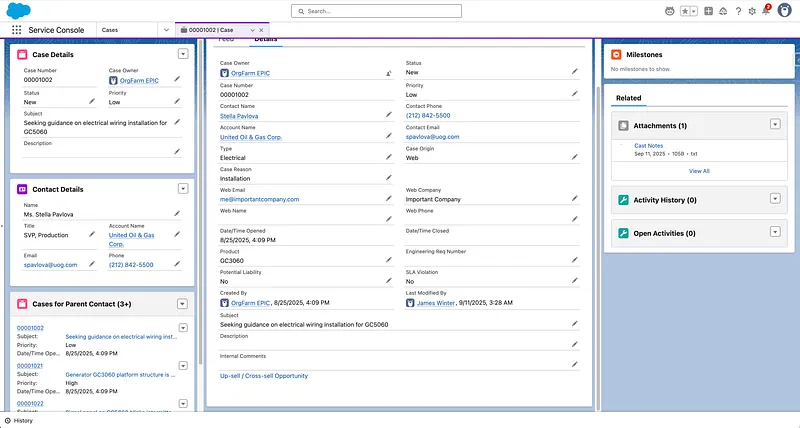
🏗️ Manual queues vs Omni-Channel push routing: a key process choice
Section titled “🏗️ Manual queues vs Omni-Channel push routing: a key process choice”One of your first design decisions is how work reaches agents after it lands in a queue. Queues are used in both approaches; what changes is whether agents pull work themselves or Omni-Channel pushes it to them based on presence, capacity, skills, and priority.
| Routing model | Best fit | Main operational cost |
|---|---|---|
| Manual queue/list view | Smaller teams or predictable email-only support | Agents choose work, so priority, ageing and fair distribution need active supervision. |
| Enhanced Omni-Channel push routing | Blended channels, skills-based work and larger contact centres | Presence, capacity weights, routing configuration and supervisor practice must stay accurate. |
| Hybrid | Manual email queues with push routing for chat, messaging or voice | Two operating models can hide ownership unless the boundary is explicit. |
New implementations should use Enhanced Omni-Channel, the recommended version. Standard Omni-Channel retired with the Summer ’26 release, and Salesforce automatically upgraded orgs to Enhanced Omni-Channel during that rollout, which has now completed. If your org was upgraded, validate routing, presence statuses, capacity, and supervisor workflows rather than assuming the operational behaviour is identical, as some routing and work-item behaviours changed with Enhanced.
If you run a single-channel email helpdesk today, manual queues plus assignment rules may be enough to start. If agents handle chat, messaging, and phone in one shift, Omni-Channel is usually the better long-term choice.
This decision is worth making early. Enabling Omni-Channel later often means reworking queues, routing configurations, console layouts, and SLA reporting. For digital chat, use Enhanced Chat, formerly Messaging for In-App and Web. Legacy Chat products, including Live Agent, Salesforce Chat, Embedded Chat, and Service Chat, reached retirement on 14 February 2026. Historical chat data can remain accessible, but new Legacy Chat sessions are no longer available, so any unfinished implementation needs a migration plan rather than further investment in the legacy channel.
🎯 Case Status Design
Section titled “🎯 Case Status Design”Statuses should mirror your actual resolution workflow. If “Pending Customer” exists but has no clear entry criteria, agents will misuse it, and SLA reporting will become meaningless.
- Map statuses to your real resolution path, not generic Salesforce defaults.
- Define clear rules for common states such as Open, Working, Pending Customer, Escalated, and Closed.
- Avoid too many statuses: six to eight is usually enough; more than that often means agents pick inconsistently and reports stop reflecting reality.
- Use validation rules to prevent skipping required steps (e.g. cannot close without resolution notes, cannot escalate without a reason).
Case status design directly impacts SLA reporting accuracy. Invest time here before you build dashboards, milestones, or automation that assume a disciplined lifecycle.
🎯 Is Service Cloud the Right Fit?
Section titled “🎯 Is Service Cloud the Right Fit?”Service Cloud can absorb almost any support workflow, which makes it easy to buy for the wrong reasons. Here is where it genuinely fits, and where to look harder before committing.
✅ When to Use Service Cloud
Section titled “✅ When to Use Service Cloud”Service Cloud is a strong fit when:
- You need a system of record for customer issues, cases, and service interactions.
- You support multiple channels (email, chat, phone, messaging, social) and want consistent agent workflows.
- You want knowledge, self-service, and case management on the same platform as CRM data.
- You need declarative automation (Flow), AI (Einstein), and integrations on Salesforce.
⚠️ When It Might Not Be the Right Fit
Section titled “⚠️ When It Might Not Be the Right Fit”Service Cloud may not be ideal when:
- You only need a simple shared inbox with no case lifecycle or SLA tracking (a lightweight ticketing tool may suffice).
- Your primary need is pre-sale pipeline and revenue forecasting (Sales Cloud is the better starting point).
- You want a standalone contact centre platform with no CRM on Salesforce (evaluate CCaaS integrations carefully rather than assuming native fit).
- You need purely public marketing websites without authenticated service workflows (Experience Cloud plus a CMS may be evaluated alongside Service Cloud).
🧰 Key Features of Service Cloud
Section titled “🧰 Key Features of Service Cloud”-
Case Management: Centralise customer inquiries with statuses, priorities, assignment, and escalation. This is the operational core of Service Cloud: agent productivity, SLA reporting, and customer satisfaction metrics all depend on how consistently cases are managed.
Case status discipline directly drives service reporting accuracy. Poor status discipline or stale cases can quickly make backlog and SLA dashboards unreliable, which is why many teams enforce status entry criteria, required fields, and closure validation rules.
- Entitlements vs milestones: Entitlements define what level of support a customer is entitled to (e.g. Gold vs Standard); milestones are the time targets attached to a case (first response, resolution). Configure both together so SLA clocks reflect the right contract, not a one-size-fits-all timer.
- Case hygiene: Subject lines, categories, and next steps need regular discipline. Cases without clear categorisation or owner action often signal process gaps that inflate handle time and backlog.
-
Omni-Channel Support: Route cases, chats, and messaging sessions to the right agent based on capacity, skills, and priority for blended-channel contact centres.
-
Knowledge Management: Publish articles for agents and customers, power deflection in portals and bots, and reduce repeat contacts when content is kept current.
-
Service Console: A unified agent desktop with case feed, customer 360, knowledge sidebar, and macros to reduce tab switching and handle time.
-
Service Analytics: Reports and dashboards for case volume, resolution time, SLA compliance, CSAT, and agent productivity.
-
Automation and AI: Flow automates case assignment, notifications, and field updates. Einstein still powers predictive features such as case classification, case routing, and article recommendations. Agentforce adds autonomous service agents for conversational self-service and multi-step resolution (often alongside or instead of legacy Einstein Bots). Both run on the Salesforce platform with the Einstein Trust Layer; plan for Agentforce where you need generative, agentic support workflows.
-
Mobile and Field Service: The Salesforce mobile app supports agents on the go; Field Service extends scheduling and dispatch for onsite work when bundled or licensed separately.
-
Service Cloud Licensing and Editions: Editions and add-ons directly affect knowledge, routing, messaging, voice, automation and scale. The rules differ by feature. For example, Salesforce’s Enhanced Chat FAQ says Enterprise Edition needs Digital Engagement or Sales Engagement for Enhanced Chat, while Unlimited Edition does not need that add-on. Field Service and voice have their own entitlement paths. Map the exact channel roadmap to the supported Service features before designing around a capability.
Licensing bites harder in service implementations because a generic “we own Service” statement does not prove that every planned channel is available. Record the edition, add-on, permission-set licence and any usage-based charge for each channel. Recheck that matrix with the current Salesforce documentation and commercial order form before build and again before launch.
🛡️ Data access and the service sharing model
Section titled “🛡️ Data access and the service sharing model”Agents only perform well when they see the right cases and customer records, and nothing more. Designing access early prevents data exposure and routing confusion.
- Organization-wide defaults (OWD): Set the baseline for Case, Account, and Contact visibility (Private is common for support data).
- Role hierarchy: Supervisors typically inherit access to their team’s cases. Design roles to mirror support management structure, not only the corporate org chart.
- Queues vs ownership: Queues enable team-based access; case ownership drives accountability. Use both deliberately so agents can collaborate without losing clear ownership.
- Experience Cloud and guest access: Customer portals expose cases and knowledge to external users. Scope permissions tightly and review guest profiles regularly.
For high-volume service orgs, favour explicit sharing design over ad hoc manual sharing. For small teams, queues with Private OWD and a simple role hierarchy is often enough to start. The building blocks themselves (OWD, roles, and sharing rules) are covered in depth in Sharing Data; this page only covers how they apply to service work.
💡 Use Cases for Service Cloud
Section titled “💡 Use Cases for Service Cloud”Service Cloud supports a wide range of service motions:
- Email and web support: Email-to-Case and web forms create cases with consistent routing and SLA tracking.
- Enhanced Chat and messaging: Persistent web or in-app conversations and other digital engagement channels with Omni-Channel routing.
- Contact centre operations: Salesforce Voice with Telephony Providers, or another partner telephony integration, with screen-pop context from CRM.
- Customer self-service: Knowledge bases and case portals via Experience Cloud.
- Post-sales handoff from sales: Cases linked to accounts and opportunities from Sales Cloud for continuity after the deal closes.
🧩 Example Architecture: Omnichannel Customer Support
Section titled “🧩 Example Architecture: Omnichannel Customer Support”A typical Service Cloud implementation for a mid-size support team might include:
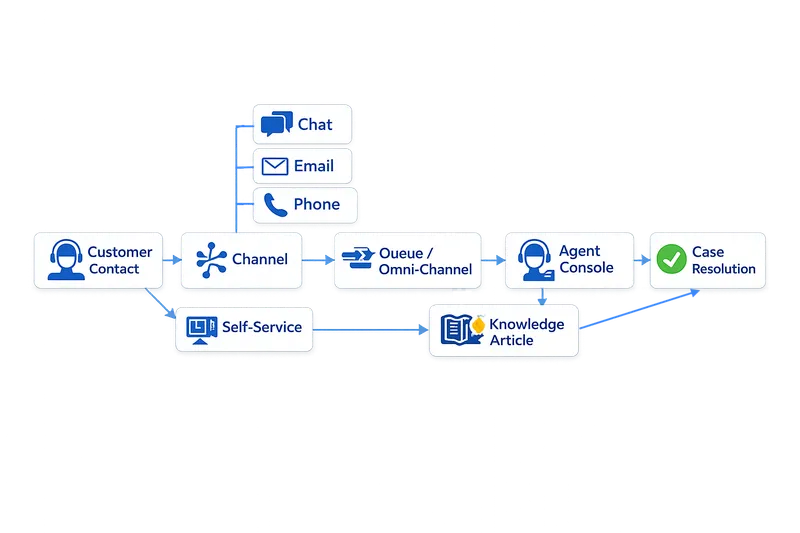
- Email-to-Case and web-to-case for inbound volume
- Omni-Channel with skill-based routing for chat and messaging
- Service Console as the agent desktop
- Knowledge for agent assist and customer self-service
- Entitlements and milestones for SLA tracking
- Flow for assignment, notifications, and case updates
- Experience Cloud portal for customers to log in, search articles, and track cases
- Integration with Sales Cloud for account and opportunity context on every case
In this model, customers reach support through their preferred channel, agents work from one console with full context, and leaders measure resolution time and SLA compliance from live data rather than spreadsheets.
✨ Operational Value of Service Cloud
Section titled “✨ Operational Value of Service Cloud”- Improved Agent Productivity: Agents spend less time searching for context and more time resolving issues when cases, knowledge, and customer history live in one system.
- Faster Resolution: Routing, macros, and knowledge deflection reduce handle time and repeat contacts.
- Consistent Omnichannel Experiences: Customers get coherent support whether they use email, chat, or phone.
- Data-Driven Service Leadership: Reports and dashboards turn volume, SLA, and CSAT data into coaching and capacity decisions.
- Scalability and Flexibility: Service Cloud grows with channels, teams, and regions, but licensing and routing design decide how much of that growth arrives without rework.
- Platform Integration: Cases inherit account, order, and campaign context from the rest of the stack, so agents are not resolving issues blind.
🔗 How Service Cloud Complements Other Products
Section titled “🔗 How Service Cloud Complements Other Products”Support quality depends on context, and context lives in the rest of the stack: the account from sales, the order from commerce, the campaign history from marketing. Connected this way, Service Cloud stops being a ticketing system and becomes the customer’s memory.
- Sales Cloud: Give agents account, contact, and opportunity context on every case; hand off closed-won deals into support workflows cleanly.
- Marketing Cloud: Connect campaign and engagement history to service cases for smarter prioritisation and retention outreach.
- Experience Cloud: Power customer and partner portals for self-service, case creation, and knowledge access.
- Commerce Cloud: Link order and fulfilment data to cases for post-purchase support and returns.
👥 Roles That Commonly Use Service Cloud
Section titled “👥 Roles That Commonly Use Service Cloud”Service Cloud implementations tend to be operations-led: support leadership and service operations define how work should flow, admins encode it, and developers step in once telephony, custom channels, or integrations enter the picture. The mix shifts with channel complexity more than with team size.
- Support Agents and Team Leads own case quality, SLA adherence, and day-to-day console usage.
- Service Operations and Workforce Management define queues, skills, routing, reporting, and capacity planning.
- Salesforce Admins configure cases, Omni-Channel, knowledge, entitlements, Flow, sharing, and console layouts.
- Salesforce Developers build integrations, custom LWC/Apex, telephony connectors, and API-driven channel extensions.
- Salesforce Architects define service data models, routing architecture, identity patterns, and scalability standards.
🧭 Best Practices for Service Cloud
Section titled “🧭 Best Practices for Service Cloud”- Define Your Support Process First: Map case statuses, escalation paths, and required fields before building automation or SLAs.
- Govern Knowledge Content: Assign owners, review cycles, and retirement rules so articles stay accurate and deflect volume effectively.
- Automate Repetitive Work: Use Flow for assignment, notifications, and field updates so agents focus on complex issues.
- Leverage Analytics: Review case volume, backlog, SLA, and CSAT reports weekly. Coach from data, not anecdotes.
- Design Routing Deliberately: Align queues, Omni-Channel, and skills with how work actually arrives and who should handle it.
- Invest in Adoption: Training, console shortcuts, and supervisor sponsorship drive usage more than feature count.
- Integrate Early: Connect sales, billing, and product systems so Service Cloud remains the trusted system of record for customer issues.
⚠️ Common Service Cloud Pitfalls
Section titled “⚠️ Common Service Cloud Pitfalls”Service implementations fail in predictable ways, and almost all of them are process problems that automation then amplifies. Plan for these before you scale.
- Enabling Omni-Channel before case process is stable. Routing amplifies bad process; define statuses, ownership, and escalation before automating distribution.
- Launching knowledge without governance. Outdated articles erode trust and increase case volume instead of deflecting it.
- Configuring SLAs without realistic targets. Milestones that do not match operational capacity produce constant breaches and agent fatigue.
- Ignoring entitlements and channel design. Different customer tiers and channels need different response rules; one-size-fits-all SLAs rarely work.
- Choosing the wrong edition or licence mix and hitting channel or automation limits mid-implementation. Confirm each planned channel has a licence path during design, not after go-live.
🚀 Getting Started with Service Cloud
Section titled “🚀 Getting Started with Service Cloud”Service Cloud makes the most sense once you have watched a case move through it: create one, route it through a queue, attach a knowledge article, and close it against a milestone. Trailhead structures that journey, and the official docs cover the details.
Begin with foundational modules such as Customer Service with Salesforce: Quick Look and Service Cloud for Lightning Experience, then progress to the Get Started with Service Cloud for Lightning Experience trail.
For platform updates, API documentation, and developer tooling, visit the Salesforce Service Cloud Developer Centre and the Knowledge Developer Guide.
A free Salesforce Developer Edition org provides core service and platform capabilities for practising cases, queues and the console. Knowledge, channels, AI and other features can have separate setup or entitlement requirements, so a learning org is not evidence of the production licence mix.
🏁 Conclusion
Section titled “🏁 Conclusion”Service Cloud is not just a ticketing tool; it is the operating system for a service process. The decisive work is aligning case states, ownership, routing, knowledge, access and channel entitlements so the metrics describe what agents are actually doing. Start with the case lifecycle, then add channels and automation only when the team can operate the simpler model consistently.
❓ Frequently Asked Questions
Section titled “❓ Frequently Asked Questions”🌐 What is Service Cloud used for?
Section titled “🌐 What is Service Cloud used for?”It is used to manage customer support cases, knowledge, and multichannel service interactions in one platform, giving agents full context and leaders reliable service metrics.
🔄 What is the difference between Sales Cloud and Service Cloud?
Section titled “🔄 What is the difference between Sales Cloud and Service Cloud?”Sales Cloud owns the selling motion: pipeline, forecasting and opportunities. Service Cloud owns the service motion: cases, entitlements, knowledge and support channels. The handoff is not always exactly “closed deal”, because pre-sales and customer-success processes can cross the boundary, but both products can work on the same account and contact data. Their current official product names are Agentforce Sales and Agentforce Service.
📞 Does Service Cloud include phone and chat?
Section titled “📞 Does Service Cloud include phone and chat?”Service Cloud supports email and can support Enhanced Chat, messaging and voice when the required edition, add-on and user access are in place. Voice uses Salesforce Voice with Telephony Providers or another partner integration. Legacy Chat is retired and should not be part of a new channel design.
🔑 What licences are required for Service Cloud?
Section titled “🔑 What licences are required for Service Cloud?”Service Cloud, officially Agentforce Service, is a product name rather than the underlying user-licence name. Salesforce commonly assigns the Salesforce user licence and controls service capabilities through the purchased edition, permission set licences, permissions and channel add-ons. Confirm each feature against the current supported-editions table and the organisation’s order form.