SOQL: Advanced Filtering Techniques

After learning basic comparisons, LIKE, and NULL checks in the WHERE clause guide, the next step is to combine those conditions into a business rule. In real Salesforce orgs, a report request that starts as “show me open opportunities” quickly becomes “show me open opportunities above a threshold, excluding specific stages, for only certain business units during this time period”.
This is where many SOQL queries become hard to trust: the syntax still runs, but the logic no longer matches the business question.
Advanced filtering is the skill that closes that gap. In this guide, you’ll learn how to use AND, OR, NOT, IN, and NOT IN with confidence, how to group conditions to avoid precedence mistakes, and how to handle practical edge cases like null values.
In project delivery, I see filtering issues most often during testing, when a single misplaced OR or missing null check quietly broadens the result set. I rely on these patterns when query logic must stay readable under change, especially in dashboards, automation checks, and validation heavy data operations. If a basic comparison or NULL check needs a refresher, return to the WHERE clause guide before combining predicates here.
🔗 AND, OR, and NOT Operators
Section titled “🔗 AND, OR, and NOT Operators”🤝 AND Operator: All Conditions Must Be True
Section titled “🤝 AND Operator: All Conditions Must Be True”The AND operator requires all specified conditions to be true for a record to be included.
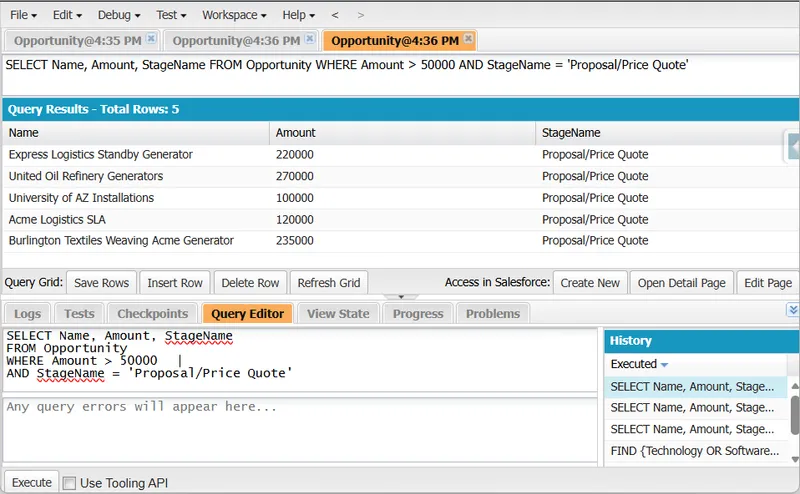
Use AND to narrow results, but if your conditions are not selective, queries can still return large datasets and impact performance. Unlike OR, which returns records matching any condition, AND returns only those matching all conditions.
SELECT Name, Amount, StageNameFROM OpportunityWHERE Amount > 50000AND StageName = 'Proposal/Price Quote'This query returns only opportunities where Amount is greater than 50,000 and StageName is ‘Proposal/Price Quote’. Use AND when every condition must be true.
🔀 OR Operator: Any Condition Can Be True
Section titled “🔀 OR Operator: Any Condition Can Be True”The OR operator returns records that match at least one specified condition.
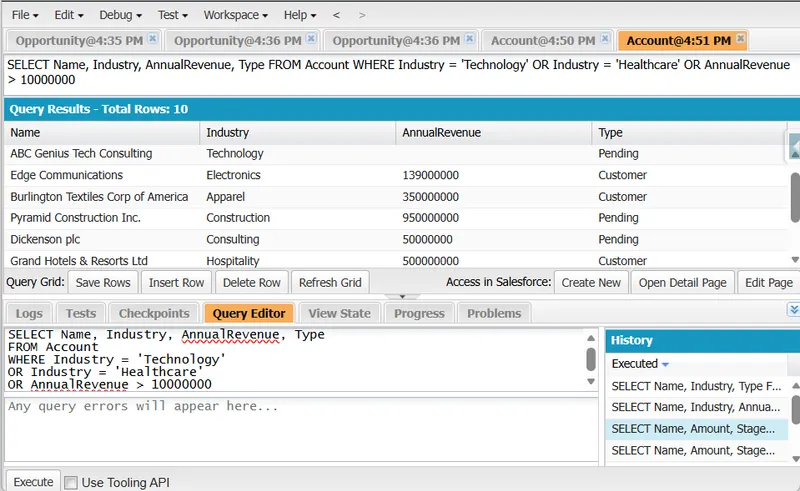
Use OR to broaden results, but keep conditions intentional. OR can quickly expand result sets and reduce selectivity, which may affect performance. Unlike AND, which narrows to records meeting all conditions, OR includes records meeting any condition.
SELECT Name, Industry, AnnualRevenue, TypeFROM AccountWHERE Industry = 'Technology'OR Industry = 'Healthcare'OR AnnualRevenue > 10000000This query selects accounts in the ‘Technology’ or ‘Healthcare’ industries, or those with an AnnualRevenue exceeding 10,000,000. Use OR when any one of several business conditions should qualify a record.
🚫 NOT Operator: Exclude Matching Records
Section titled “🚫 NOT Operator: Exclude Matching Records”The NOT operator excludes records that match a condition or grouped conditions.
Use NOT carefully. Broad negation can reduce selectivity and make query intent harder to validate during testing. In practice, pair NOT with explicit positive criteria (such as date ranges or status filters) to keep result sets predictable.
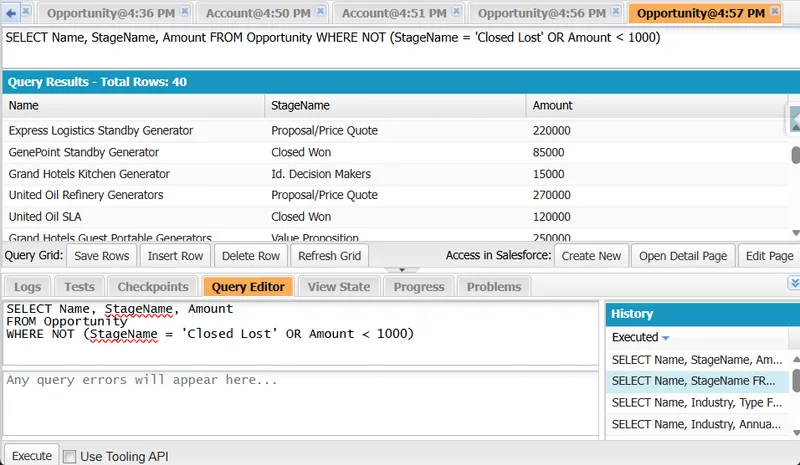
SELECT Name, StageName, AmountFROM OpportunityWHERE NOT (StageName = 'Closed Lost' OR Amount < 1000)Alternatively, you could write this using standard comparison operators:
SELECT Name, StageName, AmountFROM OpportunityWHERE StageName != 'Closed Lost' AND Amount >= 1000These queries exclude opportunities that are either ‘Closed Lost’ or have an Amount less than 1,000. Use NOT when exclusion logic is explicit and well understood, especially when combined with grouped OR conditions.
📥 IN and NOT IN Operators
Section titled “📥 IN and NOT IN Operators”➕ IN Operator for Multiple Values
Section titled “➕ IN Operator for Multiple Values”The IN operator is used to filter records based on a list of values, making it easy to match multiple criteria in a single query without chaining multiple OR statements.
SELECT Name FROM Account WHERE Industry IN ('Technology', 'Finance', 'Healthcare')This query selects Account records where Industry matches one of the listed values: ‘Technology’, ‘Finance’, or ‘Healthcare’. Use IN when you want clear, maintainable multi-value filtering without chaining long OR conditions. You can combine this with date literals for rolling periods and ordering plus LIMIT for controlled result sets when building operational lists.
OR vs IN (Quick Comparison)
Section titled “OR vs IN (Quick Comparison)”For same-field equality checks, IN is usually the better default than repeating multiple OR conditions.
| Pattern | Readability | Performance Tendency |
|---|---|---|
Industry = 'Technology' OR Industry = 'Finance' OR Industry = 'Healthcare' | Verbose, harder to maintain as lists grow | Can be harder to review and tune as value lists get longer |
Industry IN ('Technology', 'Finance', 'Healthcare') | Compact and easier to scan | Often easier for optimisation and long-term maintenance, especially with larger lists |
Bad vs Good Query Rewrite
Section titled “Bad vs Good Query Rewrite”Use this rewrite pattern when the same field is repeated across multiple OR predicates.
Bad (harder to read and maintain):
SELECT Name, IndustryFROM AccountWHERE Industry = 'Technology'OR Industry = 'Finance'OR Industry = 'Healthcare'OR Industry = 'Education'Good (same logic, cleaner intent):
SELECT Name, IndustryFROM AccountWHERE Industry IN ('Technology', 'Finance', 'Healthcare', 'Education')Both queries return the same logical result set, but the IN version is usually easier to extend, review, and troubleshoot.
➖ NOT IN Operator for Exclusion
Section titled “➖ NOT IN Operator for Exclusion”The NOT IN operator excludes records that match any value in a list.
SELECT Name, StageNameFROM OpportunityWHERE StageName NOT IN ('Closed Lost', 'Cancelled', 'Dead')This query excludes opportunities with stages ‘Closed Lost’, ‘Cancelled’, or ‘Dead’. Using NOT IN lets you efficiently filter out records that match any value in a list, which is especially useful when focusing on active opportunities and excluding those in final, undesirable stages.
However, NOT IN does not exclude null values. In SOQL, a record with StageName = null does not match any value in the list, so it is not excluded by:
WHERE StageName NOT IN ('Closed Lost', 'Cancelled', 'Dead')As a result, opportunities with a null StageName will still appear in the results, which can distort reports and dashboards if your data contains missing or incomplete values.
To exclude both the specified stages and records where StageName is null, use AND StageName != null in your filter:
SELECT Name, StageNameFROM OpportunityWHERE StageName NOT IN ('Closed Lost', 'Cancelled', 'Dead')AND StageName != nullThis ensures that opportunities with null stages are also excluded, providing a more comprehensive filtering approach. The same behaviour applies to !=: see handling NULL with the != operator for the single-value equivalent of this pattern. For cross-object scenarios, pair this technique with SOQL relationship queries so parent and child filters stay explicit.
🧬 Complex Condition Grouping
Section titled “🧬 Complex Condition Grouping”Use parentheses to group conditions and control the evaluation order, ensuring your query logic is applied correctly.
SELECT Name, Amount, Type, IndustryFROM AccountWHERE (Industry = 'Technology' AND AnnualRevenue > 1000000)OR (Industry = 'Healthcare' AND NumberOfEmployees > 500)OR (Type = 'Customer' AND Rating = 'Hot')Without parentheses, the query’s behaviour could differ due to operator precedence.
🔢 Logical Operator Precedence
Section titled “🔢 Logical Operator Precedence”In SOQL, the operator precedence is important to understand, as it determines the order in which parts of a query are evaluated. The precedence in SOQL is:
NOT: This operator has the highest precedence, meaning it is evaluated first.AND: This operator is evaluated afterNOT.OR: This operator has the lowest precedence and is evaluated last.
Given this precedence, it’s crucial to use parentheses to ensure that your queries are evaluated in the order you intend. This helps avoid logical errors and ensures that the query returns the expected results. For example, without parentheses, a query like:
SELECT NameFROM AccountWHERE Industry = 'Technology' OR Industry = 'Healthcare'AND AnnualRevenue > 1000000Would be evaluated as if you wrote:
SELECT NameFROM AccountWHERE Industry = 'Technology'OR (Industry = 'Healthcare' AND AnnualRevenue > 1000000)The condition Industry = 'Healthcare' AND AnnualRevenue > 1000000 is evaluated first, and then the result is combined with Industry = 'Technology' using the OR operator. To ensure the correct logic, you might need to use parentheses like this:
SELECT NameFROM AccountWHERE (Industry = 'Technology' OR Industry = 'Healthcare')AND AnnualRevenue > 1000000This ensures that the OR conditions are evaluated together before applying the AND condition.
✅ Conclusion
Section titled “✅ Conclusion”Reliable SOQL filtering is less about writing longer WHERE clauses and more about expressing intent clearly. The strongest queries make their logic obvious: conditions are grouped deliberately, exclusions are explicit, and null handling is intentional rather than accidental.
When these patterns are applied consistently, query behaviour is easier to explain to stakeholders, safer to modify later, and far less likely to introduce silent data-quality issues. From hands-on troubleshooting, these are common fixes behind “the numbers don’t match” incidents between reports, list views, and custom dashboards. In practice, mastering AND, OR, NOT, IN, NOT IN, and precedence rules turns filtering from “works for now” into a dependable part of your data model and reporting flow.
🔜 Your Next Steps
Section titled “🔜 Your Next Steps”- Simplify a repeated OR: Rewrite a repeated
ORfilter in one of your reports as anINlist and confirm the counts match. - Make null handling explicit: Add an explicit
!= null(or= null) branch to a negative filter and watch how the result count changes. - Group deliberately: Take a query with mixed
AND/ORand add parentheses so its logic matches the business question exactly.
Next, move on to SOQL: Ordering and Limiting to sort those filtered results and cap them to the rows you actually need.