Salesforce Fundamentals: Part 1 - Platform
Published 26/09/2025

Welcome back to our journey towards becoming a proficient Salesforce Developer! The introduction started to explore the expansive world of Salesforce and highlighted the incredible opportunities it offers. Before diving into the intricacies of coding and advanced development, it’s crucial to establish a strong foundation in Salesforce basics. Think of it as learning to walk before you can run. A deep understanding of the platform’s capabilities will make your development journey much smoother and more effective. Many successful Salesforce professionals emphasize the importance of mastering foundational concepts first, as it provides a holistic view of how the platform functions and how users interact with it.
Understanding Salesforce
Section titled “Understanding Salesforce”Salesforce is a cloud-based platform that revolutionizes how businesses manage customer relationships and operations. Its multi-tenant architecture allows multiple organizations to share the same infrastructure while keeping each “org” (short for organization) secure and isolated. An org is a specific instance of the Salesforce environment that contains a company’s data, applications, and customizations. This design ensures that all users benefit from the latest updates and features without the need for individual installations or upgrades.
As a cloud-based solution, Salesforce provides businesses with the flexibility to access their CRM from anywhere, facilitating real-time collaboration and decision-making. This accessibility is essential for digital businesses that require agility and scalability to adapt to changing market demands.
By integrating artificial intelligence, analytics, and seamless data management, Salesforce empowers organizations to deliver personalized customer experiences and make informed, data-driven decisions. In essence, Salesforce powers digital transformation by providing the tools and infrastructure necessary for businesses to innovate, compete, and thrive in today’s dynamic market.
Trailhead recommendations: To help understand the platform, look at the Salesforce CRM module to learn how to use customer relationship management (CRM) software to grow your business.
Then look at the Salesforce Platform Basics module to get introduced to the platform, navigate use cases, and build custom functionality.
Salesforce Editions and Environments
Section titled “Salesforce Editions and Environments”Salesforce offers various editions and environments to cater to the diverse needs of businesses, providing flexibility in terms of features, customization, and scalability.
🏢 Salesforce Editions
Section titled “🏢 Salesforce Editions”- Developer Edition: This edition is free and designed for developers to build and test applications. It includes access to most Salesforce features and APIs, making it ideal for learning and experimentation.
- Essentials Edition: Tailored for small businesses, this edition offers basic CRM functionalities with an easy-to-use interface, focusing on simplicity and quick setup.
- Professional Edition: Aimed at small to medium-sized businesses, this edition offers essential CRM features with limited customization and automation capabilities. It provides a solid foundation for managing customer relationships.
- Enterprise Edition: Designed for larger businesses, this edition includes advanced customization, automation, and integration features. It supports complex business processes and offers extensive API access for integration with other systems.
- Unlimited Edition: This edition provides the most comprehensive set of features, including unlimited customization and support. It is suitable for large enterprises with complex needs and a high demand for scalability and flexibility.
🌐 Salesforce Environments
Section titled “🌐 Salesforce Environments”- Production Environment: This is the live environment where actual business operations occur. It contains real data and is used by end-users to perform daily tasks.
- Sandbox Environment: Sandboxes are copies of the production environment used for development, testing, and training without affecting live data. They allow teams to experiment with new features and customizations safely. There are different types of sandboxes, such as Developer, Developer Pro, Partial Copy, and Full Copy, each offering varying levels of data and metadata replication.
- Scratch Org: Scratch Orgs are temporary Salesforce environments used for development and testing. They are part of Salesforce DX (Developer Experience) and are highly configurable, allowing developers to emulate different Salesforce editions with specific features and preferences. Scratch Orgs are ideal for agile development, continuous integration, and version control, as they can be easily created and disposed of as needed.
- Trailhead Playground: Trailhead Playgrounds are special Salesforce environments created for learning and experimentation on Salesforce’s Trailhead platform. They allow users to practice skills and complete hands-on challenges without affecting any real data or production environments. Trailhead Playgrounds are automatically created when you start a module or project on Trailhead, providing a safe space to explore Salesforce features.
Understanding the differences between Salesforce editions and environments helps organizations choose the right combination to meet their specific needs, ensuring they have the necessary tools and flexibility to support their business processes and growth.
Trailhead recommendations: Look at the Environments for Salesforce Developers module to learn how and when to use different Salesforce developer environments:
Then the Trailhead Playground Management module to create hands-on orgs, practice your Salesforce skills, and complete Trailhead challenges.
Salesforce Licensing
Section titled “Salesforce Licensing”Organizations subscribe to Salesforce by selecting an edition (like Enterprise or Unlimited), which determines core features and base price, then buying per-user-per-month licenses for each person who needs access. Additional feature licenses, permission set licenses, or add-ons (like CRM Analytics or Marketing Cloud) are layered on top as needed.
Salesforce licensing is a critical aspect of managing access to the platform’s features and capabilities. Understanding the different types of licenses available helps organizations choose the right combination to meet their business needs and ensure efficient use of resources. Below is an overview of some common types of Salesforce licenses:
🧾 Types of Salesforce Licenses
Section titled “🧾 Types of Salesforce Licenses”User Licences
Section titled “User Licences”These licenses determine the baseline of features and functionality available to a user. Common user licenses include:
- Salesforce License: Provides access to the full CRM capabilities, including standard and custom applications.
- Salesforce Platform License: Offers access to custom applications and objects but excludes standard CRM functionalities like Leads and Opportunities.
- Chatter Free/Chatter Only: Allows users to access Chatter, Salesforce’s collaboration tool, with limited access to other Salesforce features.
Feature Licenses
Section titled “Feature Licenses”These licenses grant access to additional features that are not included in the standard user license. Examples include:
- Knowledge User: Allows users to create and manage knowledge articles.
- Marketing User: Provides access to marketing features, such as campaign management.
Permission Set Licenses
Section titled “Permission Set Licenses”These licenses extend the functionality of a user’s existing license by granting additional permissions. They are often used to provide access to specific features or applications without changing the user’s primary license.
Add-On Licenses
Section titled “Add-On Licenses”These licenses provide access to additional Salesforce products or services, such as:
- Einstein Analytics: Offers advanced analytics and business intelligence capabilities.
- Pardot: Provides marketing automation tools for lead generation and nurturing.
Note: This list is not exhaustive, and Salesforce offers a variety of other licenses tailored to specific needs and products.
🗂️ Managing Licenses
Section titled “🗂️ Managing Licenses”Effective license management is essential for optimizing costs and ensuring that users have the appropriate access to Salesforce features. Key considerations include regularly reviewing and adjusting license allocations, monitoring usage to identify underutilized licenses, and ensuring compliance with Salesforce’s licensing agreements to avoid potential penalties or service disruptions.
By understanding the different types of Salesforce licenses and managing them effectively, organizations can maximize the value of their Salesforce investment and support their business objectives.
Trailhead recommendations
Navigating the Salesforce User Interface
Section titled “Navigating the Salesforce User Interface ”Upon logging into Salesforce, you’ll primarily interact with the Lightning Experience, Salesforce’s modern and intuitive user interface. Designed for efficiency and productivity, Lightning Experience offers a personalized and dynamic workspace that enhances user engagement and streamlines workflows. Familiarizing yourself with its layout is your very first step in mastering Salesforce.
⚡ Key Areas to Explore in Lightning Experience
Section titled “⚡ Key Areas to Explore in Lightning Experience”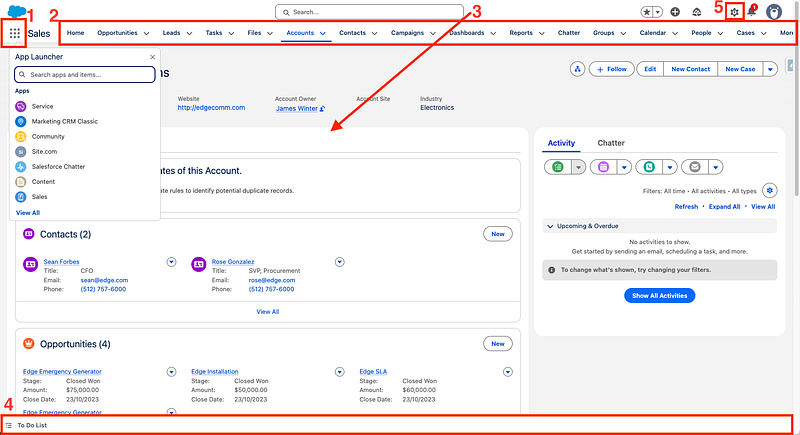
- App Launcher: This is your gateway to all Salesforce apps and items, allowing you to quickly switch between Sales Cloud, Service Cloud, or any custom applications. The App Launcher provides a centralized location to access all the tools you need.
- Navigation Bar: Located at the top of each app, the Navigation Bar provides quick access to standard and custom objects (like Accounts, Contacts, Opportunities) and other important tabs. It can be customized to include the items you use most frequently, improving your workflow efficiency.
- Record Pages: These are highly customizable pages that display all relevant information, related lists, and quick actions for individual records. Record Pages are designed to provide a comprehensive view of each record, enabling users to perform tasks efficiently.
- Utility Bar: Located at the bottom of the screen, the utility bar offers always-accessible tools such as notes, history, and assistant tools for easy multitasking without leaving the current page
- Setup Menu: Accessed via the gear icon, the Setup Menu is where administrators configure, customize, and manage almost every aspect of your Salesforce organization. It includes tools for managing users, data, security, and more.
⚙️ A Closer Look at the Setup Menu
Section titled “⚙️ A Closer Look at the Setup Menu”The Setup Menu is one of the most important areas in Salesforce, especially for anyone moving toward an admin or developer role. While everyday users may never even see it, admins and developers will spend a lot of time here configuring, customizing, and extending the platform.
Here’s a clearer sense of what makes Setup so fundamental:
- Configuration & Customization Hub - Setup is where you define how Salesforce behaves. This includes creating custom objects and fields, adjusting page layouts, building automation, and configuring apps. If you’re shaping the data model or tailoring the UI, you’ll do it here.
- User & Security Management - From creating users to assigning profiles, permission sets, and roles, Setup is the control center for access and security. You’ll also find tools for login history, password policies, and session settings.
- Automation Tools - Flow Builder, Process Builder (legacy), and other automation tools live in Setup. As a developer, this is where you’ll build declarative automation and troubleshoot existing processes.
- Monitoring & Maintenance - Setup includes logs, system status pages, health checks, and audit tools. These help you understand what’s happening in your org, diagnose issues, and keep things running smoothly.
- Developer Essentials - API settings, Named Credentials, Remote Site Settings, Sandboxes, Deployment tools, and the Schema Builder are all accessed through Setup. This is where the platform opens up for deeper development work.
🕰️ What is Salesforce Classic?
Section titled “🕰️ What is Salesforce Classic?”You might hear the term Salesforce Classic — it refers to the older user interface that predates Lightning Experience. Some organizations may still use Classic for specific functionalities or user preferences. Classic offers a more traditional layout and may lack some of the advanced features and enhancements found in Lightning Experience. However, understanding both interfaces can be beneficial, especially if you work in an environment transitioning from Classic to Lightning.
Trailhead recommendations: To get hands-on experience with the Lightning Experience interface, explore the Lightning Experience for Salesforce Classic Users module on Trailhead. While intended for Salesforce Classic Users to get comfortable with Lightning Experience it still provides good insight for new users. Then follow it up with Lightning Experience Customization to learn about customizing the Lightning Experience user interface without writing any code.
🚀 Next steps
Section titled “🚀 Next steps”You’ve now built an understanding of Salesforce, the editions, licensing, and the UI. Next, in Users, you’ll learn how Salesforce manages people: licenses, profiles, permission sets, roles, and the security foundations that shape what each person can see and do.