Salesforce Sales Cloud: Pipeline, Leads & Forecasting
Sales teams often lose deals not because of product fit, but due to poor pipeline visibility, inconsistent follow-up, and fragmented customer data across spreadsheets and inboxes. Sales Cloud is the familiar name for Salesforce’s sales CRM, and it remains common across teams, learning resources, and parts of the product. Salesforce’s current official product name is Agentforce Sales. This guide uses “Sales Cloud” throughout for readability while covering the same core job: centralising leads, accounts, opportunities, and activities so the pipeline can be operated and forecast reliably.
🌐 What is Salesforce Sales Cloud?
Section titled “🌐 What is Salesforce Sales Cloud?”Sales Cloud, now officially Agentforce Sales, is Salesforce’s customer relationship management product for sales teams. It provides tools to capture and qualify leads, manage accounts and contacts, track opportunities through a pipeline, forecast revenue, and coordinate sales activity. From first touch to closed-won, the product brings the working record and forecast onto the same platform.
🏗️ Lead-centric vs opportunity-centric: a key process choice
Section titled “🏗️ Lead-centric vs opportunity-centric: a key process choice”One of your first design decisions is how prospects enter and move through the sales cycle. Both models run on the same platform, but they change object usage, automation, and reporting.
| Process | Best fit | Main risk to control |
|---|---|---|
| Lead-centric | High inbound volume, marketing attribution, or a formal qualification gate | Poor conversion and matching rules create duplicate Accounts and Contacts. |
| Opportunity-centric | Account-based selling, repeat business, or known B2B relationships | New prospects can bypass qualification and make attribution inconsistent. |
| Hybrid | Leads for acquisition; direct Opportunities for expansion and renewal | Reps need explicit rules by channel, record type or account status so both paths remain reportable. |
If you rely on marketing campaigns and SDR qualification, a lead-centric model is usually the better default for new business. For established account teams selling into known customers, an opportunity-centric path is often more practical. In practice, most mature implementations land on a hybrid: Leads for acquisition, Opportunities for growth on existing relationships.
This decision is worth making early. Switching models later often means reworking automation, reports, dashboards, and integrations that assume a specific object flow.
🎯 Is Sales Cloud the Right Fit?
Section titled “🎯 Is Sales Cloud the Right Fit?”Sales Cloud is often the default answer to “we need a Salesforce CRM”, which is exactly why it is worth being clear about where it genuinely excels and where another approach may serve you better before you commit.
✅ When to Use Sales Cloud
Section titled “✅ When to Use Sales Cloud”Sales Cloud is a strong fit when:
- You need a single system of record for accounts, contacts, deals, and sales activities.
- You want pipeline visibility, forecasting, and rep performance tracking in one place.
- You plan to connect sales data to marketing, service, or partner experiences on Salesforce.
- You need declarative automation (Flow), AI (Einstein), and custom development on a shared platform.
⚠️ When It Might Not Be the Right Fit
Section titled “⚠️ When It Might Not Be the Right Fit”Sales Cloud may not be ideal when:
- You only need basic contact management with no pipeline or forecasting (a lighter CRM may suffice).
- Your primary need is post-sale support and case management (Service Cloud is the better starting point).
- You want a standalone marketing automation platform without CRM on Salesforce (Marketing Cloud may be evaluated separately).
- You need complex configure-price-quote and subscription billing at enterprise scale (Sales Cloud is often extended with revenue-management products rather than used alone).
🧰 Key Features of Sales Cloud
Section titled “🧰 Key Features of Sales Cloud”-
Lead Management: Capture, assign, score, and convert leads. Einstein Lead Scoring helps reps prioritise the best prospects instead of working lists manually.
-
Opportunity Management: Track deals through customisable sales stages, manage pipeline hygiene, and forecast revenue by rep, team, or territory. This is the operational core of Sales Cloud: rep dashboards, manager coaching, and leadership forecasts all depend on how consistently opportunities are maintained.
Opportunity stages and close dates directly drive forecast accuracy. Poor stage discipline or stale close dates can quickly make pipeline reports unreliable, which is why many teams enforce stage entry criteria and validation rules.
- Stage design: Stages should mirror your real sales methodology, not generic defaults. Clear entry and exit criteria help reps advance deals consistently so rolled-up forecasts reflect reality.
- Probability vs forecast category: Stage probability drives weighted pipeline totals; forecast category (Pipeline, Best Case, Commit, Omitted) is what leaders use in commit calls. Misalignment between the two is a common source of forecast surprises.
- Pipeline hygiene: Close dates, next steps, and stage updates need regular discipline. Deals without a credible close date or next activity often signal stalled pipeline that inflates forecasts until someone cleans it up.
-
Account and Contact Management: Centralise customer data with a single source of truth for relationships, activities, and account hierarchies.
-
Sales Collaboration: Tools like Chatter, activity timelines, and team selling features keep reps, managers, and overlays aligned on deal progress.
-
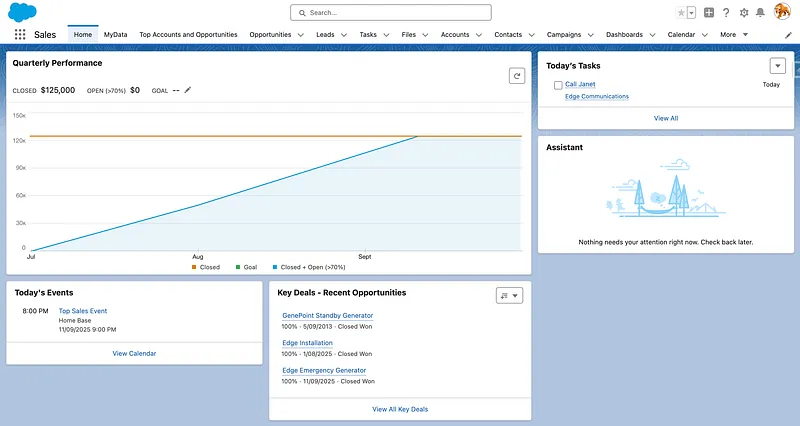
Sales Analytics: Reports and dashboards for pipeline, win rates, activity metrics, and forecast accuracy. CRM Analytics can extend this for advanced sales intelligence.
-
Mobile Access: The Salesforce mobile app keeps field reps productive with pipeline, contacts, and tasks on the go.
-
Automation and AI: Flow automates assignment, follow-ups, and approvals. Einstein surfaces next-best actions, opportunity insights, and forecasting assistance. Modern Sales Cloud implementations increasingly incorporate AI driven insights such as opportunity risk scoring, activity recommendations, and automated forecasting adjustments.
-
Sales Cloud Editions and Entitlements: Edition and add-ons such as Sales Engagement and revenue-management products directly affect available features, automation limits and scale. Check the commercial entitlement against the process before build. For example, Sales Territories (formerly Enterprise Territory Management) is available in Enterprise, Unlimited and Developer editions, while territory forecasting has its own edition and Sales-entitlement conditions.
Licensing shapes a Sales Cloud project more than most teams expect. Edition determines your automation and sandbox allowances, whether territory management is available at all, and how far you can take API-driven integrations, while CPQ, Sales Engagement, and Einstein capabilities are priced as add-ons rather than assumed features. Price the edition and add-on mix against your actual sales process during design, because discovering a missing capability after go-live usually means paying for an upgrade or reworking the process around the gap.
🛡️ Data access and the sales sharing model
Section titled “🛡️ Data access and the sales sharing model”Sales teams only perform well when reps see the right records and nothing more. Designing access early prevents pipeline leakage and compliance risk.
- Organisation-wide defaults (OWD): Set the baseline for how Account, Contact, Opportunity, and Lead records are visible across the org (Private is common for sales data).
- Role hierarchy: Managers typically inherit access to their team’s records. Design roles to mirror your sales management structure, not your org chart alone.
- Sharing rules and teams: Use criteria-based or owner-based sharing rules, account teams, and opportunity teams when hierarchy alone cannot model who needs visibility.
- Sales Territories: For geographic or segment-based selling, Sales Territories assigns accounts and opportunities to territories for routing, access and reporting. It does not replace a deliberate sharing design, and territory forecasts require forecasting to be configured as well. Check Salesforce’s territory forecast availability before making it part of the operating model.
For high-growth sales orgs, favour explicit sharing design over ad hoc manual sharing. For small teams, a simple role hierarchy with Private OWD is often enough to start. OWD, role hierarchies, and sharing rules are platform-wide concepts rather than Sales Cloud ones; Sharing Data walks through them in depth with worked examples.
💡 Use Cases for Sales Cloud
Section titled “💡 Use Cases for Sales Cloud”Sales Cloud supports a wide range of selling motions:
- B2B pipeline management: Track complex deals with multiple stakeholders, stages, and forecast categories.
- Inside sales and SDR workflows: Qualify inbound leads, log activities, and hand off to account executives.
- Field sales: Mobile access to accounts, routes, and opportunities for reps working on site.
- Partner-influenced sales: Extend visibility to partners via Experience Cloud while keeping Sales Cloud as the system of record.
- Account-based selling: Manage strategic accounts with hierarchies, plans, and multi-threaded relationships.
🧩 Example Architecture: B2B Lead-to-Close Pipeline
Section titled “🧩 Example Architecture: B2B Lead-to-Close Pipeline”A typical Sales Cloud implementation for a B2B team might include:

- Lead capture from web forms, Marketing Cloud campaigns, or partner referrals
- Lead assignment and scoring via Flow and Einstein
- Lead conversion into Account, Contact, and Opportunity when qualified
- Custom sales stages and record types aligned to your sales methodology
- Activity tracking (calls, emails, meetings) on the opportunity timeline
- Forecasting dashboards for reps and sales leadership
- Handoff to Service Cloud when deals close and support cases are needed
In this model, marketing generates demand, sales works a visible pipeline, and leadership forecasts from live CRM data rather than spreadsheets. It is a common pattern that ties together process design, automation, and cloud integration concepts covered above.
✨ Operational Value of Sales Cloud
Section titled “✨ Operational Value of Sales Cloud”- Increased Productivity: Reps spend less time on admin and more time selling when activities, data, and workflows live in one system.
- Pipeline Visibility: Managers see deal health, stage ageing, and forecast roll-ups without chasing updates in email or slides.
- Better Customer Relationships: A complete account and contact history helps teams personalise outreach and coordinate handoffs.
- Data-Driven Decisions: Reports and dashboards turn activity and outcome data into coaching and strategy adjustments.
- Scalability and Flexibility: Sales Cloud grows with headcount, territories, and product lines, but the edition you buy and the process discipline you enforce set the ceiling on that growth.
- Platform Integration: Pipeline data flows natively into marketing journeys, service cases, and commerce orders, so the customer record stays whole after the deal closes.
🔗 How Sales Cloud Complements Other Products
Section titled “🔗 How Sales Cloud Complements Other Products”A pipeline rarely starts or ends in Sales Cloud: marketing generates the leads and service inherits the customers, so the value multiplies when those handoffs happen on one platform.
- Marketing Cloud: Pass campaign responses and engagement data into Leads and Contacts for timely sales follow-up.
- Service Cloud: Give support agents account and opportunity context, and route post-sale issues without losing the customer relationship.
- Experience Cloud: Expose pipeline, orders, or partner deal registration to external users through secure portals.
- Commerce Cloud: Connect buyer activity and order history to account records for upsell and renewal motions.
👥 Roles That Commonly Use Sales Cloud
Section titled “👥 Roles That Commonly Use Sales Cloud”Because Sales Cloud is configuration-first, the admin and sales operations pairing carries most implementations, with developers and architects joining as integrations, data volume, and territory complexity grow. Titles matter less than coverage: someone has to own process design, someone has to own the build, and someone has to own the data.
- Sales Representatives and Sales Managers own pipeline hygiene, forecasting, and day-to-day CRM usage.
- Sales Operations and RevOps define stages, fields, reports, territories, and process governance.
- Salesforce Admins configure objects, page layouts, Flow, sharing, and user access for sales teams.
- Salesforce Developers build integrations, custom LWC/Apex, and API-driven extensions for sales workflows.
- Salesforce Architects define the end-to-end sales data model, integration patterns, security model, and scalability standards.
🧭 Best Practices for Sales Cloud
Section titled “🧭 Best Practices for Sales Cloud”- Define Your Sales Process First: Map stages, entry/exit criteria, and required fields before building automation or dashboards.
- Keep Data Clean: Enforce required fields, deduplicate leads and accounts, and audit ownership regularly.
- Automate Repetitive Work: Use Flow for assignment, reminders, and approvals so reps focus on selling.
- Leverage Analytics: Review pipeline, conversion, and activity reports weekly. Coach from data, not anecdotes.
- Design Sharing Deliberately: Align OWD, roles, and sharing rules with how your sales org actually works.
- Invest in Adoption: Training, in-app guidance, and sales leadership sponsorship drive CRM usage more than feature count.
- Integrate Early: Connect marketing, service, and finance systems so Sales Cloud remains the trusted system of record.
⚠️ Common Sales Cloud Pitfalls
Section titled “⚠️ Common Sales Cloud Pitfalls”Most Sales Cloud rework traces back to a handful of early decisions made by default instead of on purpose. These are the ones to get right the first time.
- Over-automating early with Flow before the sales process is stable. Automation encodes bad process just as quickly as good process; nail stages, fields, and handoffs first, then automate.
- Skipping lead process design and ending up with duplicate Accounts and Contacts. Without clear conversion rules, matching logic, and deduplication, inbound volume creates data chaos downstream.
- Ignoring forecasting configuration until late in the project. Stages, probabilities, and forecast categories should be defined with sales leadership before dashboards and commit rituals depend on them.
- Misaligned role hierarchy vs actual sales structure. If roles do not reflect how managers really oversee reps, inherited access and forecast roll-ups will be wrong no matter how good your reports look.
- Choosing the wrong edition and hitting limits mid-implementation. Edition caps on automation, sharing, territories, or add-on features can force costly rework; price the edition against your process design before you build, not after go-live.
🚀 Getting Started with Sales Cloud
Section titled “🚀 Getting Started with Sales Cloud”Sales Cloud rewards learning by doing: run a practice pipeline end to end (lead, conversion, stages, forecast) and the concepts stick far faster than reading alone. Trailhead gives you the guided path, and the official docs fill in the edges.
Begin with foundational modules such as Sales with Salesforce: Quick Look and the Learn Sales Cloud Fundamentals trail, then explore deeper topics like forecasting, Flow automation, and Einstein for Sales. As of July 2026, Salesforce documents Collaborative Forecasting for Professional, Enterprise, Performance, Unlimited and Developer editions; on Professional Edition it excludes Opportunity Splits and Custom Field forecasts. Verify the current activation and edition guidance for the org you are using.
For platform updates, API documentation, and developer tooling, visit the Salesforce Sales Cloud Developer Center and the REST API Developer Guide.
A free Salesforce Developer Edition org includes the core sales objects and platform tools needed to practise leads, opportunities, reports, dashboards and sharing. It does not prove entitlement to every paid Sales Cloud add-on.
❓ Frequently Asked Questions
Section titled “❓ Frequently Asked Questions”🌐 What is Sales Cloud used for?
Section titled “🌐 What is Sales Cloud used for?”It is used to manage leads, accounts, contacts, opportunities, and sales activities in one CRM system, giving teams pipeline visibility and leaders reliable forecasting data.
🔄 Is Sales Cloud the same as Salesforce CRM?
Section titled “🔄 Is Sales Cloud the same as Salesforce CRM?”Sales Cloud is Salesforce’s CRM product for sales teams. “Salesforce CRM” is often used broadly, but Sales Cloud specifically focuses on selling workflows rather than service, marketing, or commerce.
⚖️ What is the difference between Sales Cloud and Service Cloud?
Section titled “⚖️ What is the difference between Sales Cloud and Service Cloud?”Sales Cloud manages pre-sale relationships and pipeline. Service Cloud manages support through cases, knowledge, and service channels. Many orgs use both on the same customer record. Their current official product names are Agentforce Sales and Agentforce Service.
🔑 What licences are required for Sales Cloud?
Section titled “🔑 What licences are required for Sales Cloud?”Sales Cloud, officially Agentforce Sales, is a product name rather than the name of the underlying user licence. Salesforce commonly assigns the Salesforce user licence and controls product capabilities through the purchased edition, permission set licences and permissions. Confirm the exact commercial SKU and access assignments for the features in your design.
🏁 Conclusion
Section titled “🏁 Conclusion”Sales Cloud is not just a contact database; it is the operating system for a sales process. When stages, data quality, access and forecasting discipline align, it can become the trusted record for pipeline. The important judgement is how much process to standardise before automation makes inconsistency faster.