Salesforce Coexistence & Best Practices — UI Fundamentals
This article closes the UI fundamentals series. The Evolution of Frameworks explained how Salesforce’s UI stack came to be; the Visualforce, Aura, and LWC guides each took one framework in depth. This final part deals with the situation those guides kept hinting at: in a real org, you do not get one framework. You get all three at once, in whatever proportions fifteen years of business decisions have left behind.
None of that is something to apologise for. It is just what an established org looks like, and being good at working in one is a skill in its own right: you need to know how the three frameworks fit together, work out which old components to leave well alone and which are worth the rebuild, get a migration done without breaking the business that runs on the old code, and hold the line on standards so the estate gets better over time instead of messier. It is also the part of the series closest to what I actually do. Solution design and governance is mostly making these calls, and what follows is how I make them. Salesforce ships three releases a year, so treat the specifics here as accurate to the review date above, and check the Salesforce release notes if something looks different in your org.
🏘️ One Org, Three Frameworks
Section titled “🏘️ One Org, Three Frameworks”Walk into a Salesforce org that has existed for more than a few years and you may find the whole timeline still running in production: Visualforce pages quietly generating PDFs, Aura components powering a console the service team lives in, and LWCs handling whatever was built most recently. The frameworks did not replace each other the way versions of an app do. Each handed responsibilities forward without necessarily taking the old ones away.
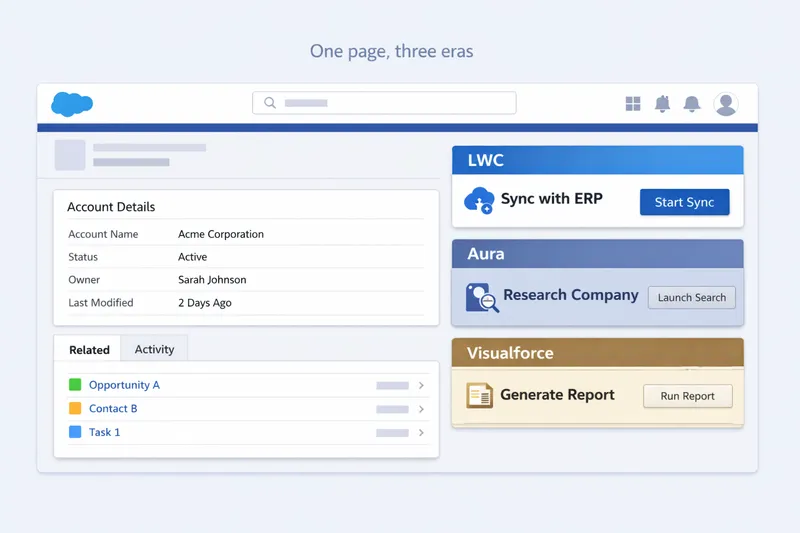
A realistic snapshot of where each framework persists, and why:
| Where you find it | Usually built in | Why it is still there |
|---|---|---|
| PDF generation, rendered documents | Visualforce | renderAs="pdf" has no LWC equivalent |
| Old page overrides, web-to-anything forms | Visualforce | Predates Lightning; still works; rarely touched |
| Service console tooling, utility bars | Aura | Built 2015–2020 when Aura was the standard |
| Wrappers and containers around newer UI | Aura | Filled historic LWC gaps (URL navigation, quick actions) |
| Record page components, screen flow UI | LWC | The default for new work since roughly 2020 |
| Experience Cloud Lightning Web Runtime (LWR) sites | LWC | LWR is Salesforce’s LWC native site runtime; there is no Aura option |
Experience Cloud spans the divide too: newer LWR sites are LWC native, but many orgs still run older Aura based Experience Builder sites, so coexistence reaches customer facing surfaces, not just internal record pages and consoles.
Two principles follow from this, and the rest of the article builds on both:
- New custom UI is LWC by default. Salesforce’s own guidance says so, the platform’s new capabilities ship LWC first, and every guide in this series has pointed the same way.
- Existing Visualforce and Aura is an asset to be managed, not an embarrassment to be hidden. It encodes years of business logic that works. The question for each piece is never “is this old?” but “what does it cost to keep, and what would it cost to replace?”
🔗 The Interoperability Rules
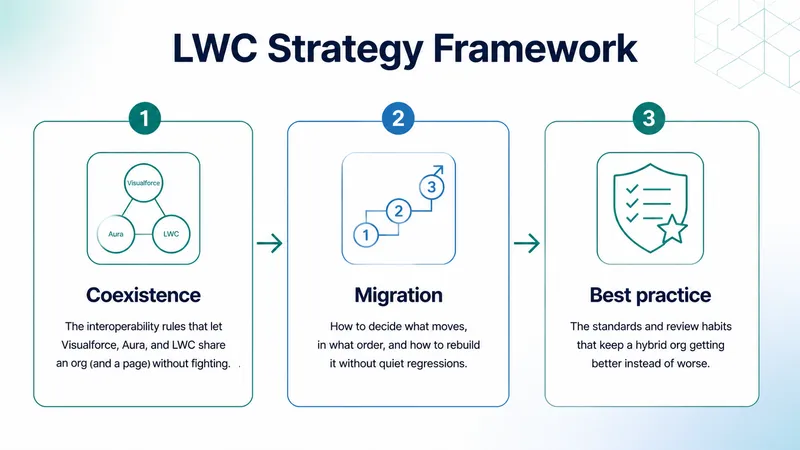
Section titled “🔗 The Interoperability Rules”Salesforce designed LWC to slot into a world full of Aura, and the rules of engagement are strict, simple, and worth memorising. Most hybrid org confusion traces back to one of them being forgotten.
Rule one: composition is one-way. An Aura component can contain an LWC. An LWC can never contain an Aura component. LWC is the lighter, standards-based layer; Aura is the heavier framework that can sit on top of it and host it, so the dependency only ever points one way. This single rule dictates migration order across an entire org: child components must move to LWC before their parents can, which is why every migration strategy you will read, including the one later in this article, works leaf first: migrate the smaller child components before the containers that host them.
Rule two: communication uses the contracts each framework already understands. Nothing exotic is needed at the boundary:
| From → To | Mechanism |
|---|---|
| Aura parent → LWC child | Set the LWC’s @api properties; call its @api methods |
| LWC child → Aura parent | Dispatch a CustomEvent; Aura handles it with on<event> syntax |
| Unrelated components (any mix of LWC, Aura, Visualforce) | Lightning Message Service |
In Aura markup, a contained LWC is treated like any HTML element: you set its public properties as attributes and wire its events with HTML style handlers. Here is the capstone component from the LWC guide hosted inside an Aura wrapper:
<aura:component implements="flexipage:availableForRecordHome,force:hasRecordId" access="global"> <c:accountContactExplorer recordId="{!v.recordId}" oncontactselect="{!c.handleContactSelect}" /></aura:component>({ handleContactSelect: function(cmp, event, helper) { // The LWC dispatched a standard DOM CustomEvent, var selectedName = event.detail.name; }})Note the direction: the Aura component is a thin shell and the LWC does the work. That is the healthy shape; the reverse, rich Aura logic wrapping a token LWC, adds interop complexity without retiring anything.
Rule three: Visualforce joins through Lightning Message Service. A Visualforce page embedded in a Lightning page runs inside an iframe, walled off from the components around it. LMS is the sanctioned bridge: LWC, Aura, and Visualforce can all publish and subscribe to the same message channel, which makes it the standard pattern for keeping a legacy Visualforce page in sync with the modern components sharing its screen during a long migration.
🧭 Leave, Maintain, Extend, or Migrate?
Section titled “🧭 Leave, Maintain, Extend, or Migrate?”Migration conversations usually start in the wrong place: with the technology (“it’s Aura, so it should be LWC”). The age of a component is not, by itself, a reason to spend money rebuilding it. The decision is an investment call, and it gets much easier when you make the options explicit. For every legacy component, there are exactly four:
| Option | What it means | Right when |
|---|---|---|
| Leave | No work. It runs as is. | Stable, low-risk, rarely changed, still does its job |
| Maintain | Fix bugs and security issues only; no new features | Works fine but carries risk you must manage (old API versions, weak tests) |
| Extend | Add the new capability beside it in LWC, not inside it | The old component is fine but the business needs more |
| Migrate | Rebuild in LWC and retire the original | Change is frequent, risk is high, or it blocks something the business needs |
The signals that should push a component toward migration, roughly in order of weight:
- It changes often. Every change to a legacy component pays an old framework tax: slower development, scarcer skills, weaker testing. Frequent change is the strongest economic case for rebuilding.
- It is on a critical path. Revenue touching consoles, case handling tools, anything where an outage is a business incident: these deserve the framework with the best testing and the most platform investment.
- It carries unmanaged risk. Apex on ancient API versions running in system mode, application event spaghetti nobody can trace, custom JavaScript that predates Lightning Web Security. The Aura security section covers exactly what to look for.
- It blocks something. A feature the business wants that screen flow reactivity or a modern base component would make trivial. If the legacy component is in the way, the migration buys more than parity.
And the signals that should push the other way: it works, it almost never changes, nobody complains, and the rebuild would consume budget that higher-churn components need more. A stable Aura utility that has not been touched since 2019 is usually a leave, however untidy it looks in the codebase.
One more filter matters in real orgs: do you actually own the code? If a page or component comes from a managed package, migration may not be your decision to make. In that case, the right questions shift: what can be configured, what can be extended safely around the package, what is the vendor’s roadmap, and is the real migration target your custom wrapper code rather than the packaged asset itself?
🪜 Migrating Aura to LWC
Section titled “🪜 Migrating Aura to LWC”When a component does earn migration, one principle should guide it: this is modernisation, not translation. The Aura guide’s migration section makes the same case, and it bears repeating here. A line-by-line port carries Aura’s design decisions (its event tangle, its controller/helper split, its imperative data plumbing) into the LWC framework which has cleaner answers for each. The goal of the rebuild is to keep the user facing behaviour identical while swapping those patterns for LWC’s: reactive state, composition through properties and events, and the platform data layer.
That said, you do need the vocabulary mapping, because reading the old component is step one of rebuilding it:
| Aura concept | LWC equivalent |
|---|---|
<aura:attribute> | Class field (private) or @api property (public) |
{!v.message} | {message} |
cmp.get("v.x") / cmp.set("v.x", val) | Read this.x / assign this.x = val |
| Controller + helper files | One JavaScript class, with shared logic moved into a reusable library module |
<aura:handler name="init"> | connectedCallback() |
<aura:if isTrue="..."> | lwc:if / lwc:elseif / lwc:else |
<aura:iteration> | for:each or iterator:it |
| Component event | CustomEvent dispatched to the parent |
| Application event | Lightning Message Service, or state lifted to a shared parent |
force:recordData | getRecord wire adapter or base record components |
$A.enqueueAction + setCallback | @wire for reads; imperative Apex with async/await for actions |
Marker interfaces (flexipage:*, force:hasRecordId) | targets in js-meta.xml + @api recordId |
.design file | targetConfigs design-time properties |
.THIS CSS scoping | Shadow DOM scoping (automatic) |
Three patterns in that table deserve more than a row, because they are where ports go wrong:
Helpers become shared JavaScript modules. Aura’s helper file was a grab-bag of shared functions. In LWC, logic more than one component needs belongs in a reusable module that exports plain functions for others to import.
export function daysBetween(startDate, endDate) { const msPerDay = 1000 * 60 * 60 * 24; return Math.round((endDate - startDate) / msPerDay);}// any component that needs itimport { daysBetween } from 'c/dateUtils';In other words, this is a code library, not a UI component you place on a page. In Salesforce, the bundle still includes the usual same-name .js-meta.xml file, but its job is to expose the module for imports rather than for App Builder placement. This is strictly better than the helper it replaces: importable by every component (Aura helpers were locked to their bundle), unit-testable in isolation, and bundled only into the components that use it.
Application events do not port; they get redesigned. If the old component participates in application event broadcasting, resist mapping each event to an LMS channel one-for-one. Map the communication design instead: most application events turn out to be parent-child communication wearing a trench coat, and become ordinary properties and events once the components are composed properly. Reserve LMS for the genuinely unrelated. (The Aura guide’s war story about untraceable application-event tangles is the cautionary tale here; do not rebuild the tangle on a newer bus.)
Imperative data plumbing often becomes no data code at all. Aura components routinely call Apex for things the modern platform hands you free: getRecord, getRelatedListRecords, the GraphQL wire adapter, base record forms. Re-run the data access decision tree from scratch for the migrated component, because the right answer has usually moved down the ladder since the original was written, and every Apex method you delete is a test class and a security review you stop owning.
📜 Migrating Visualforce
Section titled “📜 Migrating Visualforce”Visualforce migration is a different exercise from Aura migration, and treating them the same is a planning mistake. An Aura component and an LWC are at least the same kind of thing: client-side components with markup, state, and events. A Visualforce page is different entirely, a server-rendered page with its own controller lifecycle and view state, often doing several jobs at once. You are not converting a component; you are decomposing a page.
The practical questions, in order:
- Is it still used? Visualforce is the one framework where the platform hands you real usage data. The
VisualforceAccessMetricsobject records daily page views per page, queryable directly:
SELECT ApexPageId, MetricsDate, DailyPageViewCountFROM VisualforceAccessMetricsWHERE MetricsDate = LAST_N_DAYS:90A page with no views across ninety days may be a good deletion candidate rather than a migration candidate. That is usually the cheapest and most satisfying result, but do not let a neat zero do all the thinking for you. The object only keeps ninety days of data, so it cannot tell you about a page used for a quarterly, year end, or annual process that happens to fall outside the window.
- What job is it actually doing? Each job has a different modern destination, and some have none:
| Visualforce job | Modern destination |
|---|---|
| Record page UI, embedded page sections | LWC on the record page |
| Record page custom action | LWC quick action (lightning__RecordAction) |
| Full-page app or wizard | Screen flow, or LWC via lightning__Tab / lightning__UrlAddressable |
| Page overrides (View/Edit/New) | Lightning record pages and dynamic forms, with LWC for the custom parts |
| Public facing pages (Sites) | Experience Cloud LWR site |
PDF rendering (renderAs="pdf") | Stays Visualforce, or a licensed document generation product; no native LWC equivalent |
| Visualforce email templates with complex merge logic | Often stay Visualforce; assess case by case |
That record page action row is deliberately narrow. LWC quick actions are for record pages in Lightning Experience; they do not replace every legacy button target. Global actions, list view actions, related list actions, and standard action overrides still need a different pattern.
That PDF row is worth internalising, because it surprises people: rendered document generation is a genuine, permanent Visualforce use case, not a migration backlog item. A “fully migrated” org with document generation still ships Visualforce, on purpose, indefinitely, unless it licenses a document generation product such as OmniStudio Document Generation, which can produce PDFs from templates without Visualforce but is a procurement decision, not a UI migration. Knowing which Visualforce is load-bearing by design versus legacy by inertia is half the value of the assessment.
- Can the page’s jobs be split? The highest-value Visualforce migrations usually are not page-for-page rebuilds. A classic overgrown VF page might decompose into a record page layout (configuration, no code), one LWC for the genuinely custom part, and a retained VF PDF renderer, with two-thirds of the original code replaced by platform features. The Visualforce guide covers reading these pages confidently before you take them apart.
🏗️ Running a Migration Programme
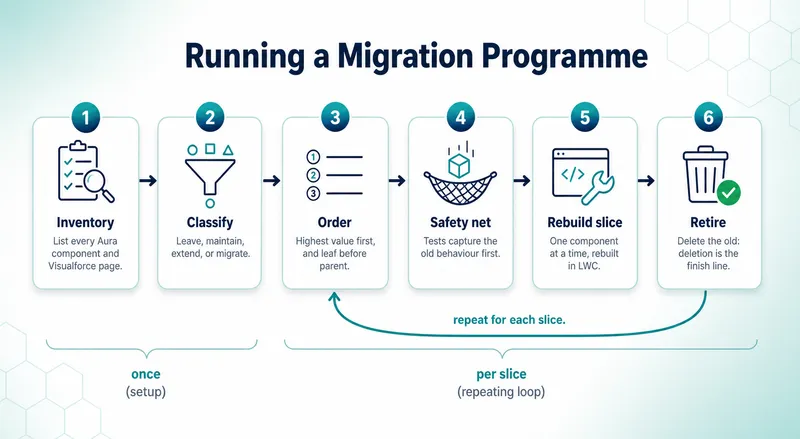
Section titled “🏗️ Running a Migration Programme”Component level technique is necessary but not sufficient. An org with hundreds of legacy components needs migration run as a programme, not a stack of one-off rebuilds. The shape that works:
- Inventory. Pull every Aura component and Visualforce page from source control (or a metadata retrieve if source control does not yet reflect the org; fix that first). Setup’s Lightning Components and Visualforce Pages lists confirm what is deployed;
VisualforceAccessMetricsadds usage for Visualforce; App Builder page audits show what is actually placed where users see it. - Classify. Run each item through the leave / maintain / extend / migrate framework above. Expect the honest answer for a large share to be leave, which is the framework working, not failing.
- Order the migrate list. Two sorts dominate: business criticality (highest value first) and tree depth (child components before parent containers, because composition is one-way). Where they conflict, the children win: a critical parent cannot move until its children have.
- Build the safety net before the new component. Apex tests around the server logic, and at minimum a written manual test script for the user-facing behaviour, captured against the old component so like-for-like behaviour has a definition.
- Rebuild one slice. One component at a time, modernised per the sections above, with its Jest tests, shipped behind the smallest possible exposure (one record page, one profile) before going wide.
- Run parallel where the stakes justify it. For critical paths, the old and new components can coexist on the same page (different visibility rules) or different pages while confidence builds.
- Retire loudly. A migration is finished when the old component is deleted, not hidden, not unused-but-deployed. Undeleted legacy keeps costing security review, API version risk, and confusion about which version is real. Celebrate deletions; they are the metric that matters.
Between steps 6 and 7, make the cutover decision explicit. Name the signal that means “the new component is now the real one” and the path back if production behaviour diverges: for example, a page assignment you can revert, a visibility rule you can flip, or a feature flag you can disable. Parallel running lowers risk only if the team knows how the final switch happens and how to undo it cleanly.
The pitfalls repeat across orgs with remarkable consistency, and so do the reasons behind them. Each one is the locally cheaper choice that pushes cost downstream rather than removing it:
| Pitfall | Why it happens | The correction |
|---|---|---|
| Big-bang rewrite | A single “let’s migrate it all in Q3” is easier to approve than a call to plan slices upfront, so scope grows and nothing ships for months | Slice it; ship value early and often, and let early slices de-risk later ones |
| Translation porting | Porting file by file is the easy path, so Aura’s architecture rides along and you pay LWC’s costs without its benefits | Redesign data access and communication per component; modernise, do not translate |
| Parity without a definition | No one wrote down what the old component did, so “looks the same to me” is the only test and regressions surface at cutover | Write a manual test script against the old component first, so “the same” has a definition |
| UI migrated, debt kept | The Apex already works and the brief said UI, so insecure system mode logic ships again behind a modern face | Upgrade the Apex (sharing, user mode) in the same slice that rebuilds its UI |
| Never retiring | Deleting feels risky and goes unrewarded, so legacy lingers “just in case”, costing security review and API version risk | Deletion is the definition of done, not “deployed but unused” |
From experience: this last pitfall is the one I come across most often, and it is usually something the current team inherited. You open the org and find old components that appear to be unused but are still deployed because deleting them felt risky. That is understandable, and I get it. Also deletion is rarely the work anyone gets thanked for. The real problem is that nobody recorded what they checked, so there is no decision you can review and you have to investigate the component all over again. That same work gets repeated each time an org changes hands. Eventually, someone has to do the slightly uncomfortable bit: prove the component is no longer needed, delete it, and document the decision so the next person understands why it was safe.
💎 Best Practices for a Hybrid Org
Section titled “💎 Best Practices for a Hybrid Org”Everything above is about changing the estate. This section is about not needing to change it as often: the standards and habits that keep quality high while three frameworks share an org. Component level craft (testing, accessibility, performance, security) is covered in depth in the LWC guide; what belongs here is the layer that makes those practices stick across a team.
📏 Write the Standard Down
Section titled “📏 Write the Standard Down”Many of the healthy hybrid orgs I have seen run on some version of a one page standard; the ones that struggle lean on tribal knowledge instead. The rules below are mostly common sense, so the value is not in inventing them but in writing them down: a standard on a page is decided once and pointed to, while one that lives in senior developers’ heads gets argued again in every review and walks out the door when they leave. Keep it short enough that people actually read it:
- New custom UI is LWC. Exceptions exist (a PDF renderer, a fix inside an existing Aura tree), but each one is named and justified, not assumed.
- Configuration before code. If dynamic forms, a screen flow, or a base component does the job, a custom component is the wrong answer; the best component is the one nobody has to maintain. This is the production readiness checklist’s first question, promoted to policy.
- Maintain legacy, do not extend it. Bug fixes in Aura and Visualforce are fine; new features built on them need a reason in writing. “It was quicker to add it to the old page” is how ten year migrations happen.
- Touched code meets current standards. When a slice of legacy is rebuilt, its Apex comes up to current security practice (sharing, user mode) at the same time. No new UI on old debt.
Keep it current, too: a platform that ships three times a year will date any standard nobody revisits, so review the page when a release changes what is possible and drop rules that no longer hold.
🔍 Review Like It Is Going to Production, Because It Is
Section titled “🔍 Review Like It Is Going to Production, Because It Is”A consistent review checklist does more for org health than any migration. The questions worth asking of every UI change, the ones that catch real problems rather than style nits:
- Should this be code at all? The most valuable review comment is the one that replaces a component with configuration.
- Is the data access on the lowest rung that works? Custom Apex where a wire adapter would do is future maintenance someone signed the team up for.
- What happens when it fails? Loading, empty, and error states; an Apex exception a user can read; behaviour for a profile that cannot see the object.
- Who can see what? Sharing and field security enforced server-side, tested as a business user, not as the admin who built it.
- Will the next developer understand it? Names, a sentence of JSDoc on the public surface, and a
descriptionin the meta file for the admins who will place it.
🧰 Shared Assets Beat Shared Habits
Section titled “🧰 Shared Assets Beat Shared Habits”A written standard and a review checklist still rely on people remembering to apply them. Shared assets go further: they capture the right choice once, in something everyone reuses, so quality and consistency come from the asset existing rather than from every developer getting it right each time. A few of them pay for themselves quickly in any org with more than a handful of components:
- Service components for shared logic (the
c/dateUtilspattern above): one tested implementation instead of five copies drifting apart. - Custom Labels for user-facing text, so wording and translation are managed centrally rather than buried in templates.
- A message channel registry: a short document listing every LMS channel, who publishes, and who subscribes. LMS misuse is invisible until it is a tangle; the registry keeps it visible. The same goes for any platform events the UI consumes.
- A component catalogue: even a simple list of existing shared components with screenshots. The reusable component nobody can find gets rebuilt, badly, with a different name.
📊 Watch the Trend, Not the Snapshot
Section titled “📊 Watch the Trend, Not the Snapshot”A snapshot count tells you little on its own. “We still have eighty Aura components” reads as a crisis or a win depending only on whether it was ninety last quarter or seventy. Health is in the trend, not the total, so watch a few numbers move over time rather than agonising over today’s count. Three of them, checked quarterly, tell most of the story:
| Number to watch | Healthy direction |
|---|---|
| Aura components and Visualforce pages in the org | Falling as slices migrate, or at least holding |
| Legacy items getting new features, not just bug fixes | Approaching zero |
| The lowest Apex API version behind a user-facing component | Rising as touched code is upgraded |
None of these need tooling beyond source control and a spreadsheet; the discipline of looking is the tool.
🔭 The Direction of Travel
Section titled “🔭 The Direction of Travel”Strategy ages quickly in a platform that ships three releases a year, so rather than predictions, here is the established trajectory, the things visibly true in the release notes year after year:
- LWC-first investment is consistent. New UI capability (screen flow reactivity, modern quick actions, URL-addressable components, the GraphQL wire adapter,
lightning-record-picker) arrives in LWC, and Aura’s release note presence shrinks toward maintenance. - The web standards bet keeps paying. LWC tracks the browser platform: native shadow DOM, standard JavaScript, ordinary tooling like Jest. The practical career advice from the LWC guide holds: the more standard web platform you know, the better your Salesforce UI work gets, and the more portable your skills stay.
- The boundary of “where LWC runs” keeps widening. Experience Cloud’s LWR runtime is LWC native, and Lightning Out 2.0, which runs LWCs inside external web apps, went generally available in Winter ‘26. The component model you learned in this series is increasingly the component model for everything Salesforce renders.
- Visualforce and Aura still get support, not investment. Salesforce has been consistent: existing implementations keep working, and the platform’s energy goes elsewhere. That is precisely what makes the leave/maintain/extend/migrate framework durable: the calculus only shifts further toward LWC over time.
🏁 Series Conclusion and Where to Go Next
Section titled “🏁 Series Conclusion and Where to Go Next”This series set out to do one thing: give you a working understanding of how Salesforce UI is built in code, the kind you can actually make decisions with. The evolution story explained why three frameworks exist; Visualforce and Aura taught you to read and maintain the estate you will inherit; the LWC guide taught you to build the part you will be judged on; and this article connected them into the decisions real orgs face.
If you take five things from the whole series:
- LWC for new work, always, with named exceptions. The platform, the docs, and the economics all point the same way.
- Let the platform carry the weight. Configuration, base components, and Lightning Data Service beat custom Apex and custom UI you then have to own.
- You can read all three frameworks now. Visualforce, Aura, and LWC each think differently, and knowing which one you are looking at, and roughly how it works, is a baseline skill in any established org, and one that is getting rarer, and more valuable, not less.
- Old is not a defect. Leave / maintain / extend / migrate is an investment decision per component, and “leave” is often correct.
- Deletion is the finish line. A migration that never retires anything is just growth.
🛤️ Keep Building
Section titled “🛤️ Keep Building”To turn this understanding into demonstrable skill, keep building in LWC, the framework new work lives in:
And within this site, the journey continues where UI meets the rest of the platform: Testing & Deployment covers moving your components safely between orgs, and if you are weighing where a UI-capable developer fits in the ecosystem, the Salesforce Roles guides map the developer and architect paths this series has been preparing you for. This article looked at where the platform is heading; the bonus read AI & the Salesforce Developer does the same for the developer role, as AI reshapes how the work gets done.
That is the whole stack, from the first S-control to the component model Salesforce is still extending today. You will not have all of it memorised, and you do not need to: what you have is the map and the judgement to walk into any org’s UI, however many eras it spans, and know what you are looking at. The frameworks will keep changing; the way of thinking about them will not. Now go and build something worth keeping.