Dynamic SOQL: Unlocking Flexibility in Salesforce Queries

Your list view needs optional filters. A report builder lets admins pick columns. A search box combines criteria you cannot hard-code at compile time. Inline SOQL ([SELECT … FROM Account]) is ideal when the query shape is fixed; Database.query() is for when the string is assembled at runtime. If you have not integrated SOQL in Apex yet, start with Integrating SOQL with Apex first. This advanced series treats dynamic SOQL as the next step after static queries, bind variables, and governor limit basics.
🧩 What is Dynamic SOQL?
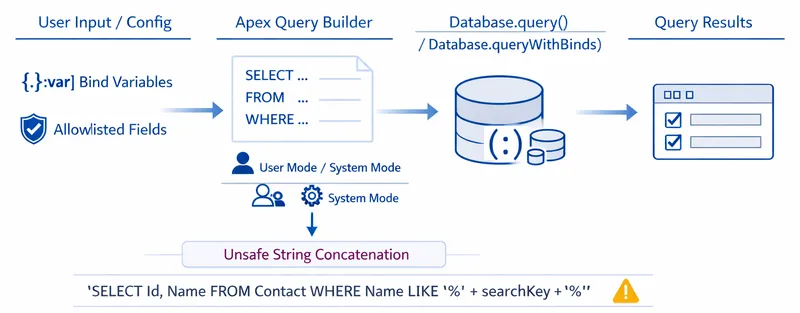
Section titled “🧩 What is Dynamic SOQL?”Dynamic SOQL means building the query as a String in Apex and executing it with Database.query() or Database.queryWithBinds(). The platform still enforces SOQL governor limits and selectivity rules; the query is dynamic only in how you construct it, not in what limits apply at runtime.
Use dynamic SOQL when:
- Filter values or optional
WHEREclauses depend on user input or configuration. - The selected field list varies (for example, a column picker), using an allowlist you control in code.
- The target sObject type is chosen at runtime (results are typically
List<SObject>).
Prefer inline SOQL when the object, fields, and filters are known when you deploy: compile-time checks and simpler debugging usually win.
I have built things dynamically that a static query would have handled perfectly well, more than once. It feels like the flexible, future-proof choice, and the cost does not show up straight away. What you are giving up is the compiler’s check of the query itself. If a field is removed or its API name changes, static SOQL is evaluated when the Apex compiles. The same field reference inside a dynamic query string is not validated until that query runs. Good tests can still catch the problem before production, but only if they execute that query shape. So dynamic SOQL is now something I make myself justify rather than something I reach for. If the object, fields, and filters are all known at deploy time, static wins.
🧱 Building Your First Dynamic Query
Section titled “🧱 Building Your First Dynamic Query”Start with bind variables for any user-supplied values. Bind :variableName inside the query string, the main defence against SOQL injection. Prefer binding over String.escapeSingleQuotes() for filter values; escaping is only a fallback when binding is not possible.
String industry = 'Technology';String query = 'SELECT Id, Name FROM Account WHERE Industry = :industry';List<Account> accounts = Database.query(query);Database.query() resolves :industry from the Apex variable in scope at the call site. That is the right choice for straightforward dynamic queries built in one method. Salesforce does not support bind expressions such as :myVariable.SomeField__c in the dynamic query string; use simple binds (:industry, :minRevenue) as documented in Dynamic SOQL.
🔀 Multi-condition filters
Section titled “🔀 Multi-condition filters”Add as many bind variables as your WHERE clause needs, and each :name must have a matching variable in scope when you use Database.query():
String industry = 'Technology';Decimal minRevenue = 1000000;String query = 'SELECT Id, Name FROM Account ' + 'WHERE Industry = :industry AND AnnualRevenue > :minRevenue';List<Account> accounts = Database.query(query);For many optional filters, build the WHERE clause in Apex from a fixed set of allowed conditions rather than pasting arbitrary strings from the client. Pair complex dynamic filters with performance optimisation guidance: non-selective dynamic queries are a common cause of timeouts on large objects.
🔑 Database.queryWithBinds()
Section titled “🔑 Database.queryWithBinds()”Database.queryWithBinds() is available in API version 57.0 and later. Use it when bind values live in a Map<String, Object> or when you need them resolved without placing Apex variables in scope. Both Database.query() and Database.queryWithBinds() accept an AccessLevel parameter, so pass it explicitly whenever the access mode is part of the design. On older APIs, keep binds in scope and use Database.query(). The query string stays the same; only how you supply the binds changes:
Map<String, Object> binds = new Map<String, Object>{ 'industry' => 'Technology', 'minRevenue' => 1000000};String query = 'SELECT Id, Name FROM Account ' + 'WHERE Industry = :industry AND AnnualRevenue > :minRevenue';List<Account> accounts = (List<Account>) Database.queryWithBinds( query, binds, AccessLevel.USER_MODE);Add one map entry per bind in the query (industry, minRevenue, status, and so on).
Three details to keep straight:
- Bind map keys: In the query string you write
:industryor:status; in the map you useindustryorstatus(no leading colon). Salesforce pairs each key to the matching bind by name. - Map-key casing: A normal Apex
Map<String, Object>treats String keys as case-sensitive, soindustryandIndustrycan exist as separate entries. Salesforce’squeryWithBinds()documentation does not define how bind-name resolution handles keys that differ only by case, so do not rely on those names remaining distinct when the query runs. Use consistent casing and make every bind name unique after converting it to lowercase. That gives the code one unambiguous convention and avoids depending on an undocumented edge case. AccessLevel.USER_MODE: Salesforce documents this as an access mode on the database operation: the dynamic query enforces the current user’s sharing rules, object permissions, and field-level security. That is related to, but not identical to, theWITH USER_MODEclause on inline SOQL, which enforces user context inside the query text. For dynamic SOQL, passaccessLevelto eitherDatabase.query()orDatabase.queryWithBinds(); inline SOQL uses the clause. Both aim at user-context enforcement, see SOQL security for how they interact with sharing on the Apex class.
📋 Dynamic Field Selection
Section titled “📋 Dynamic Field Selection”You can join a fixed allowlist of field API names into the SELECT list:
List<String> fields = new List<String>{ 'Id', 'Name', 'Industry' };String fieldList = String.join(fields, ', ');String query = 'SELECT ' + fieldList + ' FROM Account';List<Account> accounts = Database.query(query);Only include names your code validates against a known list. Never pass user typed field names directly into SELECT.
To respect field-level security before querying, filter the allowlist with Schema describe:
List<String> fields = new List<String>{ 'Id', 'Name', 'Industry' };List<String> accessibleFields = new List<String>();for (String field : fields) { if (Schema.sObjectType.Account.fields.getMap().get(field).getDescribe().isAccessible()) { accessibleFields.add(field); }}String fieldList = String.join(accessibleFields, ', ');List<Account> accounts = Database.query('SELECT ' + fieldList + ' FROM Account');Alternatively, query then strip fields with Security.stripInaccessible(), often simpler to maintain. Both approaches are covered in more detail in SOQL security.
✅ Best Practices
Section titled “✅ Best Practices”- Bind values, allowlist identifiers: Bind variables for filter values; allowlists in code for field and object names.
- Keep queries readable: Split long string construction across lines or use a small builder; avoid opaque one-liners.
- Respect governor limits: Each
Database.query()orDatabase.queryWithBinds()call counts towards per-transaction SOQL limits; bulkify and avoid queries in loops. - Prefer static SOQL when possible: Use dynamic SOQL only when the shape genuinely varies at runtime.
- Test with realistic data volume: Validate selectivity and row counts in a full sandbox, not only with small test datasets.
🎯 Common Use Cases
Section titled “🎯 Common Use Cases”- User-driven search: Optional keywords, picklists, and date ranges assembled into a bounded
WHEREclause with binds. - Conditional business logic: Different query shapes per record type or role, still built from predefined templates in Apex.
- Configurable column sets: Admin-selected columns mapped to an allowlisted field list for exports or custom grids.
✅ Conclusion
Section titled “✅ Conclusion”Dynamic SOQL unlocks runtime flexibility for search, reporting, and configurable UIs, but it shifts responsibility to your Apex: bind user values, allowlist fields and objects, enforce FLS, and stay within governor limits. Use it after you are comfortable with SOQL in Apex, then deepen security and performance before shipping user-facing features. The next stop on the advanced learning path is SOQL and Lightning, which applies these patterns inside Aura and Lightning Web Components. Return to the advanced SOQL guide index any time for the full learning path.