Salesforce Developer Journey: A Beginner's Roadmap

🎯 Why This Journey Matters
Section titled “🎯 Why This Journey Matters”Salesforce development is not just about learning a tool. It is about learning how to solve real business problems on one of the world’s most widely used customer relationship management (CRM) platforms. If you want to build useful software, understand how organisations work, and grow into a role with strong career demand, this journey gives you the foundation you need.
I know this firsthand. My own Salesforce journey started as a Technical Test Analyst. I had never even heard of Salesforce until it became part of the architecture I was testing. That exposure sparked my interest, and I eventually transitioned into a Salesforce Developer role.
Early on, I was confident in my abilities because I could write Visualforce and Apex and I was building solutions that worked, passed testing, and looked correct on the surface. But that confidence didn’t last long.
I remember building an Apex solution that worked perfectly in a controlled environment, but started failing when exposed to real data volumes because it hit governor limits. In another case, I built functionality that behaved correctly for me as an admin but didn’t work properly for real users. I hadn’t fully accounted for field-level security and the sharing model, which meant users couldn’t see the data as intended.
Fixing those issues forced me to step back and realise I was missing critical understanding of how the platform actually works.
Learning about limits, data models, roles, permissions, and sharing fundamentally changed how I approached development. My solutions became more reliable, more scalable, and far easier to maintain. That experience is exactly why I strongly advocate for developers to learn the fundamentals first, and why this guide is structured the way it is.
🗺️ What to Expect in This Series
Section titled “🗺️ What to Expect in This Series”This series is organised into four connected tracks, and each one builds on the last. I have structured them in this order for a reason: developers make better decisions when they understand the platform first, then how real orgs are administered, then how to solve problems with code, and finally how to build the user interfaces that sit on top of it all.
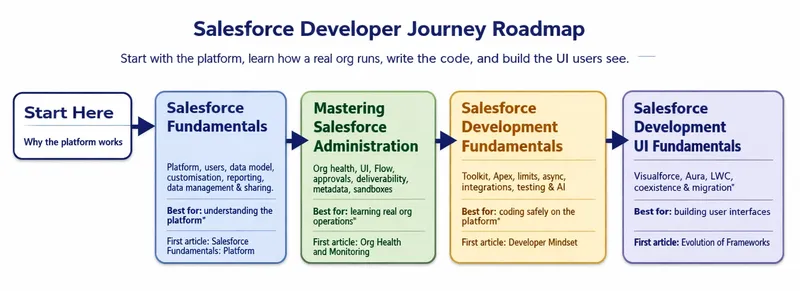
- Salesforce Fundamentals: Get oriented in Salesforce as a platform: editions and licensing, users and access, the data model (objects, fields, relationships, IDs, namespaces), customisation and automation, reports and dashboards, data management, and record-level sharing.
- Mastering Salesforce Administration: Go deeper into running real orgs: org health and monitoring, advanced UI customisation with Lightning apps and pages, declarative automation patterns with Flow, approval processes, email templates and deliverability, custom metadata types and settings, and sandbox strategy and change management.
- Salesforce Development Fundamentals: Build your developer toolkit, then move into Apex, querying data with SOQL and SOSL, triggers, limits, integrations, testing, and deployment.
- Salesforce Development UI Fundamentals: Build what users see and click: the evolution of Salesforce UI, then Visualforce, Aura, and Lightning Web Components in depth, plus how the three coexist and how to migrate between them in real orgs.
Outside the four tracks, a standalone bonus, AI & the Salesforce Developer, looks at how AI is reshaping the developer role. You can read it at any point in the journey, as it does not depend on a particular track.
You do not need to learn everything at once. Treat this as a guided path from platform basics to real-world development practice, with practical examples, Trailhead links, and companion articles at each step.
👋 Getting Oriented in Salesforce
Section titled “👋 Getting Oriented in Salesforce”Salesforce matters because many organisations use it as the system that holds customer data, business processes, and internal workflows in one place. For a developer, that means you are not just writing features in isolation. You are working inside a live platform that already supports sales, service, marketing, automation, security, and reporting.
☁️ What is Salesforce?
Section titled “☁️ What is Salesforce?”Founded in 1999 by Marc Benioff, Salesforce began as a simple sales automation software and has since grown into a comprehensive platform that supports a wide range of business functions. Its pioneering approach to cloud computing has set the standard for CRM solutions worldwide.
Salesforce is widely used because it brings customer data, business processes, and user access together in one platform. Instead of sales, service, and marketing teams working from separate tools, they can work from the same records and workflows. For developers, that matters because the code you write rarely stands on its own. It has to fit alongside automation, security settings, integrations, and reporting that are already part of the system.
Salesforce also continues to expand beyond core CRM. AI features, event-driven integrations, real-time data streaming, and advanced analytics are changing what organisations expect from the platform. Understanding that broader direction helps you see why Salesforce development is not just about writing Apex or building pages. It is about solving business problems inside an evolving ecosystem.
📈 Why Salesforce? Impact, Demand, and Opportunities
Section titled “📈 Why Salesforce? Impact, Demand, and Opportunities”Salesforce has become common across organisations because it helps teams centralise customer data, automate routine work, and build more consistent processes. When implemented well, that can improve productivity, service quality, and decision-making. For developers, it creates a practical environment where technical work is closely tied to business outcomes.
This widespread adoption has created strong demand for Salesforce professionals. The ecosystem includes administrators, developers, architects, consultants, analysts, and specialists across many industries. Within that mix, Salesforce Developers are the people who extend the platform with custom business logic, interfaces, and integrations when configuration alone is not enough.
👥 The Salesforce Ecosystem: Admin vs. Developer
Section titled “👥 The Salesforce Ecosystem: Admin vs. Developer”Before we explore the developer journey in detail, it helps to understand where the Developer role sits within the wider Salesforce ecosystem. Salesforce teams are usually made up of several key roles, each contributing in different ways to how an organisation designs, builds, and maintains its platform. If you’d like a broader overview of how these roles fit together, you can read the companion section starting with Salesforce Roles: Admin, Developer, or Architect?, which breaks down the bigger picture.
For now, let’s focus on the two roles you’ll encounter most often when starting out, the Salesforce Administrator and the Salesforce Developer. They work closely together, and while their responsibilities sometimes overlap, they approach the platform from different angles.
- Salesforce Administrator: Administrators look after the day‑to‑day running of the Salesforce platform. They keep the system healthy, organised, and aligned with how the business works. This includes managing users and data, maintaining existing configuration, monitoring system performance, and making sure processes and permissions stay clean and consistent as the organisation evolves. They may also build and refine declarative solutions by customising objects, creating reports and dashboards, and automating workflows with tools like Flow. If you’d like a deeper look at what this role involves, you can explore the dedicated guide Understanding the Role of a Salesforce Administrator.
- Salesforce Developer: A developer focuses on programmatic customisation and extending the Salesforce platform beyond its out-of-the-box capabilities. This involves writing code using Apex, building custom user interfaces with Lightning Web Components, integrating Salesforce with external systems, and developing complex business logic with a mix of low-code and pro-code tools. Developers are crucial for solving complex business problems that cannot be addressed through declarative means alone. There is also a dedicated guide, Exploring the Role of a Salesforce Developer, but much of that foundation is covered here.
You may also come across the title Technical Consultant. In practice, this usually describes someone who helps translate business requirements into workable Salesforce solutions, combining solution design, stakeholder communication, and hands-on platform delivery. Depending on the team, a technical consultant may do work that overlaps with admins, developers, or architects.
💻 Developer Role Explanation
Section titled “💻 Developer Role Explanation”Focusing now on the developer role, a Salesforce Developer is a software engineer who customises and extends the Salesforce platform to solve business problems, build applications, and integrate systems using a mix of low-code and pro-code tools. While developers may sometimes work in the background, focusing on specific development tasks, they often play a more visible role that requires strong soft skills. This includes effective communication, collaboration with team members, and an understanding of how Salesforce can serve unique organisational needs.
Core Responsibilities
Section titled “Core Responsibilities”- Salesforce Developers design, code, and implement tailor-made Salesforce solutions, often using Apex (Salesforce’s proprietary language), Visualforce, Aura Components (the legacy Lightning component framework), and Lightning Web Components (the modern standard for Salesforce UI development).
- They may integrate Salesforce with other platforms, automate business processes, and build custom features to meet specific requirements.
- Developers also maintain and enhance existing Salesforce implementations through updates and optimisations.
- Their work can span both back-end (logic, data, integration) and front-end (interfaces, user experience) development.
🛠️ Salesforce Developer Key Skills
Section titled “🛠️ Salesforce Developer Key Skills”Key technical skills to become a Salesforce Developer include mastery of Apex (Salesforce’s proprietary programming language), proficiency in Lightning Web Components (LWC) for UI development, and strong abilities in SOQL/SOSL for querying and managing data. Salesforce Developers should also be experienced with integration approaches, data modelling, security practices, and automation tools like Flow Builder.
Essential Technical Skills
Section titled “Essential Technical Skills”- Apex Programming: Writing server-side, object-oriented code for custom business logic, automation, and integrations on the Salesforce platform. It’s a core skill for any developer because it lets you extend Salesforce beyond what configuration alone can achieve.
- SOQL/SOSL: SOQL (Salesforce Object Query Language) and SOSL (Salesforce Object Search Language) are how developers retrieve data efficiently within the platform. They’re essential for working within governor limits and keeping applications fast and reliable. The developer journey covers them as an applied step in Querying Salesforce Data with SOQL & SOSL; for reference depth, the dedicated series are Discovering SOQL: The Essential Guide for Beginners and Exploring Salesforce Object Search Language (SOSL): Introduction.
- Lightning Web Components (LWC): LWCs are the modern way to build responsive, modular user interfaces using standard web technologies like JavaScript, HTML, and CSS. They allow developers to create fast, reusable components that feel native to the Salesforce experience.
- Aura Components: Aura is the older Lightning component framework. You will still encounter it in legacy orgs, but it has largely been superseded by LWC for new UI development.
- Visualforce: Visualforce is Salesforce’s older page-based UI framework. While it’s used less often today, it still plays an important role in maintaining legacy customisations or building pages that LWC, Aura, or standard layouts can’t easily support.
Supporting Skills
Section titled “Supporting Skills”Alongside core coding abilities, a Salesforce Developer benefits from understanding how the platform is structured, how data moves through it, and how to build solutions that are secure, scalable, and easy to maintain. This goes hand‑in‑hand with solid software development practices and the soft skills that make collaboration work in real teams. Problem‑solving, clear communication, and effective teamwork all play a big part in helping developers navigate challenges and contribute confidently to the success of a Salesforce implementation.
- Data Modeling & Management: Designing object models, relationships, and ensuring data quality, maybe including proper use of ETL tools for data migration.
- Security Practices: Applying Salesforce’s security model thoughtfully through profiles, permission sets, field‑level security, and sharing rules. A strong grasp of these tools helps ensure users see the right data while keeping sensitive information protected and compliant.
- Integration with APIs: Connecting Salesforce to external systems (other CRMs, ERPs, payment processors) using REST/SOAP APIs and common integration patterns or middleware for two-way data exchange.
- Integration Patterns: Understanding integration patterns is crucial for a developer working with Salesforce. This includes knowledge of approaches such as point-to-point, hub-and-spoke, enterprise service bus (ESB), event-driven architecture, and pub/sub patterns using tools like Platform Events and Change Data Capture.
- Declarative Automation (Flows): Using Flow Builder to automate business processes, guide users through tasks, and reduce manual work. Even as a developer, knowing when a Flow is the right tool keeps solutions simpler and easier to maintain.
- Testing & Debugging: Writing comprehensive unit tests, debugging Apex or flows, and ensuring robust code deployments. The testing and deployment guide expands on this in more detail.
Additional Technical Tools
Section titled “Additional Technical Tools”Salesforce Developers rely on a set of supporting tools that make building, managing, and delivering solutions more efficient and reliable. These tools sit alongside core coding skills and help developers work effectively in collaborative, fast‑moving environments.
- Version Control & Collaboration Tools — Systems like Git help developers track changes, manage branches, review code, and collaborate smoothly with other team members. Version control is essential for maintaining clean, reliable codebases and supporting team‑based development.
- Integrated Development Environments (IDEs) — Tools such as Visual Studio Code (with Salesforce extensions) provide a streamlined workspace for writing, testing, and deploying code. IDEs offer features like syntax highlighting, code completion, and integrated debugging that make development faster and more consistent.
- Deployment & Agile Practices: Familiarity with sandbox strategy and change management, Salesforce DX, metadata management, and deployment tools (including change sets and CI/CD pipelines) helps developers deliver updates in a structured, repeatable way. Understanding agile practices supports iterative development and continuous improvement across projects.
In summary, a Salesforce Developer’s toolkit is broad, with deep technical expertise in platform-specific languages and tools, strong integration and security awareness, and practical skills for automating and optimising user and data experiences on Salesforce.
🧩 Salesforce Clouds and Areas
Section titled “🧩 Salesforce Clouds and Areas”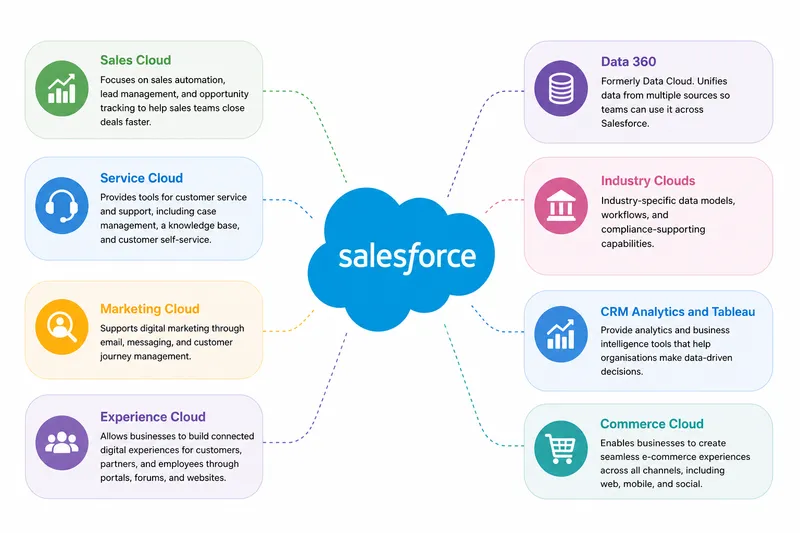
Salesforce includes a wide range of specialised clouds and products, each designed to support different parts of a business. Understanding these areas helps new developers see how broad the platform really is and how varied their work can become.
- Sales Cloud: Focuses on sales automation, lead management, and opportunity tracking to help sales teams close deals faster.
- Service Cloud: Provides tools for customer service and support, including case management, a knowledge base, and customer self-service.
- Marketing Cloud: Supports digital marketing through email, messaging, and customer journey management.
- Experience Cloud: Allows businesses to build connected digital experiences for customers, partners, and employees through portals, forums, and websites.
- Commerce Cloud: Enables businesses to create seamless e-commerce experiences across all channels, including web, mobile, and social.
- Data 360 (formerly Data Cloud): Brings data from multiple sources together so teams can use unified profiles, insights, and segments across Salesforce.
- Industry Clouds: Tailored solutions for specific industries, such as Financial Services Cloud, Health Cloud, and Manufacturing Cloud, with industry-specific data models, workflows, and compliance-supporting capabilities.
- CRM Analytics (formerly Tableau CRM) and Tableau: Provide advanced analytics and business intelligence tools to help organisations make data-driven decisions.
- Integration and Real-Time Data: Tools for integrating Salesforce with other systems, supporting event-driven workflows, and using real-time data streams to enhance business processes.
Each cloud brings its own set of features, data models, and use cases; creating a flexible ecosystem that can be shaped to fit almost any organisation’s needs.
How These Clouds Shape the Developer Role
Section titled “How These Clouds Shape the Developer Role”The variety of Salesforce clouds directly influences the work of a developer. Each cloud introduces unique capabilities, data structures, and integration points, which means developers often need to understand how different parts of the platform fit together. This can include:
- adapting solutions to the specific requirements of a cloud
- integrating multiple clouds into a single cohesive experience
- learning cloud‑specific tools or frameworks
- navigating industry‑specific rules or data models
Some developers choose to specialise; for example, focusing on Commerce Cloud for e‑commerce solutions or Health Cloud for healthcare organisations. While Sales and Service clouds are traditional starting points, project needs continue to change. For instance, some organisations need developers who understand Data 360 and how to bring customer data together. Other developers work across multiple clouds to build end‑to‑end experiences.
Overall, the breadth of Salesforce clouds expands the opportunities available to developers. It allows them to explore different domains, build specialised expertise, and contribute to meaningful solutions.
💡 Examples of Salesforce Developer Projects
Section titled “💡 Examples of Salesforce Developer Projects”Salesforce developers may work on a wide range of projects across various industries, using their skills to implement practical solutions. Here are some examples of projects a Salesforce developer may be involved with:
- Customer Support Portal: A developer might work on creating a customer support application using Service Cloud. This involves integrating with call centre software to streamline case management and agent workflows, ultimately reducing response times and enhancing customer satisfaction.
- Sales Pipeline Management: In a retail business, a developer could optimise lead conversion and sales forecasting using Sales Cloud. This includes building custom dashboards and automated workflows to enable real-time sales tracking, improving conversion rates and forecasting accuracy.
- Healthcare Appointment Scheduling: Developing a system to manage patient appointments, doctor scheduling, and automated reminders. Creating patient portals for booking and check-in processes, and integrating medical notes post-visit.
- Retail Inventory and Order Management: Building a solution to track inventory levels, automate notifications for low stock, and manage orders from multiple store locations. Integrating with point-of-sale and logistics systems to track deliveries and handle customer service.
- Analytics and Business Intelligence: A developer might leverage CRM Analytics (formerly Einstein Analytics) to provide deep data insights. This involves creating custom reports and integrating external data sources to empower data-driven decisions and enhance strategic planning.
- Multi-Cloud Integration: Advanced projects may involve integrating multiple Salesforce clouds, such as Sales, Service, and Marketing, to enable data synchronisation and cross-functional automation. Developers demonstrate expertise by creating unified user interfaces in complex enterprise environments.
These examples illustrate the diverse and impactful projects that Salesforce developers may work on.
📚 Learning Path and Resources
Section titled “📚 Learning Path and Resources”📘 Recommended Learning Paths
Section titled “📘 Recommended Learning Paths”Start with Salesforce Trailhead modules to build foundational knowledge. Trailhead is Salesforce’s free, gamified online learning platform that offers a wide range of interactive modules and projects. It allows users to learn at their own pace while earning badges and points to track their progress. There is even a trailhead trail to learn about trailhead:
For those looking to formalise their expertise, the current Salesforce Certified Platform Administrator and Salesforce Certified Platform Developer credentials are common starting points, depending on the role you want to pursue. A certification can validate a defined set of platform knowledge, but it works best alongside hands-on practice and experience solving real problems.
🔗 Additional Resources
Section titled “🔗 Additional Resources”Engage with the Salesforce community through forums, attend webinars, and explore online courses to deepen your understanding and stay updated with the latest developments. The Salesforce community is a vibrant network of professionals who share insights, best practices, and support, making it an invaluable resource for continuous learning and professional growth.
➡️ Next steps
Section titled “➡️ Next steps”Start with the foundation everything else builds on. In Platform, you’ll get oriented in Salesforce as a platform: editions, environments, licensing, and the Lightning Experience UI you’ll be working in every day.