AI for SOQL in Salesforce: A Practical Guide for Developers

Artificial Intelligence (AI) has moved from a supporting capability to a core part of modern software development. It now influences how teams generate code, test features, debug issues, and deliver releases.
For Salesforce developers, this shift has a direct impact on SOQL (Salesforce Object Query Language). AI tools can generate, optimise, and review SOQL queries from natural-language prompts, making query development faster and more accessible. However, AI-generated queries still need human validation for selectivity, governor limits, security, and org-specific context.
For a broader look at how AI is reshaping the Salesforce developer role beyond just SOQL, see the companion article: AI & the Salesforce Developer.
🚀 How AI Improves SOQL Query Development
Section titled “🚀 How AI Improves SOQL Query Development”AI is changing how teams write and optimise SOQL queries in Salesforce:
- Automated SOQL Query Generation: Salesforce-native and third-party AI tools, including Agentforce Vibes (formerly Agentforce for Developers and Einstein for Developers), GitHub Copilot, Claude, and other assistants, can produce SOQL from plain-language prompts. This can speed up first drafts, but generated syntax still needs to be compiled or run against the target org.
- SOQL Query Optimisation Support: AI can analyse existing queries and suggest improvements, such as better filtering patterns or index-aware query structures, to improve performance.
- Context-Aware Code Composition: Integrated assistants can generate SOQL as part of broader implementations, including Apex classes, Lightning components, and automation flows.
- Higher Developer Throughput: AI supports error detection, review, and documentation tasks so developers can spend more time on architecture and business logic.
🎯 How SOQL Expertise Is Evolving
Section titled “🎯 How SOQL Expertise Is Evolving”As AI takes on more of the drafting process, SOQL expertise shifts from pure syntax recall to quality control and decision-making:
- Developers can spend less time on boilerplate query writing and more time on data strategy and solution design.
- A common workflow is: prompt AI, review generated SOQL, refine for org context, then integrate into production code.
- Traditional SOQL fundamentals remain essential, but prompt design and output evaluation are now equally important skills.
- AI also lowers the barrier for less technical users who need to interact with Salesforce data.
💬 Example AI Prompts for SOQL
Section titled “💬 Example AI Prompts for SOQL”Developers can use prompts like these to generate or improve SOQL:
- Generate a SOQL query using the standard Salesforce data model to retrieve all contacts located in California who have open cases. Include the following fields in the output: Contact Name, Contact Email, Case Number, Case Status, and Case Opened Date. Sort the results by the Case Opened Date in ascending order.
- Optimise this SOQL query to improve performance by suggesting indexing strategies and restructuring:
SELECT Name, Amount, Account.Name, (SELECT Contact.LastName FROM OpportunityContactRoles WHERE IsPrimary = true), (SELECT Product2.Name FROM OpportunityLineItems WHERE TotalPrice > 1000)FROM OpportunityWHERE CloseDate >= THIS_FISCAL_YEAR AND Probability > 70AND StageName = 'Closed Won' AND Account.Industry = 'Technology'AND Description LIKE '%enterprise%'- Identify potential errors in this SOQL query:
SELECT Name, Amount, Account.NameFROM OpportunityWHERE CloseDate >= THIS_FISCAL_YEAR AND Probability > 70AND StageName = 'Closed Won' AND Account.Industry = 'Technology'AND (SELECT COUNT() FROM OpportunityLineItems) > 5🔍 Before vs After: AI-Assisted SOQL Workflow
Section titled “🔍 Before vs After: AI-Assisted SOQL Workflow”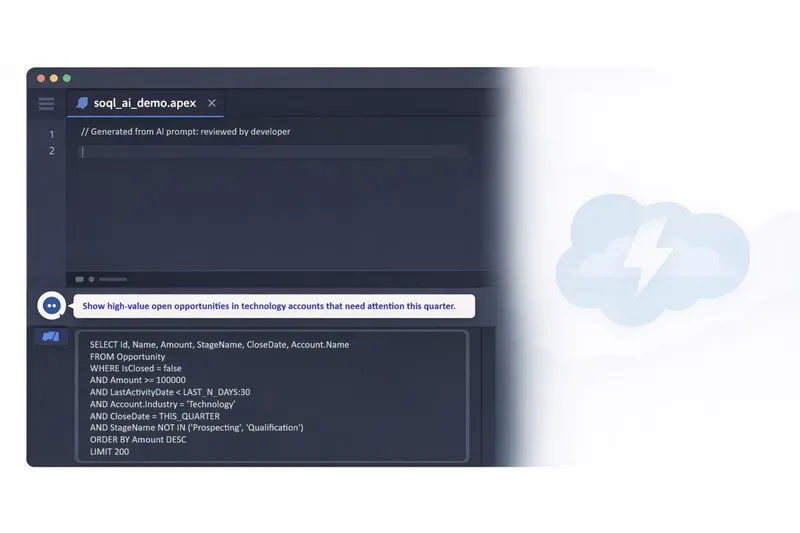
To make the value of AI for SOQL concrete, consider this common business request:
“Show high-value open opportunities in technology accounts that need attention this quarter.”
This side-by-side comparison shows how a SOQL AI workflow accelerates query development while keeping developers in control of correctness, performance, and security.
| Before AI (manual first draft) | After AI + developer review | |
|---|---|---|
| Approach | Write an initial SOQL query from memory, then refine after reviewing broad or noisy results. | Start with a natural-language prompt, generate SOQL with AI, then validate and refine using org-specific knowledge. |
| Query (Before AI) | See query below | |
| Query (After AI) | See query below | |
| Typical issues / improvements | May return large, less actionable datasets with limited prioritisation and weak filtering. | Applies business intent more precisely, focusing on high-value, stale opportunities within a defined time horizon. |
| Human review still required | Typically occurs after execution and iteration. | Required before deployment: validate filter selectivity, check indexed fields, assess governor limit impact, confirm Field-Level Security (FLS) and sharing behaviour, and decide whether clauses such as WITH USER_MODE are required for the execution context and user intent. |
📄 Before AI Query
Section titled “📄 Before AI Query”SELECT Id, Name, Amount, StageName, CloseDate, Account.NameFROM OpportunityWHERE IsClosed = falseAND Account.Industry = 'Technology'ORDER BY CloseDate DESC✅ After AI + Developer Review Query
Section titled “✅ After AI + Developer Review Query”SELECT Id, Name, Amount, StageName, CloseDate, Account.NameFROM OpportunityWHERE IsClosed = falseAND Amount >= 100000AND (LastActivityDate < LAST_N_DAYS:30 OR LastActivityDate = NULL)AND Account.Industry = 'Technology'AND CloseDate = THIS_QUARTERAND StageName NOT IN ('Prospecting', 'Qualification')ORDER BY Amount DESCLIMIT 200In this example, AI maps natural-language intent to concrete SOQL filters:
- “High-value” becomes an
Amountthreshold, as defined by your business rules rather than accepted as an AI default. - “Needs attention” is often modelled with
LastActivityDateorNextStep, depending on how your team tracks follow-up work. The explicitOR LastActivityDate = NULLkeeps opportunities with no recorded activity from disappearing silently. - “This quarter” becomes
CloseDate = THIS_QUARTER, using a standard SOQL date literal.
This demonstrates how natural language can be translated into practical SOQL filtering patterns. AI-generated suggestions are starting points and must be reviewed and validated by developers before use.
AI can significantly reduce the time from business question to usable SOQL query. However, developer validation remains essential to ensure correctness, performance, and security, especially in orgs with large data volumes or complex sharing models.
If you want a deeper implementation playbook, see our guides on SOQL performance optimisation strategies and SOQL security patterns in Apex and Lightning.
🧩 Exporting Salesforce Data Models for AI Integration
Section titled “🧩 Exporting Salesforce Data Models for AI Integration”To get better SOQL output from AI, provide data-model context whenever possible. Some assistants integrated in environments like VS Code can access metadata directly and, in many setups, use MCP servers to retrieve relevant org context. This helps AI generate more accurate queries by understanding object relationships, fields, and data types.
Alternatively, you can export schema context with tools like Salesforce Inspector. For example, this SOQL query returns metadata details for selected objects:
SELECT QualifiedApiName, DeveloperName, EntityDefinition.DeveloperName, DataType, IsIndexed, DescriptionFROM FieldDefinitionWHERE EntityDefinition.DeveloperName IN ('Account', 'Contact')You can provide this metadata to AI systems so they better understand your Salesforce schema, which improves SOQL relevance and reduces correction cycles.
🔧 AI Tools for SOQL
Section titled “🔧 AI Tools for SOQL”Below is a comparison of popular AI tools that help developers write and optimise SOQL in Salesforce.
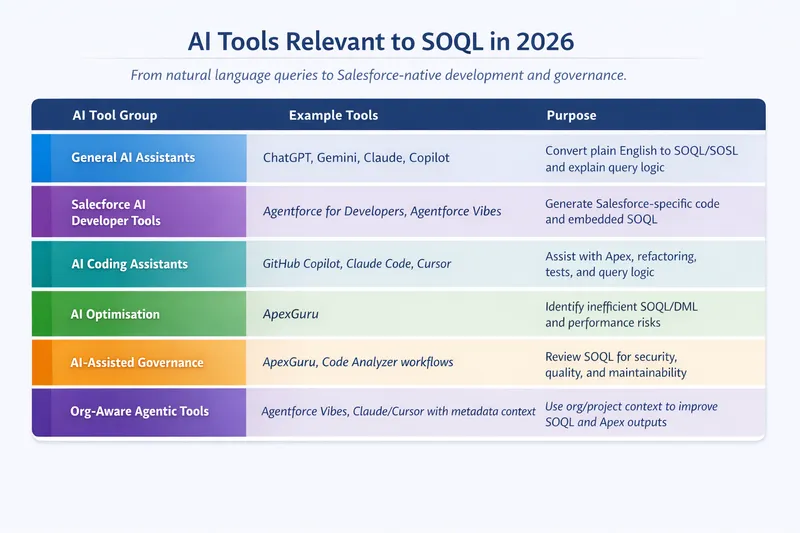
Common options include the Agentforce Vibes Extension for VS Code, which brings Salesforce-oriented AI assistance into a developer workflow, and GitHub Copilot paired with Salesforce extensions for inline SOQL drafting and code-aware suggestions. Claude can also be effective when you provide strong schema context, especially for reviewing query intent, relationship paths, and possible refinements before you run anything in an org.
🚨 Challenges and Considerations
Section titled “🚨 Challenges and Considerations”While AI offers clear productivity gains, teams should manage these trade-offs deliberately.
- Potential Errors: AI-generated SOQL can be syntactically valid but logically wrong for your org. Always include a human review step to check relationship paths, filter selectivity, row-volume assumptions, and governor-limit impact before production use.
- Data Privacy: Never include sensitive data in prompts unless your organisation has approved the specific tool and workflow. Follow data-classification policies, least-privilege access, and retention controls for prompt and output logs.
- Ethical AI Use: Treat AI output as a recommendation, not an authority. Watch for biased assumptions in prompts or sample data, keep decisions explainable, and define accountability for production incidents caused by AI-assisted changes.
- Best Practices: Teams should standardise a repeatable workflow: prompt templates, review checklists, unit/integration tests, security checks, and query performance monitoring after release.
- Emerging Trends: The current direction is towards more automated query drafting, optimisation suggestions, and natural-language workflows. While these capabilities are improving quickly, strong results still depend on high-quality metadata context and developer oversight, and availability may vary by org and tool.
🚧 When Not to Rely on AI for SOQL
Section titled “🚧 When Not to Rely on AI for SOQL”AI is useful for drafting and iteration, and it is improving quickly, but for now, some scenarios may still benefit from collaboration with experts for design and validation from the outset.
- Highly selective queries in large data volume (LDV) orgs: When index strategy and cardinality are critical, rely on Salesforce Query Plan Tool selectivity analysis and hands-on tuning rather than AI-generated queries or recommendations.
From experience: In one recent LDV org with millions of records, I used AI to draft the queries, then validated selectivity with the Query Plan Tool and iterated until the plan avoided a non-selective scan. The final choice came from the query plan, not the AI draft. - Security-sensitive queries: For complex sharing models, restricted data access, and Field-Level Security (FLS) enforcement, treat AI suggestions as drafts and verify query behaviour explicitly in your org. In practice, that means adding
WITH USER_MODEwhere it fits the execution path (WITH SECURITY_ENFORCEDno longer compiles in API 67.0 and later, so don’t let an AI tool introduce it or assume a legacy query can be upgraded without choosing an appropriate access mode), alongside guidance from Enforcing object and field permissions in Apex. - Performance-critical Apex paths: In triggers, batch jobs, and other high-throughput execution contexts, query cost must be tightly controlled and queries tested under realistic volumes.
- Legacy orgs with technical debt: Non-standard object models, custom conventions, and historical workarounds can reduce AI accuracy and require more manual correction.
In these cases, view AI as a valuable assistant rather than the final authority, and revisit this approach as the technology continues to evolve.
✅ Conclusion
Section titled “✅ Conclusion”AI is reshaping how developers work with SOQL by making it faster to draft, optimise, and review queries. With the right workflow, AI can improve speed, consistency, and query quality while reducing repetitive effort.
At the same time, AI-generated SOQL still requires human judgment. Query selectivity, governor limit awareness, data model context, and security behaviour all depend on platform expertise. The most effective workflow combines AI speed with developer oversight: prompt, review, refine, and deploy with confidence.
As AI becomes a standard part of Salesforce development, AI literacy is now a core skill set. Prompt engineering, context curation, and disciplined integration of AI output into production-grade solutions will help teams deliver smarter, safer, and more efficient outcomes.
That wraps the advanced SOQL series. Return to the advanced SOQL guide index to revisit any topic, or explore SOSL when you need broad multi-object text search rather than structured queries.