SOSL in Salesforce: An Introduction

Early in my Salesforce development journey, I was tasked with building a custom search feature in Sales Cloud for a sales support team that needed one search box for Accounts, Contacts, and Leads. My first attempt used separate SOQL queries, then stitched everything together. It worked in a small sandbox data set, but once it was used with realistic record volumes, response times became inconsistent and I started hitting governor limits in edge cases. I remember tracing debug logs to understand why simple searches were taking so much effort. Then I discovered SOSL (Salesforce Object Search Language). With a single query and a focused RETURNING clause, I could search across objects in one pass and return cleaner, more relevant results with far less code. In practical terms, the search handler went from several object-specific query branches to one SOSL path, and support feedback shifted from “sometimes slow” to consistently usable for day-to-day lookups. That experience changed how I approach unstructured search requirements in Salesforce.
This guide introduces the fundamentals of SOSL. We will cover:
- The Fundamentals: What SOSL is, how it uses the Salesforce search index, and when to choose it over SOQL.
- Core Capabilities: Searching for specific words or phrases across multiple objects simultaneously.
- Practical Context: The nuances of SOSL, such as search index delays, and how it fits into your broader development toolkit.
📑 In this series
Section titled “📑 In this series”- Introduction (this article)
- SOSL Syntax Overview
- Limits and Apex Integration
🧭 What is SOSL?
Section titled “🧭 What is SOSL?”Salesforce Object Search Language (SOSL) is a specialised query language in Salesforce used to perform efficient text searches across multiple objects at once.
Unlike SOQL, which performs structured queries against a single object with precise filtering, SOSL is optimised for unstructured, text-based searches. It operates on Salesforce’s search index, which means results are fast but may not reflect real-time data changes immediately.
SOSL excels at finding records when you do not know which object or field the data resides in, or when you need to search across multiple objects simultaneously.
🔍 What You Can Do with SOSL
Section titled “🔍 What You Can Do with SOSL”SOSL enables searching for specific words or phrases, often when the exact object or field location is unknown. It returns up to 2,000 candidate results across the search, with default ranking driven by relevance. An ORDER BY inside an object’s RETURNING block can replace that default order for that object. Matches come from searchable, indexed fields such as text, email, name, and phone fields, and the FIND expression supports wildcards and logical operators.
✨ Key Features and Use Cases
Section titled “✨ Key Features and Use Cases”- Cross-Object Searches: SOSL allows you to perform searches across both standard and custom objects at the same time, making it particularly useful for global search functionalities or when the exact data location is unknown.
- Results grouped by object: In Apex, a search returns
List<List<SObject>>, with one inner list for each object in theRETURNINGclause, in that order, and an empty list where an object had no matches. The REST API returns the same matches as a single flatsearchRecordscollection instead, tagging each record with its object type. - Diverse Applications: SOSL is highly effective for tasks such as identifying duplicate records, implementing search-box features, or swiftly locating related records for a given term, irrespective of the object they are stored in.
🚧 Important Limitations
Section titled “🚧 Important Limitations”Whichever surface you use, each object type is searched and returned separately rather than combined into a relational join. If relationship queries are enabled in the org, SOSL can support SOQL-style relationship traversal in the RETURNING field list for supported fields, but that still returns separate per-object matches rather than one joined dataset.
Keep these constraints in mind when choosing SOSL over SOQL:
- No joined result set: Cross-object logic happens by searching multiple objects in one request, not by joining their rows. Supported relationship-field traversal is a separate capability.
- Filtering scope: Object-specific options such as
WHERE,ORDER BY,LIMIT,OFFSET, andUSING ListViewbelong inside an object’sRETURNINGblock and each has its own restrictions. You cannot filter the search itself with the same flexibility as a SOQLWHEREclause on a single object.
🆚 When to Use SOSL vs SOQL
Section titled “🆚 When to Use SOSL vs SOQL”Use the right query language for the job. SOSL and SOQL overlap in name only; they solve different problems.
Use SOSL when:
- You do not know which object contains the data.
- You need keyword matching across searchable text fields, where the search index can apply stemming and synonyms.
- You are building global search functionality.
Use SOQL when:
- You know the object and fields you need.
- You need precise filtering, relationship traversal, or aggregation.
- You require deterministic query results from live database records.
For structured queries against a single object, see Discovering SOQL: The Essential Guide for Beginners. The Limits and Apex Integration article in this series also compares SOSL and SOQL in more depth.
🔧 Where Can SOSL Be Used
Section titled “🔧 Where Can SOSL Be Used”SOSL can be used in various Salesforce components, including Apex code, REST and SOAP APIs, Visualforce controllers, Lightning components, and the Developer Console. Its versatility makes it an essential tool for developers working across different parts of the Salesforce platform.
🧩 SOSL Core Concept
Section titled “🧩 SOSL Core Concept”A typical SOSL query is composed of 4 key clauses:
FIND {searchQuery}[IN searchGroup]RETURNING objectType(fieldList)[WITH clauses]- FIND clause: This is the only required clause and specifies the text to search for. It is the starting point of any SOSL query. Example:
FIND {Acme}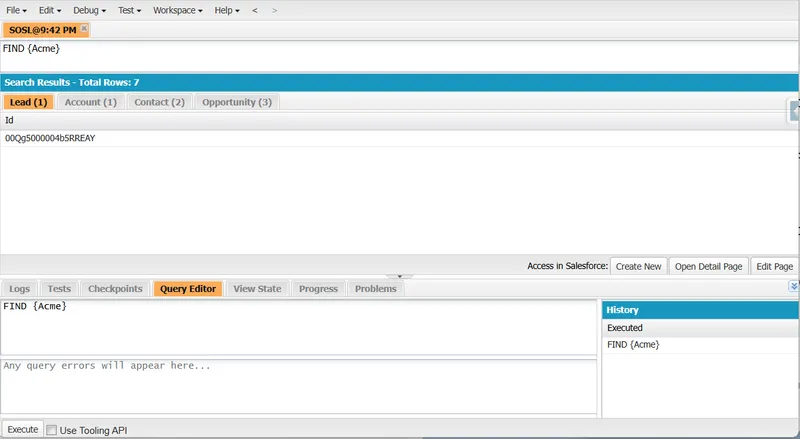
- IN clause (Optional): This clause specifies which searchable field groups to search within. If omitted, SOSL searches across all searchable text-based fields (such as name, email, and phone fields) that are indexed for search.
IN ALL FIELDSstill maps to those indexed text, email, phone, and name fields, not literally every field on the object. Example:
IN ALL FIELDS- RETURNING clause: This clause specifies which objects and fields should be returned in the search results. It can include filtering, sorting, and limiting options. It is optional for SOAP and REST searches but required for SOSL written in Apex. Example:
RETURNING Account(Name, Industry), Contact(FirstName, LastName, Email)- WITH clause (Optional): This clause provides additional filtering and presentation options. Support varies by clause and execution surface; for example,
WITH HIGHLIGHTis supported by SOAP and REST, not inline Apex. Example:
WITH HIGHLIGHTSome clauses also contain their own options. In SOAP or REST, the most basic search can look like:
FIND {Acme}but can also be long and complicated:
FIND {Technology OR Software OR Cloud OR Enterprise}IN ALL FIELDSRETURNING Account( Id, Name, Industry, Type, NumberOfEmployees, BillingCity, BillingState, BillingCountry, Phone, Website, Description, Owner.Name WHERE Industry IN ('Technology', 'Software', 'Telecommunications') AND NumberOfEmployees > 100 AND BillingCountry = 'United States' ORDER BY NumberOfEmployees DESC, Name ASC LIMIT 25 ), Contact( Id, FirstName, LastName, Email, Phone, Title, Department, Account.Name, Account.Industry, MailingCity, MailingState WHERE (Title LIKE '%Manager%' OR Title LIKE '%Director%' OR Title LIKE '%VP%') AND Email != null AND Account.Industry = 'Technology' AND Department IN ('IT', 'Engineering', 'Sales') ORDER BY Account.NumberOfEmployees DESC, LastName ASC LIMIT 50 )WITH HIGHLIGHT🚩 Common SOSL Mistakes I’ve Seen
Section titled “🚩 Common SOSL Mistakes I’ve Seen”In production implementations, these patterns repeatedly cause slow debugging cycles:
-
Assuming real-time results: SOSL uses the search index, so new or updated records can take time to become searchable. In practice, this lag is often short, but it is not guaranteed to be instant and can vary by org load and indexing conditions.
-
Overusing broad wildcards: Queries like
FIND {Ac*}can return much larger candidate sets thanFIND {Acme}and are often slower in larger orgs. Use wildcards deliberately, and benchmark representative terms in your own data volumes before shipping. -
Ignoring visibility and access rules: API searches and user-mode Apex return only the records the running user can access, so results differ by permission set and sharing. An Apex search that explicitly requests system mode does not filter that way. If results look “missing”, check access and sharing context before rewriting the query, and confirm which mode the code actually runs in. Limits and Apex Integration covers the execution modes in detail.
✅ Conclusion
Section titled “✅ Conclusion”Salesforce Object Search Language (SOSL) is a powerful tool for performing efficient, text-based searches across multiple objects and fields within Salesforce. Its ability to handle complex queries and return organised, relevant results makes it indispensable for developers and administrators who need to locate data quickly and accurately, even when the exact location is unknown. By leveraging SOSL, you can enhance your Salesforce applications with robust search functionalities that cater to diverse business needs. In my own projects, learning when to pause and choose SOSL over another quick SOQL workaround has consistently saved time and reduced complexity later.
To take a deeper look into the structure and components of SOSL queries, read the next article, SOSL Syntax Overview, for the knowledge to craft precise and effective searches.
📚 Resources
Section titled “📚 Resources”If you want authoritative references while you practise SOSL, start with these official Salesforce sources: