SOQL and Salesforce APIs

Salesforce APIs provide powerful tools for integrating, moving, and migrating data across systems. SOQL (Salesforce Object Query Language) supplies the read side of those processes: it retrieves records, while creates, updates, and deletes use separate API operations. There are many ways of getting data from Salesforce; in this guide, we explore how SOQL is used with the REST API, Bulk API 2.0, SOAP API, and Composite API.
Two distinctions help before you pick an endpoint:
- Think of these APIs as transport layers for SOQL off the platform, whereas SOQL in Apex runs SOQL inside Salesforce with different governor limits and execution context (sharing, FLS, and user vs system mode).
- Named Query API introduces governed, reusable query contracts on newer releases, but still executes over REST. It complements the patterns below rather than replacing REST query calls, Bulk API 2.0 jobs, SOAP
query, or Composite sub-requests.
🔌 Understanding Salesforce APIs
Section titled “🔌 Understanding Salesforce APIs”Salesforce exposes many integration surfaces for off-platform clients like middleware, data warehouses, partner applications, and enterprise buses that call Salesforce over the network rather than from Apex on the platform. Four common APIs for running SOQL from those integrations are:
- REST API: A lightweight HTTP API for everyday off-platform reads; run SOQL synchronously on the Query resource and receive JSON or XML in batches (a maximum of 2,000 records, sometimes fewer, with
nextRecordsUrlfor more). - Bulk API 2.0: Built for large scale data movement; submit SOQL as asynchronous query jobs and download CSV results for ETL, migrations, and warehouse loads.
- SOAP API: A robust SOAP stack for enterprise integrations; embed SOQL in
queryand page large result sets withqueryMore. - Composite API: Groups multiple REST operations in one HTTP call; include SOQL query
GETs alongside describes, updates, or other REST steps to cut round trips.
Pair any external integration with SOQL security (OAuth, least privilege, FLS) and performance optimisation (selective filters, indexed fields).
📊 When to Use Each API
Section titled “📊 When to Use Each API”| REST API | Bulk API 2.0 | SOAP API | Composite API | |
|---|---|---|---|---|
| Best for | Apps, microservices, real-time reads | Large exports, ETL, migrations | Legacy enterprise buses, WSDL-based stacks | Fewer round trips when you need several REST operations |
| Processing | Synchronous | Asynchronous (query job) | Synchronous (with queryMore) | Synchronous per sub-request |
| Typical volume | Maximum 2,000 records per response, sometimes fewer; follow nextRecordsUrl | Millions of rows via job results | Large result sets via queryMore | Same pagination behaviour as the underlying REST sub-request |
| SOQL delivery | GET .../query/?q= (URL-encoded SOQL) | POST .../jobs/query with SOQL in JSON body | <queryString> in SOAP query | GET .../query/?q= inside compositeRequest |
| Result format | JSON or XML | CSV (query jobs) | SOAP-serialised records | JSON (composite response) |
Use REST for interactive integrations and moderate row counts. Use Bulk API 2.0 when result sets are too large or too slow for synchronous paging. Use SOAP when your integration standard already centres on SOAP. Use Composite to combine a SOQL query with describes, updates, or other REST calls in one trip, not to bypass Bulk limits for huge extracts.
🌐 Using SOQL with the REST API
Section titled “🌐 Using SOQL with the REST API”The REST API allows developers to execute SOQL queries to retrieve data from Salesforce. The Query resource runs SOQL synchronously over HTTP. See Execute a SOQL Query in the REST API Developer Guide.
📤 Example request
Section titled “📤 Example request”GET /services/data/vXX.X/query/?q=SELECT+Id,+Name+FROM+Account+WHERE+Industry='Technology' HTTP/1.1Host: yourInstance.salesforce.comAuthorization: Bearer {access_token}- The standard
/query/endpoint returns records that are not soft-deleted (same as a normal SOQL query in the UI). - The SOQL query is included in the URL as a query parameter, specifically in the
q=parameter. - The
+symbol (or%20) is used to represent spaces in the URL-encoded query string. For example,SELECT+Id,+Name+FROM+Accounttranslates toSELECT Id, Name FROM Account. - The
Authorizationheader contains the access token for authentication, ensuring that the request is securely authenticated and authorised to access Salesforce data. - A response contains at most 2,000 records, and Salesforce can return a smaller batch based on record size and query complexity. If more rows exist,
doneisfalseandnextRecordsUrlpoints to the next batch (noOFFSETin the locator; follow the URL Salesforce returns).
🚮 query vs queryAll
Section titled “🚮 query vs queryAll”Use queryAll when you need soft-deleted and archived records, for example recycle-bin recovery or auditing deletes:
GET /services/data/vXX.X/queryAll/?q=SELECT+Id,+Name+FROM+Account HTTP/1.1The SOQL syntax is the same; only the endpoint changes. For active records only, stay on /query/.
⌛ Timeouts and when to leave REST
Section titled “⌛ Timeouts and when to leave REST”REST query calls use SOQL query timeouts, not the general 10-minute REST API limit. According to the Salesforce SOQL and SOSL limits reference, a SOQL query has 32 minutes total to run, split into 2 minutes to execute the operation and 30 minutes to process the results. A QUERY_TIMEOUT can occur at either stage, so a query that starts returning rows can still time out while paging through a large result set.
- Large or non-selective queries often time out in REST even if row counts seem modest. Tighten filters, use indexed fields (performance guide), or move the extract to Bulk API 2.0 below.
- High row counts are fine in REST only when each batch returns within the timeout; millions of rows belong in asynchronous Bulk jobs, not chained synchronous
/querycalls alone.
🎯 Common use cases
Section titled “🎯 Common use cases”- Data Retrieval: Fetch data for integration with external systems or applications.
- Real-time Updates: Use SOQL queries to retrieve the latest data for real-time applications.
📦 Using SOQL with Bulk API 2.0
Section titled “📦 Using SOQL with Bulk API 2.0”The Bulk API 2.0 query runs SOQL asynchronously so is designed for handling large volumes of data efficiently, making it ideal for data migration and batch processing tasks. It allows you to process records asynchronously in batches, which is particularly useful when dealing with large datasets that exceed the limits of synchronous processing.
- Asynchronous Processing: The Bulk API processes data in the background, allowing you to submit jobs and check their status later.
- Batch Processing: Data is processed in batches, which can be configured to optimise performance and resource usage.
- Scalability: Designed to handle millions of records, making it suitable for large-scale data operations.
🔧 Typical flow
Section titled “🔧 Typical flow”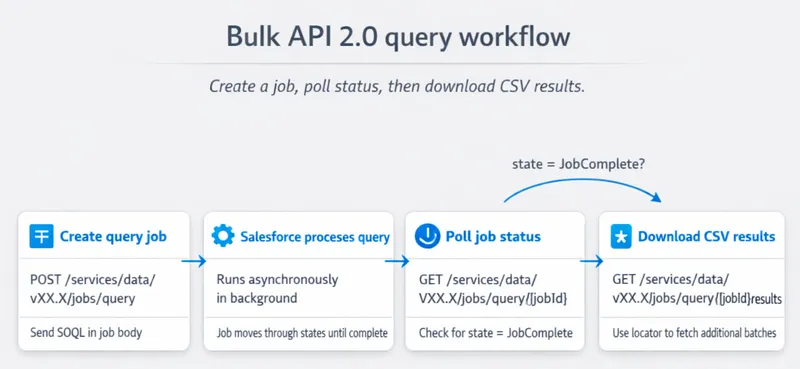
-
Create a query job.
POSTthe operation and the SOQL to/services/data/vXX.X/jobs/query. For querying, the operation type isquery, orqueryAllwhen you also need deleted and archived records.{"operation": "query","query": "SELECT Id, Name FROM Account WHERE Industry = 'Technology'","contentType": "CSV","columnDelimiter": "COMMA","lineEnding": "LF"}A successful response returns the job
idand astateofUploadComplete. That means Salesforce has queued the job, not that it has run. -
Poll job status. Check
GET /services/data/vXX.X/jobs/query/{jobId}until the state isJobComplete. Build backoff and failure handling into the polling loop rather than treating job submission as completion. The states you need to handle areInProgress,JobComplete,Aborted, andFailed. -
Download results. Use
GET .../jobs/query/{jobId}/resultsto retrieve the CSV. Large result sets arrive in batches: the response carries anSforce-Locatorheader, and you pass its value back as thelocatorquery parameter to fetch the next set. Salesforce states that when no further results exist, that value is the stringnull, which is the condition your loop should stop on.
🚧 SOQL limitations on bulk query jobs
Section titled “🚧 SOQL limitations on bulk query jobs”A query that runs fine through REST can be rejected as a bulk job, so check the SOQL before you build the job around it. Salesforce lists five things a bulk query cannot include:
- Clauses:
GROUP BY,OFFSET, andTYPEOF. - Aggregate functions: like
COUNT()and the rest. - Date functions in
GROUP BY. Date functions in aWHEREclause are fine. - Compound data: compound address and geolocation fields, and
FIELDS(). Query the individual components instead. - Parent-to-child relationship queries. Child-to-parent traversal in the
SELECTlist is supported.
The pattern behind the list is that a bulk query returns flat CSV rows. Anything that shapes results into groups, totals, or nested structures belongs in a synchronous call instead.
🎯 Common use cases
Section titled “🎯 Common use cases”- Export large datasets asynchronously with a Bulk API 2.0 query job. Bulk inserts, updates, and deletes use separate ingest jobs rather than SOQL.
- Nightly warehouse loads and migration cutovers.
- Exports beyond comfortable REST paging (still write selective SOQL, see performance guidance).
🧼 Using SOQL with the SOAP API
Section titled “🧼 Using SOQL with the SOAP API”The SOAP API provides a robust framework for integrating Salesforce with enterprise systems. The SOAP API query call embeds SOQL in a SOAP envelope. Use queryMore with the query locator when result sets exceed one batch. Full reference: SOAP API Developer Guide.
📤 Example request
Section titled “📤 Example request”<soapenv:Envelope xmlns:soapenv="http://schemas.xmlsoap.org/soap/envelope/" xmlns:urn="urn:partner.soap.sforce.com"> <soapenv:Header> <urn:SessionHeader> <urn:sessionId>your_session_id</urn:sessionId> </urn:SessionHeader> </soapenv:Header> <soapenv:Body> <urn:query> <urn:queryString>SELECT Id, Name FROM Account WHERE Industry = 'Technology'</urn:queryString> </urn:query> </soapenv:Body></soapenv:Envelope>🎯 Common use cases
Section titled “🎯 Common use cases”- Operations that combine query with other SOAP operations in one session.
- Connect Salesforce with other enterprise systems using a standardised protocol.
- Perform complex data operations that require robust error handling and transaction support.
🧩 Using SOQL with the Composite API
Section titled “🧩 Using SOQL with the Composite API”The Composite API executes multiple REST API requests in a single HTTP call, including SOQL GETs. It reduces round trips between your client and Salesforce, useful for orchestration, not for moving more rows per query.
The Composite resource runs up to 25 REST sub-requests in one call.
- Composite improves chattiness, not data volume: it will not help you extract large datasets faster.
- Each query sub-request keeps normal REST pagination: the response batch has a 2,000-record maximum, can be smaller, and may include
nextRecordsUrl. - Composite helps with orchestration, not throughput: combine a query with describes, updates, or chained reads in one trip; use Bulk API 2.0 for large extracts.
📤 Example request
Section titled “📤 Example request”{ "compositeRequest": [ { "method": "GET", "url": "/services/data/vXX.X/query/?q=SELECT+Id,+Name+FROM+Account+WHERE+Industry='Technology'", "referenceId": "AccountQuery" }, { "method": "GET", "url": "/services/data/vXX.X/sobjects/Contact/describe", "referenceId": "ContactDescribe" } ]}- The
compositeRequestarray contains multiple requests, and these can include SOQL queries. - Each request has a
referenceIdthat can be used to refer to the response in subsequent requests. This allows you to chain requests where the output of the first request is used in a subsequent one.
🎯 Common use cases
Section titled “🎯 Common use cases”- A Lightning or partner service that needs query results plus object describe metadata in one payload.
- Dependent reads where the second sub-request uses
referenceIdvalues from the first (with the same maximum batch size and pagination behaviour as REST Query).
🔒 Performance and Security Considerations
Section titled “🔒 Performance and Security Considerations”- API and query limits: External API queries are subject to API allocations, query cursors, query timeouts, and the selected API’s limits. Apex’s 100-query and 50,000-row transaction limits do not govern a normal REST or SOAP integration call. Bulk jobs have their own Bulk API limits.
- Authentication: Use OAuth 2.0 for REST, Bulk, and Composite; session IDs for SOAP integrations per your security model.
- Data access: API queries run as the authenticated integration user, so object permissions, field-level security, and record sharing still apply. SOQL security explains this execution model and why the integration user should be least-privileged.
✅ Best Practices for SOQL with APIs
Section titled “✅ Best Practices for SOQL with APIs”- Choose the right API first: Do not page REST indefinitely when Bulk 2.0 fits the volume.
- Optimise SOQL: Queries should be selective to avoid full table scans; the exact threshold depends on the index type on the filtered field, not the object type. See SOQL performance optimisation for the selectivity thresholds and how to check them with the Query Plan tool. This helps every API surface.
- Handle partial failures: REST and Composite return per-request errors; Bulk jobs need status polling and retry logic.
- Monitor usage: Track daily API limits and long-running Bulk jobs.
🔄 What’s the difference between REST API and Bulk API for SOQL queries?
Section titled “🔄 What’s the difference between REST API and Bulk API for SOQL queries?”REST runs SOQL synchronously via GET /query/?q=... and returns JSON/XML in batches with a maximum of 2,000 records, with nextRecordsUrl for additional batches. Salesforce can return fewer than the maximum. Bulk API 2.0 runs SOQL as an asynchronous query job, then delivers large result sets as CSV downloads, better for ETL-scale extracts, not sub-second UI reads.
📏 How many records can SOQL return through the REST API?
Section titled “📏 How many records can SOQL return through the REST API?”Each REST Query response returns at most 2,000 records, and its actual batch can be smaller. If more rows match, the response includes nextRecordsUrl to fetch the next batch. Client-side pagination with LIMIT/OFFSET in SOQL is capped (OFFSET maximum 2,000). For very large reads, use Bulk API 2.0 or design filters to reduce volume.
🤔 When should I use Bulk API vs. REST API?
Section titled “🤔 When should I use Bulk API vs. REST API?”Use REST for real-time or near-real-time integrations, moderate row counts, and JSON consumers. Use Bulk API 2.0 when you need millions of rows, long-running exports, or CSV handoff to a warehouse and can tolerate asynchronous job polling. If you are unsure, prototype with REST; move to Bulk when paging latency or volume becomes painful.
🧩 Can I run SOQL queries inside Composite API requests?
Section titled “🧩 Can I run SOQL queries inside Composite API requests?”Yes. Include a sub-request with method: "GET" and url: "/services/data/vXX.X/query/?q=..." in compositeRequest. Each query sub-request follows normal REST Query limits and pagination behaviour. Composite reduces HTTP round trips; it does not turn a synchronous query into a bulk extract.
🆚 Does SOQL behave differently across APIs?
Section titled “🆚 Does SOQL behave differently across APIs?”The SOQL language is the same, but runtime behaviour differs:
- REST / Composite (query sub-requests): synchronous batches with a 2,000-record maximum that can be lower, returned as JSON/XML for REST and within the Composite JSON response for a sub-request.
- Bulk API 2.0: Async jobs, CSV output, and a subset of SOQL features are not supported on bulk query jobs.
- SOAP: Same underlying query engine, different wire format and
queryMorelocator pattern. - Apex: Same SOQL, plus governor limits and sharing/FLS rules distinct from API integration users.
Always validate queries in the target API (and org) before production cutover.
✅ Conclusion
Section titled “✅ Conclusion”SOQL, when used in conjunction with Salesforce APIs, provides a powerful mechanism for data integration and migration. By understanding the capabilities and best practices of the REST, Bulk, SOAP, and Composite APIs, you can create efficient and secure solutions that enhance data connectivity and operational efficiency. Use REST (or Composite wrapping REST) for most app integrations, Bulk API 2.0 for large asynchronous extracts, and SOAP where enterprise standards require it. Combine this guide with security and explore Named Query API when you want governed, reusable read contracts on newer platform releases. The final stop on the advanced learning path is AI for SOQL, on using AI tools to draft, optimise, and review queries.