Salesforce Fundamentals: Part 1 - Platform

Before you write a line of code or configure a field, understanding how Salesforce is structured as a platform will save you from decisions that are hard to undo. The introduction to this series laid out the developer journey ahead. This chapter gives you the foundation that everything else builds on: what Salesforce is, how editions and environments shape what you can do, how licencing controls who can do it, and how the Lightning Experience is where users spend their time.
In my experience, developers who skip this groundwork often build solutions that work in isolation but break down in production. These solutions are not designed for the edition, ignore licence constraints, or depend on Setup configuration they didn’t realise existed. Starting here means you avoid those surprises later.
🌥️ Understanding Salesforce
Section titled “🌥️ Understanding Salesforce”Salesforce is both a set of business applications and a platform for building your own. Sales, service, and the other products all share the same core services, including identity, data storage, security, automation, reporting, and APIs. That means information and processes can move across products instead of sitting in separate silos.
An org is your organisation’s Salesforce environment. It holds your users, data, configuration, code, installed packages, and feature settings. Salesforce runs and updates the underlying cloud service, while your organisation is responsible for how the org is set up, who can access it, and how its data and customisations are governed.
That starts to matter as soon as you begin making changes. A request that sounds as simple as “add a field” may also affect permissions, reports, automation, integrations, and deployment. Thinking about the wider platform helps you spot those knock-on effects before a small change reaches production.
Because Salesforce runs in the cloud, users can work from wherever their organisation allows. Customers also get platform upgrades without having to install and maintain Salesforce software locally.
Trailhead recommendations: To help understand the platform, look at the Salesforce CRM module to learn how to use customer relationship management (CRM) software to grow your business.
Then look at the Salesforce Platform Basics module to get introduced to the platform, navigate use cases, and build custom functionality.
🗃️ Salesforce Editions and Environments
Section titled “🗃️ Salesforce Editions and Environments”An edition is a commercial bundle of features and limits. An environment is an org used for a particular stage of work. They answer different questions: what has the organisation licensed? and where should this change be built or tested?
🏢 Salesforce Editions
Section titled “🏢 Salesforce Editions”Salesforce’s current edition families include small-business suites such as Free Suite, Starter Suite, and Pro Suite, as well as Professional, Enterprise, and Unlimited editions and product-specific premium bundles. The important point is not to memorise that list: feature availability, entitlements, and limits vary by product, contract, and release.
Before designing around a feature, check the Required Editions section in the current Salesforce Help page and confirm the entitlement in the target org. Do not assume that something available in a Trailhead Playground or another customer’s org is licensed in yours.
🌐 Salesforce Environments
Section titled “🌐 Salesforce Environments”Production org
Section titled “Production org”This is the live Salesforce environment where real work happens. It contains actual business data and is used by people and integrations every day, so changes here need to be handled carefully.
Sandbox
Section titled “Sandbox”A sandbox is linked to a production org and is used for development, testing, training, or staging. It gives teams a place to try and validate changes without altering production data.
Salesforce offers several sandbox types, including Developer, Developer Pro, Partial Copy, and Full. They provide different amounts of storage, production data, and refresh availability, so the right choice depends on what you need to test. A sandbox can still contain sensitive data or connect to external systems, so it needs appropriate access and integration controls.
Scratch org
Section titled “Scratch org”A scratch org is a temporary, configurable Salesforce environment used for source-driven development. It is especially useful when you want a clean org for isolated work, automated testing, or a continuous integration (CI) pipeline.
Scratch orgs are disposable by design, which is part of their strength. You create one when you need it, deploy the source you want to work with, and discard it when you are done rather than treating it as a long-lived shared environment.
Trailhead Playground
Section titled “Trailhead Playground”A Trailhead Playground is a practice org created for learning and hands-on exercises. It gives you a safe place to complete Trailhead modules and try things out without touching real business data.
It is a useful learning environment, but it is not the same as a customer org. Do not treat it as a substitute for validating production licences, security, or deployment planning.
Understanding the differences between Salesforce editions and environments helps organisations choose the right combination to meet their specific needs, ensuring they have the necessary tools and flexibility to support their business processes and growth.
Trailhead recommendations: Look at the Environments for Salesforce Developers module to learn how and when to use different Salesforce developer environments:
Then the Trailhead Playground Management module to create hands-on orgs, practice your Salesforce skills, and complete Trailhead challenges.
🪪 Salesforce Licencing
Section titled “🪪 Salesforce Licencing”Organisations subscribe to Salesforce products and editions, then assign users the licences and entitlements needed for their jobs. Additional feature licences, permission set licences, usage entitlements, and add-ons can sit on top of the base subscription.
Salesforce licencing is a critical aspect of managing access to the platform’s features and capabilities. Understanding the different types of licences available helps organisations choose the right combination to meet their business needs and ensure efficient use of resources. Below is an overview of some common types of Salesforce licences:
🧾 Types of Salesforce Licences
Section titled “🧾 Types of Salesforce Licences”👤 User Licences
Section titled “👤 User Licences”These licences determine the baseline of features and functionality available to a user. Common user licences include:
- Salesforce Licence: Provides access to the full CRM capabilities, including standard and custom applications.
- Salesforce Platform Licence: Offers access to custom applications and objects but excludes standard CRM functionalities like Leads and Opportunities.
- Chatter Free/Chatter Only: Allows users to access Chatter, Salesforce’s collaboration tool, with limited access to other Salesforce features.
✨ Feature Licences
Section titled “✨ Feature Licences”These licences grant access to additional features that are not included in the standard user licences. Examples include:
- Knowledge User: Allows users to create and manage knowledge articles.
- Marketing User: Provides access to marketing features, such as campaign management.
🛡️ Permission Set Licences
Section titled “🛡️ Permission Set Licences”These licences extend the functionality of a user’s existing licence by granting additional permissions. They are often used to provide access to specific features or applications without changing the user’s primary licence.
➕ Add-On licences
Section titled “➕ Add-On licences”These licences provide access to additional Salesforce products or services, such as:
- CRM Analytics: The current name for the native analytics product previously called Einstein Analytics and Tableau CRM.
- Marketing Cloud Account Engagement: The current name for the B2B marketing automation product previously called Pardot.
Note: This list is not exhaustive, and Salesforce offers a variety of other licences tailored to specific needs and products.
🗂️ Managing Licences
Section titled “🗂️ Managing Licences”Good licence management is about giving users the access they actually need, not just handing out licences and hoping they fit. It also means reclaiming licences when people leave, keeping an eye on unused capacity, and checking what else depends on a user’s licence before you change it. Licences set the boundaries of what a user can be given, while profiles, permission sets, permission set groups, sharing, and other controls decide what they can really access.
That distinction matters because licence changes are not always isolated. A user might lose access to apps, features, or connected processes if you change the wrong licence without checking the rest of the setup. In practice, good licence management is as much about governance as it is about cost.
Trailhead recommendations
🖥️ Navigating the Salesforce User Interface
Section titled “🖥️ Navigating the Salesforce User Interface ”Upon logging into Salesforce, you’ll mainly use Lightning Experience, the modern Salesforce interface. Learning where to find records, apps, and Setup is the first step to getting comfortable with the platform.
⚡ Key Areas to Explore in Lightning Experience
Section titled “⚡ Key Areas to Explore in Lightning Experience”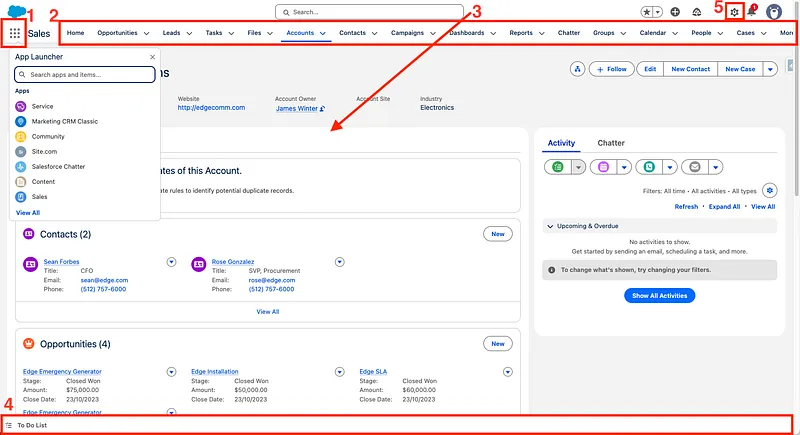
- App Launcher: This is your gateway to all Salesforce apps and items, allowing you to quickly switch between Sales Cloud, Service Cloud, or any custom applications. The App Launcher provides a centralised location to access all the tools you need.
- Navigation Bar: Located at the top of each app, the Navigation Bar provides quick access to standard and custom objects (like Accounts, Contacts, Opportunities) and other important tabs. It can be customised to include the items you use most frequently, improving your workflow efficiency.
- Record Pages: These are highly customisable pages that display all relevant information, related lists, and quick actions for individual records. Record Pages are designed to provide a comprehensive view of each record, enabling users to perform tasks efficiently.
- Utility Bar: Located at the bottom of the screen, the utility bar offers always-accessible tools such as notes, history, and assistant tools for easy multitasking without leaving the current page
- Setup Menu: Accessed via the gear icon, the Setup Menu is where administrators configure, customise, and manage almost every aspect of your Salesforce organisation. It includes tools for managing users, data, security, and more.
⚙️ A Closer Look at the Setup Menu
Section titled “⚙️ A Closer Look at the Setup Menu”The Setup Menu is one of the most important areas in Salesforce, especially for anyone moving towards an admin or developer role. While everyday users may never even see it, admins and developers will spend a lot of time here configuring, customising, and extending the platform.
Here’s a clearer sense of what makes Setup so fundamental:
- Configuration & Customisation Hub - Setup is where you define how Salesforce behaves. This includes creating custom objects and fields, adjusting page layouts, building automation, and configuring apps. If you’re shaping the data model or tailoring the UI, you’ll do it here.
- User & Security Management - From creating users to assigning profiles, permission sets, and roles, Setup is the control centre for access and security. You’ll also find tools for login history, password policies, and session settings.
- Automation Tools - Flow Builder is the main declarative automation tool. Workflow Rules and Process Builder are legacy automation you may still need to discover and retire in an established org.
- Monitoring & Maintenance - Setup includes debug logs, scheduled jobs, paused and failed Flow interviews, health checks, limits, and audit tools. Salesforce service status itself is published separately on Trust.
- Developer Essentials - API settings, Named Credentials, Remote Site Settings, Sandboxes, Deployment tools, and the Schema Builder are all accessed through Setup. This is where the platform opens up for deeper development work.
🕰️ What is Salesforce Classic?
Section titled “🕰️ What is Salesforce Classic?”Salesforce Classic is the older interface that predates Lightning Experience. It remains available in some editions and orgs, and a small number of established implementations still depend on it, but current product innovation is centred on Lightning Experience. Learn enough to recognise Classic and support a controlled transition; build new user experiences for Lightning unless a verified requirement says otherwise.
Trailhead recommendations: To get hands-on experience with the Lightning Experience interface, explore the Lightning Experience for Salesforce Classic Users module on Trailhead. While intended for Salesforce Classic Users to get comfortable with Lightning Experience it still provides good insight for new users. Then follow it up with Lightning Experience Customisation to learn about customising the Lightning Experience user interface without writing any code.
🎯 Final Thoughts
Section titled “🎯 Final Thoughts”Understanding the Salesforce platform is less about memorising every edition feature or UI menu and more about developing a mental model of how the pieces fit together. Once you know how orgs are structured, how licences constrain what users can do, and where Setup sits in the system, you start reading Salesforce problems differently. You can locate the right control faster, reason about access constraints before they bite you, and make configuration decisions that hold up over time.
In my experience, the developers who struggle most in early projects are the ones who jumped straight to Apex or Flow without this grounding. When an unexpected behaviour shows up, such as a feature missing for a user or an environment behaving differently from expected, they lose significant time because they don’t know where to look. This chapter won’t teach you every corner of the platform, but it gives you the map.
🚀 Next steps
Section titled “🚀 Next steps”You’ve now built an understanding of Salesforce, the editions, licencing, and the UI. Next, in Users, you’ll learn how Salesforce manages people: licences, profiles, permission sets, roles, and the security foundations that shape what each person can see and do. This is also where the first real access related production surprises tend to happen. Understanding it now makes those situations much easier to diagnose.