Salesforce SOAP Login & Legacy Auth Retirement Runbook
Salesforce is retiring two authentication patterns: the SOAP API login() operation and the OAuth 2.0 username-password flow. Both hand raw user credentials to an integration, creating a security risk because those credentials can be stored, copied, and reused outside a governed client identity and token lifecycle. The platform direction is clear: new external clients connecting to Salesforce should authenticate through External Client Apps and modern OAuth flows, with identity, access, and policy made explicit rather than hidden inside a stored username and password.
Ignoring that direction will not produce one tidy red light on a dashboard. A nightly extract can stop feeding a compliance report. A warehouse connector can leave stock levels stale. A finance reconciliation can fail before month end while every team assumes another team owns it. The hard part is rarely changing one authentication call. It is finding the forgotten job, identifying its owner, choosing the correct replacement identity, and proving that the migration covers every environment.
This article is a migration runbook for that work. It is deliberately scoped to SOAP login() and OAuth username-password flow, then works through inventory, classification, target architecture, migration, testing, change management, and ongoing governance. Salesforce has separately announced the retirement of OAuth user-agent and hybrid user-agent flows, so review that dedicated guidance rather than treating a flow omitted here as supported.
🧩 What This Runbook Counts as Legacy Auth
Section titled “🧩 What This Runbook Counts as Legacy Auth”In this runbook, legacy authentication means either an integration sends a Salesforce username and password to obtain access, or it reuses a session or token originally created through one of those credential-based flows. The API called afterwards does not change that classification.
You will encounter that dependency in three common forms:
- A SOAP client calls
login()on an Enterprise or Partner endpoint with a username, password, and often a security token. Salesforce returns a session ID and server URL, which the client uses for later calls. - An OAuth client sends
grant_type=password, its Connected App credentials, and a Salesforce username and password to the token endpoint. This is the OAuth 2.0 username-password flow. - A script, job, or tool reuses a Salesforce session ID or access token that was originally created by SOAP
login()or username-password OAuth, then calls REST, Bulk, SOAP, Apex REST, or another API family.
SOAP Tooling can appear in usage evidence when a session created through Enterprise or Partner login() is later used for Tooling API calls. It is not a separate retiring login() endpoint.
The API called after authentication does not determine whether an integration is affected. How the client obtains its token does. A REST integration is affected if it obtains its token through the username-password flow, while a SOAP integration is unaffected if it already authenticates through a supported OAuth flow.
Keep this authentication path in view while you investigate:
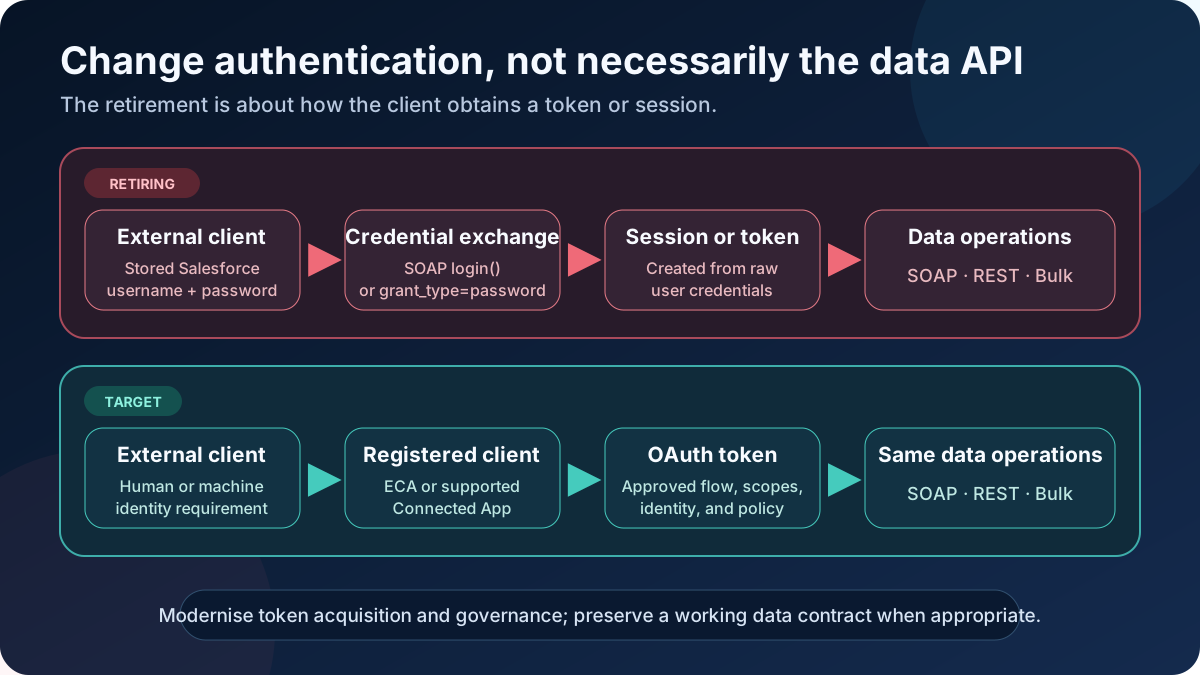
Authentication modernisation changes how a client obtains and governs a token. It does not require the client to replace a working SOAP, REST, or Bulk data contract.
| Pattern | Retirement exposure | What to verify |
|---|---|---|
SOAP login() followed by SOAP operations | Directly affected in API versions 31.0 through 64.0 | Enterprise or Partner client type, API version, login endpoint, user, and client ownership |
OAuth request with grant_type=password | Directly affected when a Connected App uses this flow | Connected App, calling workload, stored credentials, and user context |
SOAP operations with an OAuth access token in SessionHeader.sessionId | Not affected by the login() retirement | OAuth flow, ECA or time-limited Connected App exception, token lifecycle, scopes, and execution user |
| REST or Bulk calls using a token from the username-password flow | Affected by the OAuth flow retirement | Token acquisition code, not only the data API |
Empty CONNECTED_APP_ID in API usage logs | Investigate | It can indicate SOAP login() or session-based authentication not bound to a client app; correlate before declaring it affected |
| Existing OAuth integration using web server, client credentials, or JWT bearer | Not directly affected by these two retirements | It can still have excessive scopes, weak secrets, or poor ownership |
This distinction prevents an unnecessary protocol rewrite. Replacing a stable enterprise SOAP contract with REST may be worthwhile for other reasons, but these retirements require a new authentication method, not a new data API. Treat authentication and protocol modernisation as separate decisions.
🗓️ Timeline: Winter ‘26 Through Summer ‘27
Section titled “🗓️ Timeline: Winter ‘26 Through Summer ‘27”These dates need to be treated as hard architectural constraints. A deprecation warning can be deferred; an unavailable authentication operation cannot.
-
Winter ‘26, API v65.0 — the new version boundary. SOAP API
login()became unavailable in v65.0 and later, and new orgs have it disabled by default. Architectural impact: increasing a SOAP client’s API version does not buy time, while a newly created sandbox or scratch org can expose the dependency before production does. -
Summer ‘26 — an additional permission gate. New orgs that enable SOAP
login()require the user to have Use Any API Auth. Existing orgs can opt into the same permission enforcement, which Winter ‘27 then makes mandatory everywhere. Architectural impact: temporary compatibility now has an explicit user gate, but granting the permission is not a migration. -
July 2026 — controls for new client apps. New ECAs and Connected Apps that use refresh tokens are subject to refresh-token rotation and a 30-day idle expiry. PKCE is required for authorisation-code grants using
localhostor custom-scheme callbacks. Architectural impact: clients must persist each replacement refresh token, handle reauthorisation deliberately, and test these controls rather than assuming an older app’s token behaviour. -
Winter ‘27 — the permission gate becomes universal. Every user authenticating through SOAP
login()must hold Use Any API Auth, assigned through a profile or permission set. Salesforce lists this release update as enforced with Winter ‘27, and users without the permission receive an authentication error. Architectural impact: an org planning around Summer ‘27 can lose its SOAP integrations a full release early. The immediate fix is an access change rather than a migration, so treat it as a stay of execution, not a resolution. -
20 February 2027 — username-password flow enforcement. Salesforce enforces the retirement of OAuth 2.0 username-password flow. Architectural impact: Connected App integrations that still use the flow stop obtaining tokens. Salesforce recommends web server flow with PKCE for user-driven access and client credentials for server-to-server access.
-
Summer ‘27 — SOAP
login()retirement. SOAP APIlogin()in API versions 31.0 through 64.0 is retired and unavailable; versions 30.0 and lower are already retired. Architectural impact: remaining callers receive a deactivated-endpoint failure, and every later API call that depends on the missing session fails.
Execution gate: Before each sandbox test or production cutover, reopen the official SOAP login() retirement and username-password flow retirement pages. Record the verification date and your instance maintenance date in the change record.
Salesforce initially described the username-password change as a Winter ‘27 enforcement, then updated the date to 20 February 2027. That is exactly why an integration register should store both the official source and the date it was last verified.
The same discipline applies when two official pages disagree. As at 31 August 2026, the Winter ‘27 Release Updates index lists the SOAP login() retirement under Scheduled to Be Enforced in Spring ‘27, while the retirement note itself states Summer ‘27 in both the Winter ‘26 and Winter ‘27 release notes. Plan against the dedicated note, record which page you relied on, and re-verify before cutover rather than assuming the earlier of the two dates is a typo.
🔎 Step 1: Inventory Every Affected Integration
Section titled “🔎 Step 1: Inventory Every Affected Integration”Inventory is the most important part of this programme because the integrations you know about are rarely the complete population. A service account can represent several jobs, one middleware connection can feed dozens of processes, and a quiet quarterly task may not appear during a short observation window.
Use several evidence sources and reconcile them. No single Salesforce screen gives you a complete application inventory.
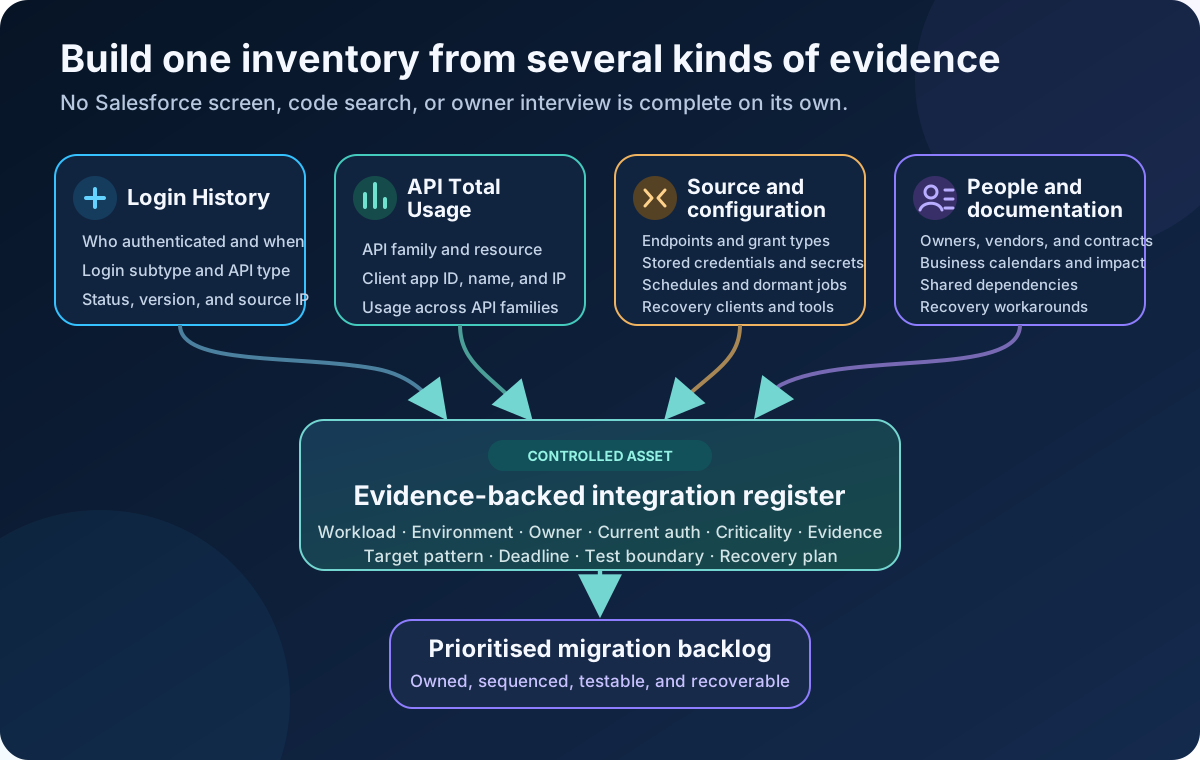
The integration register is the reconciliation point: every technical signal must become an owned workload, environment, business impact, target pattern, and test boundary.
-
Choose a representative observation window. Cover daily and weekly jobs, month end, quarter end, and any seasonal processes that matter to the business. All users can access the past 24 hours of API Total Usage event files. Orgs with Event Monitoring activated get 30-day retention and can increase it to one year. If your licence or retention is short, export the files daily and build your own evidence window.
-
Start with Login History. In Setup, use Quick Find to open Login History. Review the entries online, then download All Logins as CSV or GZIP so the export includes API access. For SOAP
login()calls, look for entries where all three conditions are true: Login Type is Other Apex API or Partner Product; Login Subtype is SOAP API; and API Type is SOAP Enterprise, SOAP Partner, or SOAP Tooling. Application should show N/A because the SOAP client is not bound to a Connected App or External Client App; this value is intentional and does not mean data is missing. Record Username, Login Time, Source IP, Status, API Version, Login Type, Login Subtype, API Type, and Application. Treat Source IP as correlation evidence because it can identify a proxy rather than the originating client. -
Retrieve API Total Usage event files through the browser or a query. These are separate retrieval paths:
- Event Log File Browser: In Setup, go to Security → Event Monitoring → Event Log File Browser. Set Event Type to API Total Usage, choose the Start Date and End Date, select the Daily interval unless you specifically need hourly files, and apply the filters. From each matching file’s action menu, select Download as CSV File. You do not run SOQL in the browser.
- Data Loader or Salesforce CLI: Outside the browser, query the
EventLogFileobject. The query returns file records andLogFileURLs, not the event CSV contents:
sf data query -q "SELECT Id, LogFile, EventType, CreatedDate FROM EventLogFile WHERE EventType IN ('ApiTotalUsage')" --target-org YOUR_ORG_ALIASCopy the
LogFilepath from each result and request it through the same authenticated org connection. With Salesforce CLI, you can stream the response body directly to a CSV file:sf api request rest "/services/data/v66.0/sobjects/EventLogFile/EVENT_LOG_FILE_ID/LogFile" --target-org YOUR_ORG_ALIAS --stream-to-file api-total-usage-EVENT_LOG_FILE_ID.csvReplace
EVENT_LOG_FILE_IDwith the returnedId, or replace the whole REST path with the exactLogFilevalue from the query. Use a different output filename for each result so one event file does not overwrite another. -
Collect and combine the CSV data. The browser download and CLI REST command both produce the event CSV contents. If you use another REST client, send an authenticated
GETrequest to each returnedLogFileURL and save the response body as a CSV file. Keep the raw files immutable, then load a working copy into your analysis tool so that filters and joins are repeatable. -
Find direct SOAP login events. Filter for
API_FAMILY = 'SOAP'andAPI_RESOURCE = 'login'. UseUSER_NAME,CLIENT_IP,CLIENT_NAME, timestamp, and API type to connect the event to a workload.CLIENT_NAMEis optional, so its absence is common in older code. -
Investigate unbound API activity. Review events where
CONNECTED_APP_IDis empty across SOAP, REST, Bulk, Apex REST, and Apex SOAP activity. Salesforce documents an empty value as SOAPlogin()or Session authentication. Treat it as a lead, then correlate it with a login event, source IP, username, schedule, and application logs. Populated IDs also help: Connected App IDs use the0H4prefix and External Client App IDs use0xI. -
Inventory username-password OAuth separately. Add Login Subtype to a Login History view and look for the username-password OAuth subtype. Inspect each relevant Connected App and search code, pipeline variables, middleware exports, and secrets-manager metadata for
grant_type=password. Do not rely on Connected Apps OAuth Usage alone because Salesforce says the flow’s one-time access tokens are not shown there as active sessions. -
Inspect source code, configuration, and legacy clients explicitly. Runtime evidence proves what ran during the observation window; static inspection can reveal quarterly jobs, disabled schedules, and dormant recovery tools. Search repositories, deployed artefacts, scheduler definitions, middleware exports, pipeline variables, and desktop-tool profiles for:
- Salesforce SOAP endpoint fragments such as
/services/Soap/c/and/services/Soap/u/. - SOAP client
login()calls and generated Enterprise or Partner bindings, especially code that consumes a returnedserverUrlorsessionId. - The exact OAuth payload
grant_type=password. - Configuration that combines a Salesforce or My Domain URL with a username, password, or security token.
- Older WSC, Java, .NET, or PHP clients; Data Loader installations; desktop ETL profiles; and scheduled scripts that could still submit user credentials.
Treat every match as an investigation lead, not proof of exposure. An older client can use modern OAuth, and a SOAP endpoint can receive an OAuth token without calling
login(). Confirm the authentication path through runtime evidence, configuration, and the workload owner. - Salesforce SOAP endpoint fragments such as
-
Reconcile evidence with people and documentation. Match usernames and source IPs to your configuration management database (CMDB) or service inventory, integration diagrams, scheduled jobs, middleware consoles, network logs, vendor contracts, and business calendars. Ask what runs as the user, not merely who owns the user account.
The output should be an integration register, not a pile of CSV files. At minimum, record the following fields:
| Field | Why it matters |
|---|---|
| Integration name and business capability | Connects a technical login to a real business outcome |
| Technical owner, business owner, operational owner, accountable risk owner, and vendor contact | Establishes who can change, approve, support, disable, and accept residual risk |
| Source and target systems | Shows the actual trust boundary |
| Org ID, My Domain, environment, app ID, and endpoint | Prevents production-only migration, mistaken org identity, and forgotten sandbox credentials |
| Protocol and operations | Separates authentication work from a possible API redesign |
| Current auth method and evidence | Makes the finding reviewable rather than anecdotal |
| User, Connected App or External Client App, scopes, and permission sets | Captures effective identity and access |
| Frequency, criticality, maximum tolerated outage, RTO, and data-loss tolerance | Drives priority, continuity design, and test coverage |
| Manual workaround, replay or backfill method, and reconciliation owner | Makes a missed run recoverable rather than merely detectable |
| Evidence source, export cadence, retention location, and change or control ID | Keeps discovery and assurance evidence available for later attestation |
| Target pattern, deadline, status, acceptance boundary, and rollback or roll-forward plan | Turns discovery into a managed change |
At this point, you should have an evidence-backed integration register with each suspected legacy login mapped to a workload, environment, owner, business impact, and next investigation or migration action.
🧭 Step 2: Classify Before You Prioritise
Section titled “🧭 Step 2: Classify Before You Prioritise”Classification turns a flat list of findings into a migration portfolio. The three most useful axes are ownership, data protocol, and authentication pattern. Add middleware topology and business criticality because one apparent connection can front many downstream processes.
| Integration class | Typical evidence | Migration control | Typical complexity |
|---|---|---|---|
| Custom application or script | Source repository, scheduler, direct source IP | Your team changes token acquisition and deployment | Medium, but high if the runtime or library is obsolete |
| Vendor product or managed package | Vendor-owned client, package docs, support contract | Vendor must provide and support a compliant version | Medium to high because the timeline is external |
| Middleware-managed connection | MuleSoft, Workato, Boomi, Informatica, SSIS, or another connector | Platform team updates a shared connection definition | Medium, with broad blast radius if reused |
| Salesforce-managed feature | Cross-org adapter or analytics connector configuration | Follow the product-specific migration path and release note | Low to medium, but easy to overlook |
| Unknown or shadow integration | Login and network evidence with no registered owner | Incident-style discovery, containment, and ownership | Highest until identified |
Protocol tells you what changes after authentication. SOAP, REST, and Bulk are data interfaces; they are not identity models. Ownership tells you who can deliver the change. Authentication pattern tells you whether the retirement applies. Business criticality tells you what to migrate first.
A useful rule: an integration is not “low risk” because it runs once a month. Infrequent jobs are harder to observe and often carry finance, audit, regulatory, or executive reporting data. Score the impact of missing the run, not the number of API calls.
🔐 Step 3: Choose OAuth Flows and External Client Apps
Section titled “🔐 Step 3: Choose OAuth Flows and External Client Apps”An External Client App (ECA) is Salesforce’s preferred control surface for a new inbound integration. It defines the OAuth capabilities an external client can request, while org-specific policies control who can use the app and how. ECAs use a closed-by-default distribution and installation model and are metadata-friendly, which makes ownership and environment promotion clearer than an anonymous credential hidden in a script. Closed by default does not configure least privilege for you: the subscriber org must still review permitted users, scopes, permission sets, refresh-token and session policies, and any network controls.
Since Spring ‘26, creation of new Connected Apps is restricted by default. Existing Connected Apps can continue to work, but the Winter ‘27 release update ends Salesforce support for them in Summer ‘27. If a vendor still tells you to create or retain a Connected App, ask for its ECA migration plan rather than treating continued runtime behaviour as continued support.
The SOAP login() and username-password retirements target authentication flows, but the separate Connected App release update changes the wider portfolio decision. The durable target is now an ECA even when an existing Connected App already uses a supported OAuth flow. If migration cannot finish before Summer ‘27, record the Connected App as a time-limited unsupported exception with an accountable risk owner, compensating controls, vendor position, and target removal date.
Choose the flow from the identity requirement, not from whichever option the client library exposes first.
| Requirement | Recommended target | Identity and token behaviour |
|---|---|---|
| A person interactively authorises an application | OAuth 2.0 web server flow with PKCE | The token represents the authorising user. For new apps, the client must persist rotated refresh tokens and handle reauthorisation after the idle limit. |
| A trusted server process runs as one machine identity | OAuth 2.0 client credentials flow | Salesforce issues an access token for the app’s one configured integration user. The token request uses the org’s My Domain endpoint, and the flow does not issue refresh tokens. |
| A headless workload must preserve several Salesforce user contexts | OAuth 2.0 JWT bearer flow, or separate app boundaries | Client credentials cannot switch among several run-as users in one app. JWT bearer can obtain a token for a pre-authorised user without storing that user’s password. |
| A headless process has mature certificate and key management | OAuth 2.0 JWT bearer flow | A signed assertion obtains a token for a pre-authorised user without storing the user’s password or a refresh token. |
| A SOAP client must keep its WSDL contract | One of the OAuth flows above, then SOAP | Put the OAuth access token in SessionHeader.sessionId and call the correct Enterprise or Partner SOAP endpoint. |
PKCE binds the authorisation-code request to the later token exchange. Salesforce recommends it for public and private clients, and the username-password retirement note explicitly directs user login and authorisation to web server flow with PKCE. For new apps created from July 2026, PKCE is mandatory for authorisation-code grants using localhost or a custom-scheme callback. New apps that use refresh tokens must also rotate them and expire them after 30 idle days, so clients must save each replacement token and test reauthorisation.
For machine identities, client credentials and JWT bearer solve different operational problems. The client credentials flow uses a consumer key and shared secret and has a straightforward token call, but one app has one configured run-as user. JWT bearer uses asymmetric signing and can preserve several pre-authorised user contexts, which avoids presenting a shared client secret to the token endpoint but adds certificate creation, rotation, expiry monitoring, and private-key custody. If your organisation already runs a capable key-management service or needs several user contexts, JWT can be the stronger fit. If it does not, a well-governed client credentials implementation can be safer than a badly operated certificate programme.
The client credentials flow also has specific boundaries. Send its token request to the org’s My Domain endpoint rather than login.salesforce.com or test.salesforce.com. Request only supported scopes such as api; full, web, and refresh_token or offline_access are unavailable for this flow.
Apply a consistent client-app control pattern across the portfolio while you migrate to ECAs and manage any time-limited Connected App exceptions:
- Name apps by capability, consumer, and environment, for example
ERP_OrderSync_PROD, notSalesforce Integration. - Prefer one app, one API-only integration user, and one dedicated permission set per independently deployable integration per org. Document exceptions where licensing or vendor design makes that boundary impractical.
- Grant narrow object, field, record, and Apex access through permission sets. OAuth scopes do not replace Salesforce permissions, and
Modify All Datais not a shortcut for designing them. - Select only the OAuth scopes supported by the chosen flow and required by the client.
- Configure administrative pre-authorisation and subscriber policies explicitly, including permitted users, session and refresh-token behaviour, and stable IP controls where appropriate.
- Store client secrets, private keys, and refresh tokens in an approved secret manager. Test normal and emergency rotation, revocation, and expiry handling before go-live.
- Record API consumption expectations and alert on authentication failures, unusual source IPs, and changes in call volume. Define the alert owner, response time, evidence location, and retention period.
🛠️ Step 4: Design the Migration Per Integration Archetype
Section titled “🛠️ Step 4: Design the Migration Per Integration Archetype”A migration factory needs a standard pattern, but not one universal technical solution. Start every integration with the same decision record, then apply the archetype-specific work below.
💻 Custom Java, .NET, Python, or Scripted Client
Section titled “💻 Custom Java, .NET, Python, or Scripted Client”Custom code gives you control, but older generated SOAP clients often hide more login behaviour than expected. The safest migration preserves the working data contract and replaces the authentication boundary first.
-
Write the identity decision. State whether the process represents one person, one machine identity, or several pre-authorised Salesforce users. Select web server with PKCE, client credentials, JWT bearer, or separate app boundaries accordingly.
-
Implement the approved client-app decision. Create an ECA and configure only the required flow and scopes, then create the dedicated integration user and permission set where the design requires a run-as user. If a Connected App must remain temporarily, document the unsupported exception, controls, accountable owner, and migration date.
-
Replace credential submission with token acquisition. Remove the Salesforce username, password, and security token from the runtime. Use a maintained OAuth library where possible, and retrieve secrets or private keys at runtime from the approved store.
-
Decouple token acquisition from API transport. For SOAP, inject the access token into
SessionHeader.sessionIdand set the endpoint explicitly from trusted org or identity information. For REST and Bulk, send the access token as a Bearer token. -
Handle expiry and revocation deliberately. The client credentials flow obtains a new token rather than refreshing one. Web server flow can use a refresh token within the client app’s policy, and new apps must persist each rotated replacement token. JWT bearer creates and signs a fresh assertion. In every case, retry authentication only for an authentication failure, cap retries, and avoid turning an outage into a token storm.
-
Cut over, observe, then remove the legacy path. During the agreed rollback window, you may restore the previous connector configuration if the change fails, provided the legacy credentials remain secured and the rollback is explicitly authorised. Once the migration is accepted, or Salesforce disables the legacy flow, the old configuration is no longer a recovery option. Fix the OAuth path, replay and reconcile any missed transactions, then delete stored passwords, security tokens, obsolete secrets, and fallback code after the observation period.
📦 Third-Party Connector or Managed Product
Section titled “📦 Third-Party Connector or Managed Product”The vendor owns the implementation, but you own the risk in your org. Open a case with the official retirement links and ask for exact, testable answers:
- Which product version supports an ECA, and when will any existing Connected App be migrated?
- Which OAuth flow does it use, and does it support PKCE where applicable?
- Does the product support one client app, execution identity, and credential set per customer and environment?
- Where are secrets, certificates, and refresh tokens stored and rotated?
- Can it preserve SOAP operations while replacing
login()? - What are its incident-notification, emergency-revocation, upgrade, outage, rollback, and continuity commitments?
Do not accept “supports OAuth” as a complete answer. OAuth username-password flow is OAuth and is still retiring. Ask for the grant type.
🔄 Middleware and ETL Platforms
Section titled “🔄 Middleware and ETL Platforms”MuleSoft, Workato, Boomi, Informatica, SSIS, and similar platforms often reuse one Salesforce connection across many flows, recipes, and scheduled jobs. The inventory and classification steps should already have exposed those dependencies. At this stage, use that evidence to decide whether the processes should continue sharing one authentication boundary, then migrate them without treating a successful connection test as business acceptance.
-
Decide whether the connection should remain shared. Start with the integration register rather than repeating discovery. Keep processes on one connection only when they can share the same execution identity, scopes, permissions, risk owner, credential lifecycle, and cutover window. Where those requirements differ, split the workloads into separate connections or client-app boundaries and record the resulting migration waves.
-
Configure each environment independently. Validate the approved ECA in a sandbox first. If a documented Connected App exception remains during migration, validate that temporary path too. Then deploy or configure the equivalent app metadata, policies, execution identity, and permissions in staging and production. Supply environment-specific credentials through the platform’s secret store or secure deployment mechanism. Never copy sandbox secrets into production or assume that similarly named integration users have equivalent access.
-
Test authentication and business processing separately. First prove that the connector can obtain, refresh or reacquire, and revoke tokens as designed. Then run every dependent process end to end, including its queries, transformations, writes, schedules, retries, replay, and reconciliation. A green Test Connection result proves that the platform can authenticate; it does not prove that the migrated jobs still produce the correct business outcome.
🧪 Step 5: Simulate Retirement Before Salesforce Does
Section titled “🧪 Step 5: Simulate Retirement Before Salesforce Does”Testing must show that no required workload still depends on the retiring authentication path. Successfully obtaining a token through the new flow proves only that the replacement works; it does not expose a forgotten month-end job that still uses legacy authentication.
For SOAP login(), Salesforce provides a faithful retirement test:
-
Migrate and regression-test known integrations in a sandbox. Include negative authentication, token expiry, permission denial, My Domain endpoint, refresh-token rotation, secret or certificate rotation, revocation, and network failure cases.
-
Open Release Updates in the sandbox. Find the SOAP API login() Retirement card, select View Update, then select Enable Test Run. Salesforce blocks all SOAP
login()calls and returns the same response expected after official enforcement. -
Run a representative business cycle. Trigger scheduled jobs and vendor connections, not only developer smoke tests. Review application logs, alerts, Login History, API Total Usage data, and business outputs.
-
Disable the test run if rollback is required. Selecting Disable Test Run makes the legacy operation available again before retirement. Treat this as test rollback, not as a production migration plan.
-
Decide whether a production test is safe and necessary. Enabling the test run breaks every remaining SOAP
login()caller for its duration. Require clean sandbox evidence, dependency and business-owner sign-off, a named go or no-go owner, monitoring, continuity and backfill readiness, a low-risk window, and explicit rollback criteria. Where deliberately causing a production outage is unacceptable, record the risk decision and rely on sandbox enforcement plus strong production observation evidence.
For OAuth username-password flow, if the Release Update card is present, follow the testing and activation steps shown in your org. You can also test the final state in a sandbox through OAuth and OpenID Connect Settings by turning off Allow OAuth Username-Password Flows. Salesforce warns that blocking the flow immediately stops existing integrations that use it, so apply the same change-window discipline. If the card is absent, use the blocked state recorded during Inventory as evidence; this retirement does not affect that org, and no activation test is required.
After each test, confirm both sides of the evidence:
| Evidence | Expected result |
|---|---|
| Login History | No successful SOAP API login subtype or username-password OAuth subtype for migrated workloads |
| API Total Usage | No SOAP plus login events; unexplained empty CONNECTED_APP_ID activity is investigated |
| Client-app records | The expected ECA, or a documented temporary Connected App exception, has visible subscriber policies, execution identity, scopes, flow, and ownership |
| Client and middleware logs | Token acquisition, rotation, revocation, expiry handling, and API calls succeed without password fallback |
| Business controls | Reconciliations, reports, extracts, downstream processing, replay, and backfill complete correctly |
🤝 Change Management: Vendors and Business Owners
Section titled “🤝 Change Management: Vendors and Business Owners”This is an integration portfolio change, not a Salesforce platform task assigned to one administrator. Every affected row needs a technical owner who can change the connection, a business owner who understands the impact, an operational owner who will respond when the cutover is monitored, and an accountable service or risk owner who can approve residual risk. Name the security approver, credential custodian, go or no-go authority, rollback authority, and on-call escalation route before the change window.
Send vendors the official SOAP and username-password retirement links, the current dates, and the evidence that associates their product with the login. Ask for a supported version and written confirmation of its OAuth grant type. Put the response, target version, delivery date, and escalation route in the integration register.
Internally, establish two deadlines:
- A design freeze now: no new integration may use SOAP
login()or OAuth username-password flow. New inbound clients use External Client Apps and an approved OAuth pattern. - A completion deadline before Salesforce’s dates: leave enough time for vendor delay, sandbox refresh, security review, production blackout periods, and one clean business cycle with legacy authentication blocked.
For regulated organisations, map each integration to the reports, controls, records, and retention obligations it supports. A failed compliance extract can become an audit exception even when no Salesforce data was changed. Define where immutable source evidence, app metadata, subscriber policies, design approval, test results, credential-removal approval, and monitoring records are retained, who can access them, and how long they remain available.
🧨 Edge Cases and Gotchas
Section titled “🧨 Edge Cases and Gotchas”Hidden dependencies are where a tidy migration plan becomes an incident. Make these cases explicit in discovery and testing.
🏢 Salesforce-Managed Features
Section titled “🏢 Salesforce-Managed Features”Salesforce’s retirement article names the Salesforce Connect Cross-Org Adapter and CRM Analytics (CRMA) Connector as impacted components in some contexts. The product teams are aware, but that does not remove the customer’s configuration work.
Summer ‘26 adds Named Credential support to the cross-org adapter. Existing external data sources can show Legacy as the authentication method and should be migrated to Named Credential following the product-specific release note. Salesforce says the CRMA Connector will be moved off SOAP login() before retirement. Track the relevant product release and validate your connection rather than assuming an automatic platform change covers every existing configuration.
👤 Shadow Integrations and Shared Users
Section titled “👤 Shadow Integrations and Shared Users”A service username is not an application identifier. It can be copied into a cron job, a desktop ETL tool, a vendor appliance, and a developer’s local script. Rotating that password may reveal dependencies, but using a credential rotation as a discovery technique in production is a disruptive experiment, not a runbook.
A realistic failure looks like this: the integration team migrates the documented nightly ETL connection and sees clean tests. Six weeks later, Finance runs a quarter-end script from a locked-down jump host. The script still calls SOAP login(), the operator sees only an authentication fault, and the statutory reconciliation misses its window. The technical migration was correct; the inventory window and business-owner review were not.
🌍 Environment and Endpoint Drift
Section titled “🌍 Environment and Endpoint Drift”Sandboxes are often forgotten because production is the visible risk. They are also where migration defects surface first:
- After creating or refreshing a sandbox, the team assumes that its SOAP
login()setting matches production instead of verifying it; newly created orgs have the operation disabled by default. - A client-credentials implementation sends its token request to
login.salesforce.comortest.salesforce.com, even though that flow requires the org or sandbox My Domain endpoint. - The ECA metadata is present, but the target environment’s policies, authorised permission sets, integration user, callback URL, certificate, or consumer secret are absent or different.
- A middleware promotion copies a protected credential’s name or reference but leaves its value blank, allowing deployment to succeed even though runtime authentication fails.
- Legacy SOAP client code relies on
LoginResult.serverUrl; after token acquisition moves to OAuth, the client does not set the equivalent SOAP service endpoint before invoking the generated proxy.
✅ Architect’s Checklist and Governance Recommendations
Section titled “✅ Architect’s Checklist and Governance Recommendations”The following checklist is designed to paste into an internal architecture or Confluence page. Attach evidence to each item rather than treating the checkbox as evidence itself.
🔍 Discovery and Ownership
Section titled “🔍 Discovery and Ownership”- Official retirement dates and the relevant instance maintenance date were reverified, with source URLs and verification date recorded in the change record.
- Release Update and org-wide settings were checked in every org and sandbox, and any already-blocked username-password flow or SOAP
login()state was recorded. - Login History reviewed for SOAP API and username-password OAuth subtypes across a representative business cycle.
- API Total Usage files reviewed for
API_FAMILY = SOAP,API_RESOURCE = login, and unexplained emptyCONNECTED_APP_IDvalues. - Connected Apps, source repositories, schedulers, middleware connections, vendor products, and Salesforce-managed connectors reviewed for the documented source and configuration indicators.
- Every integration records its Org ID, My Domain, environment, current and target client-app IDs where applicable, endpoints, owners, criticality, maximum tolerated outage, RTO, and data-loss tolerance.
- Manual workaround, replay or backfill method, reconciliation owner, and evidence-retention location are documented.
🏗️ Target Design
Section titled “🏗️ Target Design”- Ownership, protocol, authentication pattern, and middleware dependencies are classified.
- An External Client App is designed for each integration, and any time-limited Connected App exception records its unsupported status, accountable owner, controls, and migration date.
- The OAuth flow and client-app boundary are selected from the identity and user-context requirement: web server with PKCE, client credentials, JWT bearer, or separate app boundaries.
- The client credentials flow uses the org’s My Domain endpoint, one explicit run-as user, and only supported scopes such as
api. - OAuth scopes, integration-user permission sets, subscriber policies, stable IP controls where appropriate, and API consumption follow least privilege.
- Administrative pre-authorisation is configured, effective access is granted through dedicated permission sets, and broad bypass permissions such as Use Any API Client are absent or recorded as approved exceptions.
- API Access Control is evaluated as a separate hardening decision, with allowlisted apps, native-tool and Visualforce compatibility, and any Use Any API Client exceptions documented before enablement.
- PKCE is implemented for supported authorisation-code flows and enforced where required. Apps using refresh tokens persist each rotated token, enforce the 30-day idle limit, and handle reauthorisation.
- Normal and emergency procedures cover secret and certificate rotation, refresh-token replacement, token revocation, credential compromise, and service restoration.
🧪 Delivery and Assurance
Section titled “🧪 Delivery and Assurance”- Custom code, vendor versions, and middleware connections are updated or upgraded as required in every environment.
- SOAP
login()enforcement and username-password blocking are exercised in a sandbox, or their already-blocked state is recorded. Rotation, expiry, and revocation are tested for the selected OAuth flow. - The production-test decision records business approval, go or no-go ownership, monitoring, continuity readiness, and rollback criteria.
- Functional outputs, failure handling, replay or backfill, reconciliation, audit evidence, and at least one full business cycle are validated.
- The final token endpoint, org or identity URL, SOAP service endpoint, execution identity, scopes, and effective Salesforce permissions are verified in each environment.
- Post-migration monitoring shows no legacy authentication activity throughout the observation period, and unexplained activity is investigated.
- Acceptance evidence, the observation period, residual risks, accountable approval, and the decision to remove the legacy path are recorded.
- Passwords, security tokens, obsolete secrets, and fallback code are removed after acceptance and the agreed observation or rollback period.
🔁 Ongoing Governance
Section titled “🔁 Ongoing Governance”Governance continues after the migration. Treat annual owner attestation as a minimum operating baseline rather than a Salesforce-mandated cadence, and shorten it where organisational policy or risk requires.
- The integration register is attested by its owners at least annually and whenever a vendor, runtime, environment, execution user, credential, endpoint, or OAuth policy changes.
- Approved authentication patterns are included in architecture review templates, and every design identifies its execution identity, token lifecycle, revocation path, monitoring owner, and evidence location.
- Vendor support status, product version, OAuth grant type, delivery commitment, and escalation route are revalidated on the agreed cadence.
- Login History and API usage evidence are reviewed on a schedule using the available licensed telemetry, with monitoring or alerts for SOAP
login(), username-password subtypes, and unexplained API activity without a client app. - Every exception has an accountable risk owner, documented rationale, compensating controls, expiry date, and remediation plan.
These controls turn the programme into a secure default instead of a one-off retirement project.
🎯 Final Thoughts: Secure by Default as a Design Principle
Section titled “🎯 Final Thoughts: Secure by Default as a Design Principle”These retirements impose a deadline, but they also create an opportunity to reduce long-standing integration risk. They require teams to identify shadow connections, remove hardcoded credentials, separate machine identities from human users, narrow permissions, and make application ownership explicit.
At a high level, the migration path is straightforward:
- Inventory every integration and environment to establish what authenticates, how, and when.
- Classify each workload by protocol, ownership, execution identity, dependencies, and business impact.
- Establish a governed client boundary using an External Client App, with any temporary Connected App exception explicitly owned and scheduled for migration.
- Replace legacy credential submission with the OAuth flow that matches the required user or machine identity.
- Test, observe, and remove the old path only after a complete business cycle proves that no required workload still depends on it.
I would push back on the framing that Salesforce is “breaking SOAP”. Secure by default is the architectural principle that an external client should be denied until it is registered, authorised, scoped, monitored, and owned.
The same direction appears across the Summer ‘26 and Summer ‘27 architecture landscape, from Apex user-mode defaults and explicit execution modes to External Client Apps, Salesforce Hosted MCP Servers, and Agentforce Gateway controls. If you are planning a Hosted MCP or Agentforce rollout, legacy-auth retirement is an opportunity to align inbound authentication with the same ECA and OAuth governance model. Different features, same question: which identity can invoke which capability, under which policy, with which audit trail?
If I had to name one measure of success here, it would not be that every integration still runs in 2027. It would be that the organisation can finally answer, with evidence, what connects to Salesforce, why it is allowed, who owns it, how access is revoked, and what happens when authentication fails.
For the broader platform context, read Salesforce MCP in Summer ‘26 and the Salesforce integrations guide.