Salesforce Named Query API: What Changed at GA in Spring '26
I can’t count the number of times I’ve had to write and maintain bespoke Apex REST wrappers whose only purpose was “run this query and return rows for an external system.” But wrapper classes are only half the problem. Just as painful is the cycle of passing SOQL queries to an integration team, having them get it wrong, going back and forth to fix it, and then repeating the whole process the next time requirements change. Worse still is when an integration team quietly runs an incorrect or inefficient query against the org and nobody on the Salesforce side even realises until something breaks.
That is why Named Query API is worth a closer look. Salesforce introduced it before Spring ’26, but the Spring ’26 status needs a precise distinction: the REST API became Generally Available in API version 66.0, while using named queries as Agentforce actions remained Beta. Salesforce documented the REST capability for Enterprise, Performance, Unlimited, and Developer editions. Agentforce action use also depended on Agentforce enablement and could carry additional product or usage costs.
At a high level, Named Query API lets you define reusable, centralised query definitions in Salesforce and let authorised consumers execute them through a controlled API contract. For REST integrations, that gives us a cleaner path for read-oriented use cases without building custom endpoint code or handing downstream teams raw SOQL. Agentforce could also expose a named query as an action, but at Spring ’26 that capability still needed to be treated as a beta evaluation rather than assumed production-ready.
For the definitive Spring ’26 status, see Salesforce’s Spring ’26 Named Query release note and REST API Developer Guide: Named Query APIs. For more on where Agentforce fits, see our AI and the Salesforce developer guide.
🎯 What Named Query API Actually Solves
Section titled “🎯 What Named Query API Actually Solves”Most Salesforce integration portfolios eventually hit the same pattern:
- a partner app needs a specific data shape
- middleware needs a stable query contract
- teams build small custom API endpoints to bridge that gap
Those endpoints work, but they also create long-term overhead: deployment cycles, test maintenance, code ownership ambiguity, and duplicated query logic.
Named Query API addresses that by moving the query contract into a managed platform definition. Instead of “Apex class per read use case,” you can define the query once and reuse it from integration clients.
🔗 Why Integration Teams Should Care
Section titled “🔗 Why Integration Teams Should Care”♻️ Reuse and consistency
Section titled “♻️ Reuse and consistency”A named query gives downstream systems a single, stable contract for a data retrieval use case. When business logic changes, you update one query definition rather than touching multiple custom integrations.
🧹 Less custom code for read scenarios
Section titled “🧹 Less custom code for read scenarios”For simple to moderate read use cases, this can remove entire categories of “thin wrapper” Apex endpoints.
🛡️ Better governance posture
Section titled “🛡️ Better governance posture”Because query definitions are centralised, reviews are simpler. Security and data-exposure discussions move upstream, before a dozen different consumers embed their own query variants.
🤖 Potential fit for agent experiences
Section titled “🤖 Potential fit for agent experiences”Salesforce also positioned named queries for agent actions, which could be useful when you wanted one retrieval contract shared across app and agent channels. At publication, that action capability remained Beta, so the appropriate approach was a controlled pilot: test permissions with the actual agent user and retain a rollback path. If you’re exploring AI-enabled workflows, this ties back to our AI and the Salesforce developer guide.
🛠️ Hands-On: A Practical Implementation Pattern
Section titled “🛠️ Hands-On: A Practical Implementation Pattern”The exact setup labels can vary slightly by org and release UI, so use Setup search where possible.
1️⃣ Step 1: Identify one read-only use case
Section titled “1️⃣ Step 1: Identify one read-only use case”Start small. Choose a query currently implemented through a custom endpoint, for example:
- “open Cases for an Account”
- “recent Opportunities by owner”
- “active Contracts by customer ID”
This gives you a direct baseline for comparing complexity and behaviour.
2️⃣ Step 2: Create a named query definition
Section titled “2️⃣ Step 2: Create a named query definition”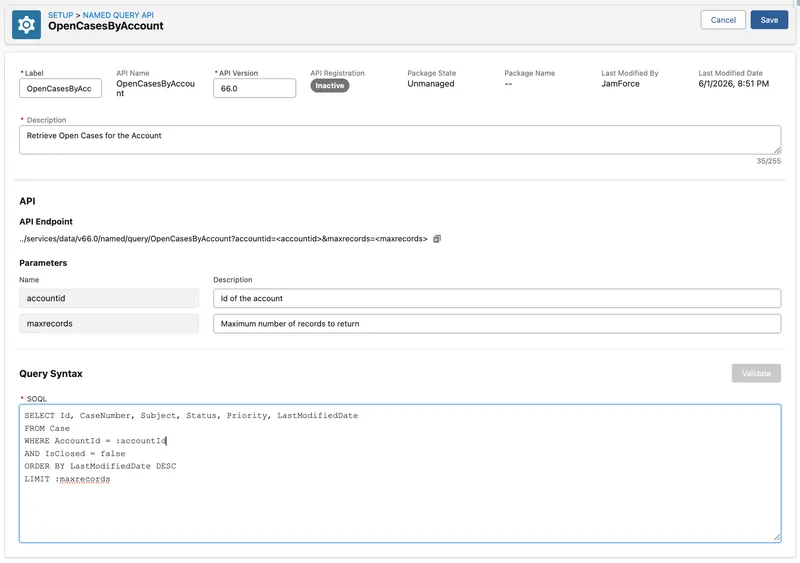
Create the query in Setup (search for Named Query in Quick Find) with parameterised filters.
A representative query pattern looks like:
SELECT Id, CaseNumber, Subject, Status, Priority, LastModifiedDateFROM CaseWHERE AccountId = :accountIdAND IsClosed = falseORDER BY LastModifiedDate DESCLIMIT :maxrecordsUse parameter names that are integration-friendly (accountId, maxrecords) and document expected formats. Unlike a hand-built Apex REST wrapper, named query parameters are typed from the SOQL parameter definitions, so you do not write a separate Apex mapping layer.
3️⃣ Step 3: Expose and test via API tooling
Section titled “3️⃣ Step 3: Expose and test via API tooling”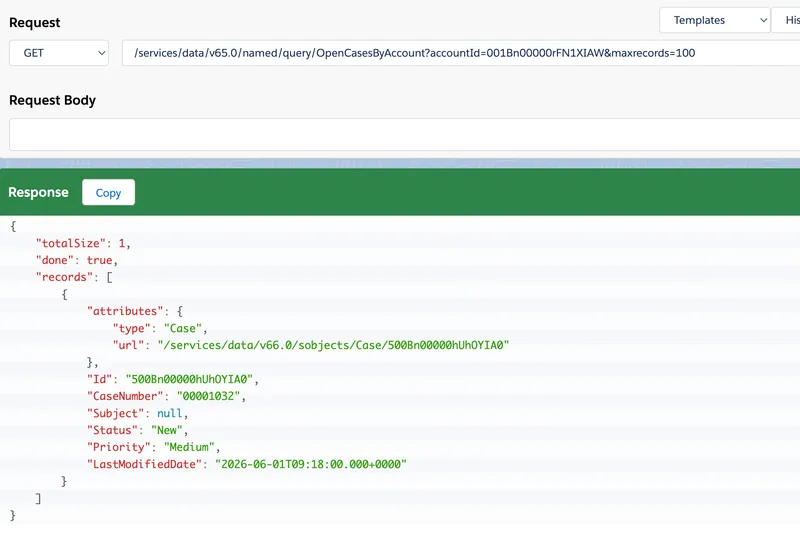
Use Postman, Insomnia, or your middleware test harness to execute the named query via the REST API surface exposed by Salesforce for named queries.
A typical Spring ’26 call pattern is:
GET /services/data/v66.0/named/query/OpenCasesByAccount?accountId=001xx000003DGSWAA4&maxrecords=100Authorization: Bearer <access_token>Use the API version your integration is tested against rather than silently advancing it each release. Confirm the endpoint and supported definition options against the current REST API guide before deployment.
4️⃣ Step 4: Move one integration consumer
Section titled “4️⃣ Step 4: Move one integration consumer”Swap one existing consumer from custom Apex endpoint -> named query endpoint. Measure:
- implementation effort
- response behaviour
- error handling changes
- ongoing maintenance effort
If results are good, expand gradually to other read-oriented use cases.
📋 Recommended Integration Use Cases
Section titled “📋 Recommended Integration Use Cases”Named Query API is especially useful when:
- you need repeatable read contracts for multiple consumers
- data retrieval rules change over time and must stay centralised
- you want to reduce custom endpoint footprint
- you need the same query semantics available for agent and app use cases
Less ideal when:
- you need complex transaction orchestration
- you need write operations (create/update/delete) in the same interaction
- logic is highly dynamic and better handled with custom runtime composition
| Decision | Prefer Named Query API | Prefer custom Apex or another API |
|---|---|---|
| Contract | Stable, parameterised read shape | Consumer chooses fields or filters dynamically |
| Operation | Read-only retrieval | Writes or multi-step transactions |
| Logic | SOQL can express it cleanly | Complex orchestration or transformation is required |
| Spring ‘26 release status | The REST GA capability was sufficient | A beta Agentforce action would have been a critical dependency |
| Ownership | Salesforce team owns and reviews the query definition | Integration service must own the full contract and processing |
⚙️ Operational Best Practices
Section titled “⚙️ Operational Best Practices”📜 Treat query definitions as integration contracts
Section titled “📜 Treat query definitions as integration contracts”Version and review changes intentionally. If a query shape changes, communicate it like an API contract update.
📏 Keep result sets bounded
Section titled “📏 Keep result sets bounded”Design with sensible filtering and limits. Unbounded “fetch everything” queries become an availability and cost problem quickly.
📊 Enforce observability from day one
Section titled “📊 Enforce observability from day one”Track query call volume, latency, and error rates in the same dashboards you use for other integration endpoints.
👤 Validate access behaviour with real profiles
Section titled “👤 Validate access behaviour with real profiles”Test with realistic integration users and permissions, not just admin users, so field/object visibility behaviour is understood before go-live.
🔍 What to Verify in Your Org Before Broad Adoption
Section titled “🔍 What to Verify in Your Org Before Broad Adoption”Because Salesforce capabilities can evolve quickly across releases, verify these points in your specific org:
- feature status for the release deployed to the org; in Spring ’26, REST was GA and Agentforce actions remained Beta
- current setup path labels
- supported query patterns and constraints
- endpoint path format for your API version
- whether the named query is activated and available in API Catalog (only needed when used from Agentforce)
- that Agentforce related settings are enabled if you want to use named queries from Agentforce flows
Use the Salesforce Developer Guide, release notes, and in-org API catalogue as the source of truth for your rollout. If you’re delivering this across sandboxes or a multi-org pipeline, also review Sandbox Strategy & Change Management to keep integration testing and deployment coordinated. For Agentforce-specific activation details, see Create Actions from Named Queries in the Agentforce Developer Guide.
🏁 Conclusion
Section titled “🏁 Conclusion”- Named Query REST API is a generally available option for read-focused Salesforce integrations from Spring ’26.
- It can reduce maintenance-heavy custom endpoint code while improving contract consistency.
- Start with one well-defined use case, measure results, then scale adoption.
- Keep governance tight: version query definitions, bound result sets, and monitor behaviour.
If your integration architecture has accumulated many “query wrapper” services, Named Query API is a practical candidate for measured replacement. The judgement is not whether it can run SOQL; it is whether a central, read-only contract is simpler to secure, version, and operate than the endpoint you already own.